How Quotr's Rapid Progress Makes Estimates Faster to Build and Easier to Revise
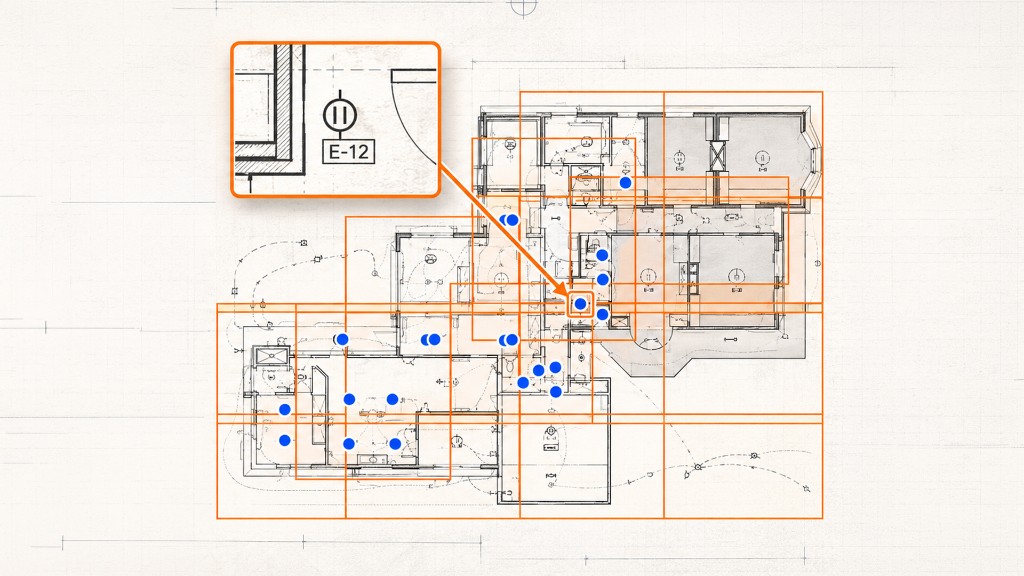
I first came across Quotr while working on a project that required counting a large number of electrical symbols. Each repeated symbol had to be identified and checked. A friend recommended Find Symbols, so I created an account and gave it a try.
As I continued using Quotr, I began to notice how quickly it was developing. Symbol detection first caught my attention. Over time, the cost library became easier to use, and the AI Agent introduced project questions and estimate line-item operations. Each change addressed a practical estimating task and gave me another reason to use Quotr in my daily work.
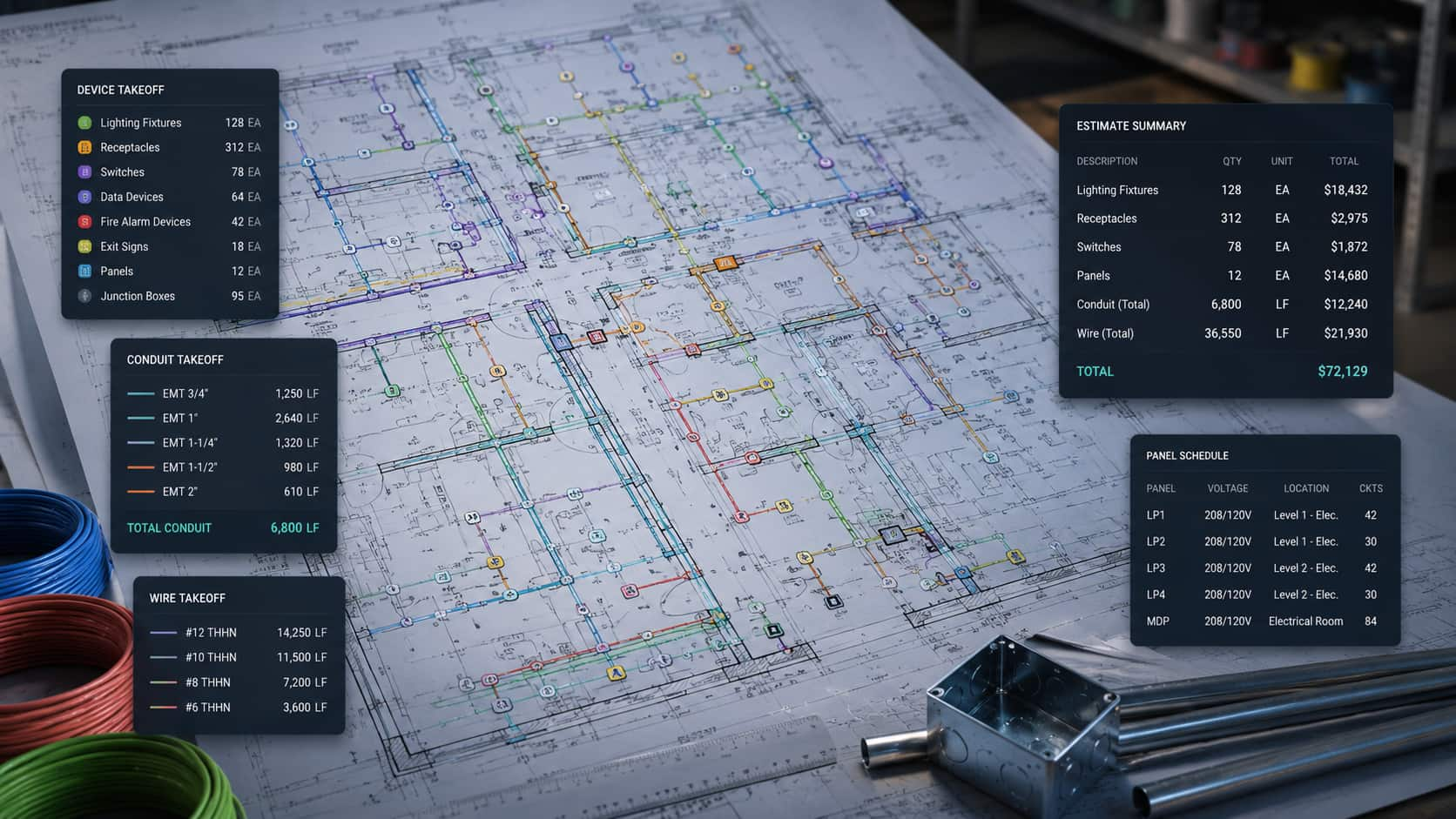
For an estimator, the value of these updates becomes clear in the work itself. Supplier pricing can be reused, line items can be prepared in batches after takeoff, and quantity changes can carry through to linked materials. Looking back at those changes shows how Quotr’s rapid progress has made everyday estimating more convenient.
A Better Cost Library Makes Supplier Quotes Easier to Reuse
A material pricing inquiry often produces a supplier quote listing item names, specifications, and prices. That information is useful on the current project and can also support similar work later. Previously, when I needed the same type of material, I had to search through earlier project files and organize the relevant information again.
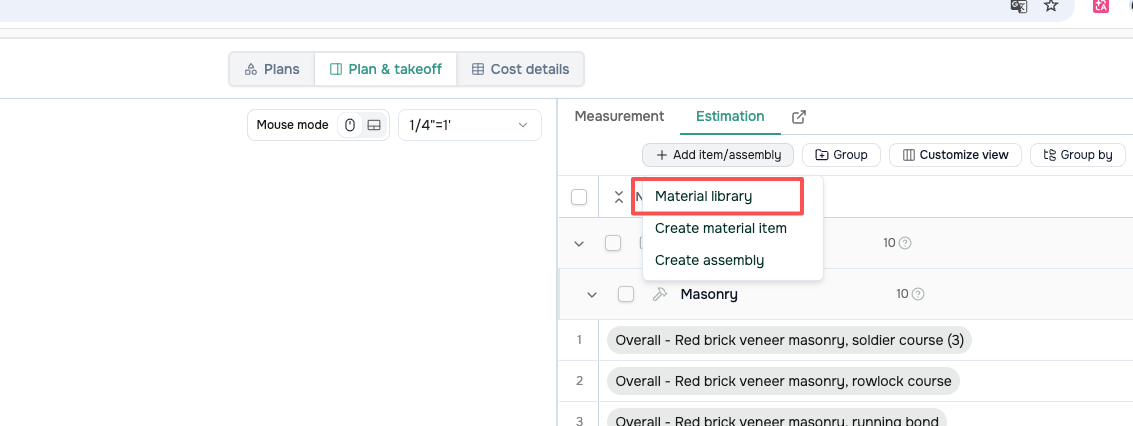
The cost library has continued to improve as I have used it. Now I can add a supplier quote directly to Quotr and turn its material and pricing information into reusable entries. When a similar material comes up on another project, I can find it in the Material library and build on the work already done.
Figure 1a. Opening the Material library to reuse existing material entries.
Figure 1b. Saved material entries and units in the cost library.
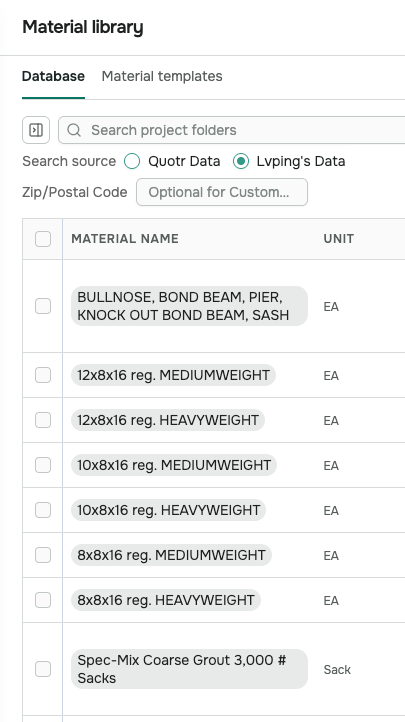
Before reusing an entry, I still check its specification, pricing unit, quote date, and applicable conditions, then adjust it for the current project. A supplier quote can therefore remain useful beyond the job it was obtained for, while the cost library grows with each project.
The AI Agent Adds Help with Drawing Review and Estimate Preparation
The introduction of the AI Agent was another significant change in how I used Quotr. It can answer questions in plain language and carry out line-item operations based on instructions. At the start of an estimate, I can ask it to help organize the scope, locate material requirements, and find the relevant drawings, then check those findings against the plans and notes.
That gives me a starting point for follow-up questions. Where does a material requirement come from? How does a plan tag relate to the material schedule? Which details need a closer look? I can work through those questions within the same project and use the confirmed information when organizing measurements and preparing estimate items.
Matching and Adding Line Items After Takeoff
The Agent has been most helpful to me after the measurements are complete. At that point, the quantities are available, but I still need to search a large collection of material records, compare the options, and add the appropriate items to the estimate. That can involve considerable repeated searching and data entry.
Now I can ask the Agent to find matching items based on the project’s characteristics and material requirements, then add them in batches. It uses the project information already gathered to help prepare the line items, shortening the work between measured quantities and a priced estimate.
Figure 2. The Agent prepares estimate line items in batches for review and confirmation.
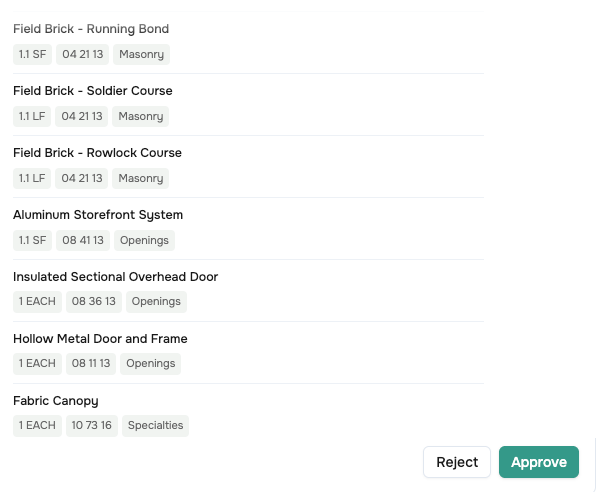
If materials need to be added or replaced, or descriptions, unit rates, and waste factors need adjustment, I can continue giving the Agent instructions. Being able to ask questions and request changes lets me keep refining the estimate as the work develops.
The estimate can also be organized to reflect the work’s complexity. Items represent individual materials or work activities, while Assemblies combine materials, labor, and ancillary components. Material rates, waste allowances, labor costs, overhead, and profit can be adjusted to suit the project.
Grouping items by area, room, or trade gives the review a clearer structure. The Agent helps create the content in batches, while the estimate retains the parameters and categories needed for pricing. Together, these help move material information into a usable project estimate more quickly.
For me, the improvement is practical. The Agent helps with the searches and entries that I previously handled one at a time. I review the results and make adjustments, with more of my attention available for material suitability, scope completeness, and the basis of the price.
Connected Takeoffs Make Estimate Revisions Easier to Follow
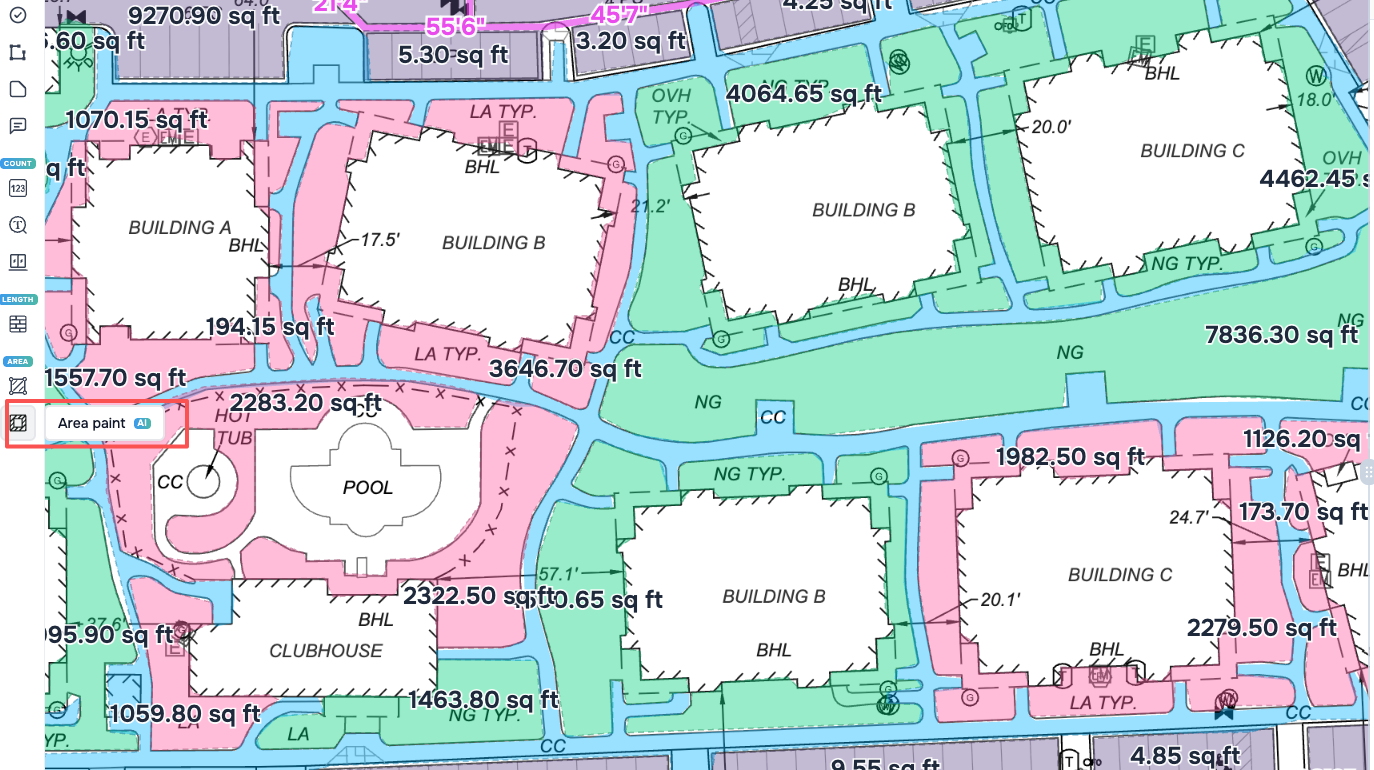
When measuring drawings, I manually select and use the AI tools in the drawing workspace. Find Symbols helps locate repeated symbols. Find Text helps find identification numbers, text, and material tags. Area Paint assists with identifying enclosed regions and measuring their areas.
Figure 3. Area Paint is selected in the drawing workspace, with filled regions and area labels shown on the plan.
The user selects and operates those measurement tools on the drawing. The Agent supports project information and estimate items through questions and instructions. Once the measurements are complete, area, length, and count markups provide the quantity references for the estimate. These capabilities work together within the same project.
Connecting drawing measurements to estimate line items also makes the work easier to revise and review. A line-item quantity can reference its corresponding measurement markup, allowing changes on the drawing to carry through to the estimate.
In the masonry elevation shown below, S18 has a total measured area of 435.60 SF. The estimate item takes its quantity directly from that reference, keeping the drawing measurement and the estimate tied to the same source.
Figure 4a. The S18 wall-area markup has a total measured area of 435.60 SF.
Figure 4b. The estimate quantity references S18 and remains linked to the drawing measurement.
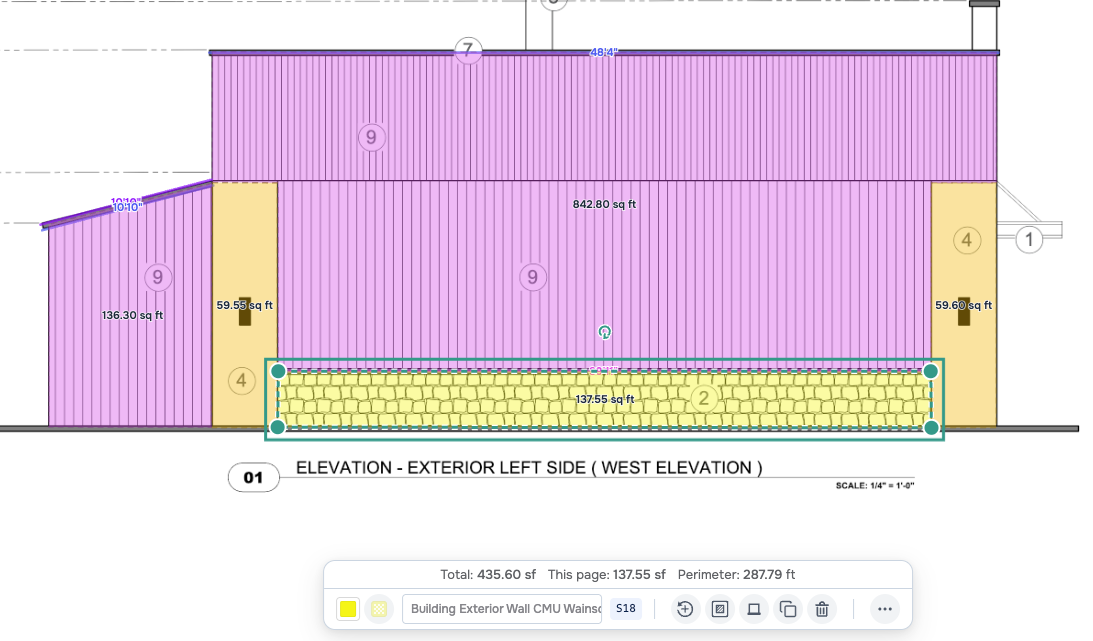

If a later change to the elevation finish reduces the masonry area, I can adjust the measured boundary directly on the revised drawing. As that boundary shrinks, the area recorded under S18 decreases.
The quantities of items linked to S18 then update, along with the associated costs. I follow those links to check the results and see how the change in the elevation affects the estimate. This reduces repeated quantity entry and makes subsequent revisions easier to trace.
Area, length, and count measurements can all be referenced in line-item formulas. The user sets up and checks those relationships, and the links remain in place as measurements change. Clear quantity sources and traceable changes give the review a specific place to start.
Connected Information Simplifies Review and Delivery
After the linked quantities update, I continue checking the measurement boundaries, material specifications, quantity formulas, and pricing basis against the drawings. The Agent can also help compare markups with estimate items, check for duplicates or omissions, and examine quantity relationships that need further explanation. I can then request changes based on the confirmed requirements.
Each review finding can be addressed where it originates. If the measured scope changes, I edit the markup and check the linked results. If an item description or pricing parameter needs adjustment, I revise the relevant line item or ask the Agent to help, then review the updated estimate.
When the review is complete, I export a marked-up PDF and an estimate spreadsheet. The PDF shows measurement locations, boundaries, and categories. The spreadsheet presents the material items, quantities, and costs. These records also provide a basis for discussing the estimate or responding to client changes.
Across a complete estimate, Quotr’s development has connected tasks that previously required repeated organization. Cost information can be reused, the Agent helps prepare and revise items in batches, and linked measurements carry quantity changes through to the relevant materials. Review and delivery can then build on the same records. Those everyday changes are where I see the efficiency gains.
Progress in Practice and What Comes Next
From creating an account to identify electrical symbols to using an improving cost library, asking the Agent questions, requesting item changes, and linking measurements to estimates, I have seen Quotr progress quickly. Its updates keep finding practical uses on projects and expanding the work I can complete within the same platform.
Further Agent-driven capabilities for creating takeoff markups, linking materials, and generating proposals are still in development. Those directions give me reason to look forward to closer connections between drawing interpretation, measurement, estimate preparation, and deliverables.
As an estimator who uses Quotr regularly, my confidence comes from the convenience it already brings and the pace of its continued improvement. I believe it will become more capable as these features develop, reducing repeated work on more projects and making estimates faster to build, easier to review, and easier to revise.
Frequently Asked Questions
How does Quotr’s cost library let estimators reuse supplier quotes?
A supplier quote can be added directly to Quotr and turned into reusable material entries with item names, specifications, units, and prices. When a similar material comes up on a later project, the estimator finds it in the Material library instead of searching old project files and re-entering the information. Before reusing an entry, it’s still worth checking the specification, pricing unit, quote date, and applicable conditions, then adjusting for the current project.
What can the Quotr AI Agent do after a takeoff is complete?
Once quantities are measured, the Agent can find matching material records based on the project’s characteristics and add the appropriate line items in batches, rather than the estimator searching records and entering items one at a time. The estimator then reviews the matches — specifications, units, included work, and pricing basis — and can instruct the Agent to add, replace, or adjust descriptions, unit rates, and waste factors as the estimate develops.
How do connected takeoffs update an estimate when a drawing changes?
A line-item quantity can reference its corresponding measurement markup on the drawing. When the markup changes, the linked quantity and its associated cost update with it. For example, a masonry elevation markup (S18) with a measured area of 435.60 SF feeds its quantity straight to the estimate item; if a finish change reduces the wall area, adjusting the boundary on the drawing lowers the S18 area and updates every linked item. Area, length, and count measurements can all be referenced in line-item formulas, so revisions stay traceable to their source.
What does Quotr produce when the estimate is finished?
After review, Quotr exports a marked-up PDF and an estimate spreadsheet. The PDF shows measurement locations, boundaries, and categories; the spreadsheet lists material items, quantities, and costs. Together they give a record for internal review, client discussion, or responding to scope changes.