How We Taught Our AI to Find the Symbols Other Takeoff Tools Miss
Co-authored research with Yuan Gan and Shida Jiang
Short answer
A takeoff sheet is a huge image covered in tiny marks, and when you feed the whole sheet to an AI at once, the small symbols can land on less than a single visual token, too little for any model to reliably see. We spent a paper’s worth of work proving exactly when that happens and exactly when zooming in fixes it without introducing new errors. The result is a rule our software follows on every drawing: read the sheet in overlapping close-up views that never zoom out relative to the full sheet. Across our tests on real construction drawings, that rule never significantly lowered how many symbols we found compared with a single full-sheet pass, and it raised the count by as much as 28 percentage points. That is the difference between a takeoff that misses a legend symbol and one that doesn’t.
We published the whole thing, code and data included, because we think a claim about accuracy should be something you can check.
Why “just read the whole drawing” doesn’t work
If you have ever handed a 36-by-48 sheet to someone and asked them to count every receptacle symbol, you know the problem. The symbols are small, there are a lot of them, and they hide in legends, details, and dense plan areas. Your eyes solve this by zooming in, scanning a section at a time, and keeping track of where you’ve been.
An AI vision model doesn’t get to do that by default. When you send it an image, the model doesn’t see pixels the way you do. It breaks the image into a budget of “visual tokens,” and everything on the sheet has to share that budget. On a full construction sheet, a legend symbol might get a fraction of one token. In our benchmark, a real legend symbol sent on the whole sheet spanned about 0.40 tokens per side. You cannot reliably recognize something you’ve only half-sampled, and neither can the model.
The obvious fix is “give it more resolution.” We measured how much that actually buys you, and the answer is humbling: doubling the token budget on a whole sheet raises how much of a symbol the model sees by only about 41 percent. A symbol at 0.40 tokens per side goes to roughly 0.56. Still too small. You can keep throwing pixels at the full sheet and you will keep hitting a wall, because the math of fitting a large image into a fixed token budget is working against you.
This is not a quirk of one model or one vendor. It is a property of how large images get fed to vision-language models in the first place. That mattered to us, because our customers’ accuracy can’t depend on waiting for the next, bigger model to come along.
What we actually proved
The paper asks three questions: what limits these models on small objects, which of those limits a better model can remove, and whether the old approach of breaking an image into pieces still has a future. We answer them with a theory grounded in two simple quantities. One is how many visual tokens land across an object’s side. The other is how much content a single look has to cover. Push the first one up and recognition improves. Let the second one balloon and the model has too much to account for in one pass.
From there, a clean result falls out. Breaking a sheet into overlapping views cannot, on average, lower how many symbols you find, as long as two conditions hold: no view is more zoomed-out than the whole sheet, and neighboring views overlap by at least one symbol so nothing falls in a crack. Both halves matter. Drop the overlap and you lose symbols on the seams. Zoom out and you are back to the original problem. Keep both and you are strictly better off, or at worst no worse. We also proved the cost of reading a sheet this way is bounded, and gave a simple rule that gets close to that bound as sheets get bigger.
In plainer terms: there is a right way to zoom in, we found it, and we proved it is safe.
We tested it about 177,000 times
A proof is only worth so much if it falls apart on real drawings, so we ran the theory hard. About 177,000 requests across 797 images, spanning construction drawings, floor plans, and natural and synthetic images, against eight different vision-language models.
On controlled images, the theory made 40 specific predictions about which setups would beat which. None were violated. When we checked the predictions after the fact on messier real-world images, 61 of 89 held up as statistically significant and only 4 failed, and every one of those failures came from the same narrow case: OpenAI models handed more pixels than their default path uses. The pattern held.
The result we care about most is the one on construction drawings. On 14 full sheets, our safe-zoom rule never significantly lowered how many symbols we found compared with reading the whole sheet, and it raised that number by up to 0.28 on a zero-to-one scale, up to 28 more symbols found for every hundred that were there. For a trade doing an electrical or plumbing takeoff, where a missed symbol is a missed count and a missed count is a wrong bid, that is the whole game.
The solution: how Quotr turns this into a better takeoff
Research is only useful if it changes the product, so here is exactly what the safe-zoom rule does inside Quotr when you upload a set.
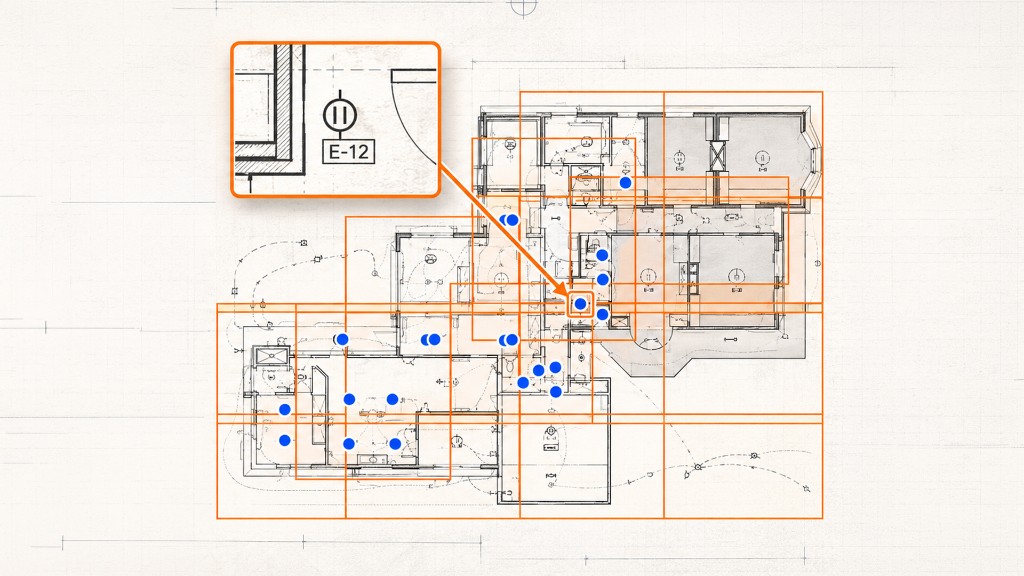
It reads every sheet up close, not all at once. Instead of sending a full drawing to a model and hoping the symbols survive the shrink, Quotr covers each sheet with overlapping close-up views, sized so symbols land on enough visual tokens to actually be recognized, and overlapped so nothing is lost on the seams between views. That is the rule we proved safe, running on your plans.
It finds the marks a single pass skips. The whole reason the method exists is the small stuff: legend symbols, receptacles, diffusers, cleanouts, the dense callouts in a detail. On our test sheets, reading this way found up to 28 more of those per hundred than a single full-sheet pass. On your sheet, that is counts that would otherwise have been missed, caught before they turn into a short bid.
It shows its work. Every symbol Quotr finds is tied back to the exact spot on the exact sheet it came from. You are never handed a number you can’t trace. You scan the markups, confirm what’s right, fix what isn’t, and the count is yours. The AI does the slow, complete first read; you do the judgment.
It gets better as models do, without starting over. Because the method is about how the image is read, not which model reads it, every improvement in the underlying models compounds on top of it. And because we know the real bottleneck, we can tell which of those improvements actually help a takeoff and adopt them deliberately, instead of chasing whatever is newest.
That is the solution in one line: a plan reader built on a proven rule, that finds more and makes every count checkable.
Why this makes us confident in Quotr
We didn’t do this research to publish a paper. We did it because our software reads your plans, and we wanted to know, provably, that it reads them the right way.
Most AI takeoff tools send a drawing to a model and hope the model is good enough. We did the opposite. We measured exactly where a full-sheet pass fails, worked out the conditions under which closer reading is guaranteed not to hurt, and built that rule into how Quotr reads every sheet. When our AI finds a symbol a single full-sheet scan would have skipped, that is not luck. It is the theory doing its job.
Confidence, for us, isn’t a slogan on a pricing page. It is a result we published with the code and data attached, so you don’t have to take our word for any of it.
The honest caveats
A good result deserves honest edges. The safe-zoom guarantee is about not making recall worse on average and raising it where it was leaving symbols behind; it is not a promise of perfect recall, and no method delivers that. Reading a sheet in more views costs more compute than a single pass, which is a tradeoff we chose deliberately in favor of finding more symbols. And the four cases where predictions failed were real; we reported them rather than hiding them, because that is what publishing code and data is for. The paper, the code, and the benchmark are all public so anyone can check our work.
Read the research
The full paper is on arXiv, and the code and data are on GitHub.
- Paper: Why VLMs Miss Small Objects, and When Zooming In Is Safe (arXiv:2610.09313)
- Code and data: github.com/shijunzhe/vlm-small-objects
- More of our work: Quotr Research
Citation
Junzhe Shi, Yuan Gan, and Shida Jiang. “Why VLMs Miss Small Objects, and When Zooming In Is Safe.” arXiv preprint arXiv:2610.09313 [cs.CV], 2026. Available at https://arxiv.org/abs/2610.09313.
@article{shi2026vlmsmallobjects,
  title   = {Why VLMs Miss Small Objects, and When Zooming In Is Safe},
  author  = {Shi, Junzhe and Gan, Yuan and Jiang, Shida},
  journal = {arXiv preprint arXiv:2610.09313},
  year    = {2026},
  eprint  = {2610.09313},
  archivePrefix = {arXiv},
  primaryClass  = {cs.CV},
  url     = {https://arxiv.org/abs/2610.09313}
}
FAQ
Why do AI tools miss small symbols on construction drawings? Because a vision model splits an image into a fixed budget of visual tokens, and on a full-size sheet a small symbol can land on less than one token, too little to recognize reliably. In our benchmark a legend symbol spanned about 0.40 tokens per side on the whole sheet. Sending higher resolution helps only a little: doubling the token budget raises how much of the symbol the model sees by about 41 percent.
Does zooming in fix it? Yes, if it’s done correctly. Our research proves that reading a sheet in overlapping close-up views, where no view is more zoomed-out than the whole sheet and neighboring views overlap by at least one symbol, cannot lower how many symbols you find on average and usually raises it. On real construction drawings our rule raised recall by up to 0.28.
How was this tested? In about 177,000 requests across 797 images, against eight vision-language models, covering construction drawings, floor plans, and natural and synthetic images. On controlled images, none of the theory’s 40 predicted orderings were violated.
How does this connect to Quotr’s software? Quotr’s takeoff reads every sheet using this safe-zoom method, so it finds small blueprint symbols a single full-sheet pass would skip, and ties each one back to the drawing it came from. You review and own the final count.
Is the research public? Yes. The paper is on arXiv (2610.09313) and the code and data are on GitHub, so anyone can check the results.
See it on your own plans
The fastest way to see what closer reading does for a takeoff is to run it on a sheet you know. Start a free trial or book a 30-minute demo and bring your densest drawing.
About Quotr.ai
Quotr.ai is an AI-powered construction estimation, takeoff, and procurement platform built for subcontractors, general contractors, and developers. Backed by Llama Ventures and based in San Francisco. Learn more at quotr.ai. The platform has three parts: Quotr Software (AI takeoff, estimating, and bidding, including the AI agent that reads your plans), Quotr Service (done-for-you cost estimates, takeoffs, and pro formas), and Quotr Procurement (factory-direct materials delivered door-to-door).