How Quotr.ai Turns a PDF Blueprint Into a Priced Estimate in 12 Minutes
Quick Answer
Quotr.ai helps contractors, subcontractors, developers, and preconstruction teams turn PDF blueprints into priced construction estimates by connecting plan reading, quantity takeoff, estimate building, bid preparation, and procurement in one AI-assisted workflow.
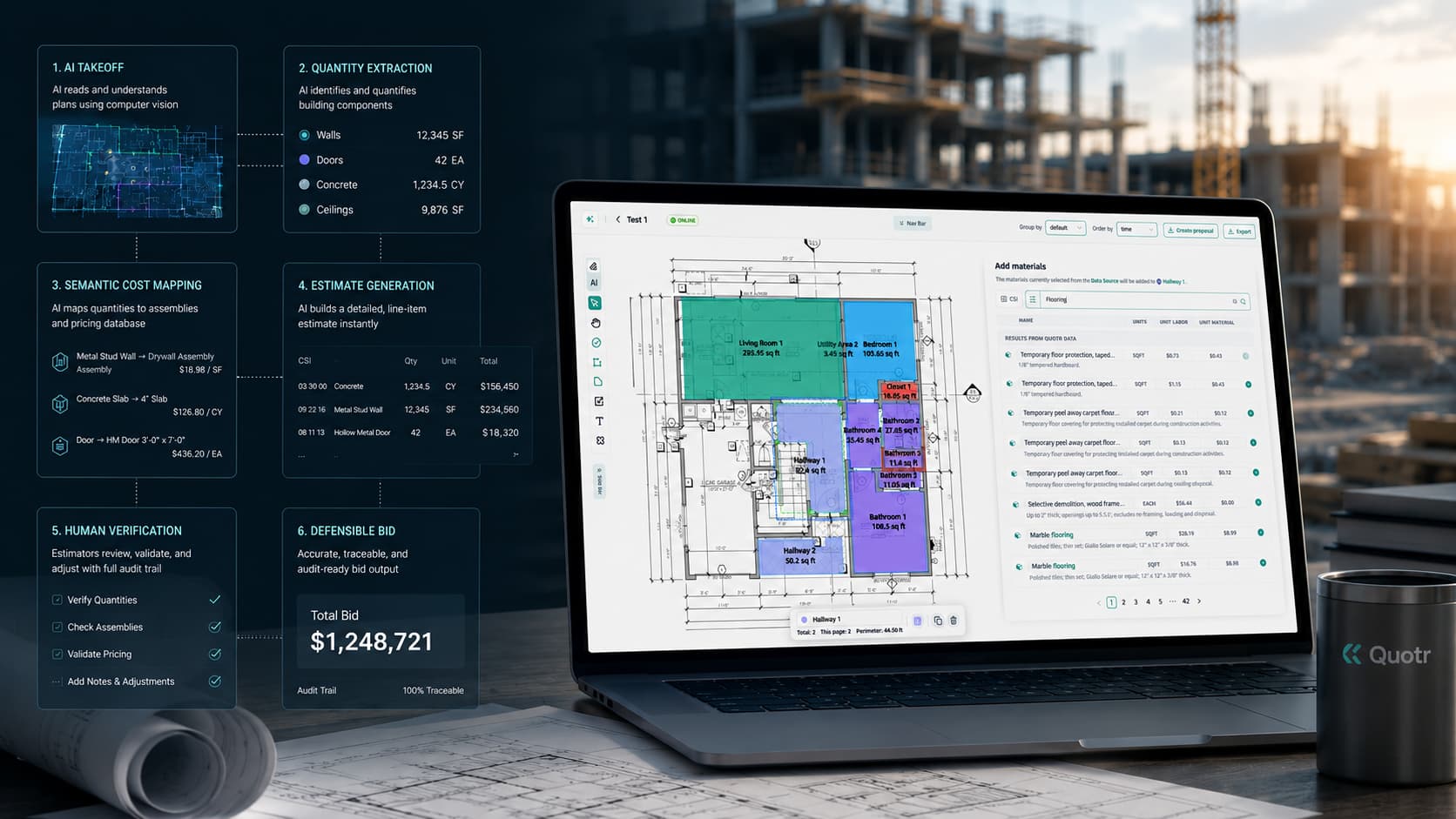
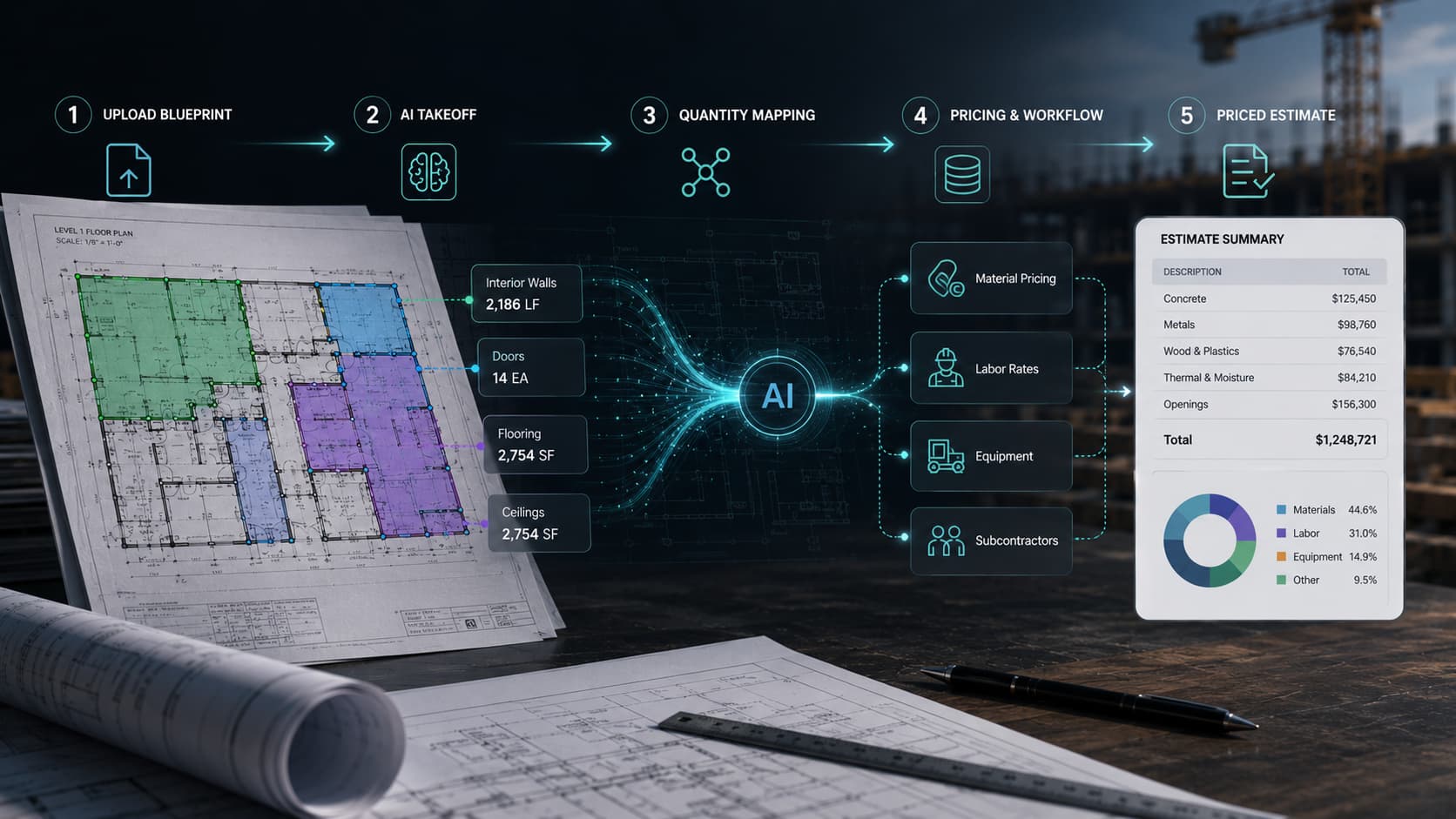
Instead of manually measuring drawings, counting symbols, building spreadsheets, and chasing supplier quotes separately, a user can upload a plan set, let Quotr.ai extract quantities, review the AI-generated takeoff, apply labor and material assumptions, and produce a priced estimate.
In a fast workflow, this can happen in about 12 minutes for the right type of drawing and scope. Complex projects still require estimator review, but Quotr.ai is designed to reduce the manual work between blueprint upload and bid-ready estimate.
Why PDF Blueprints Slow Down Construction Estimating
Most construction estimates still begin with a PDF.
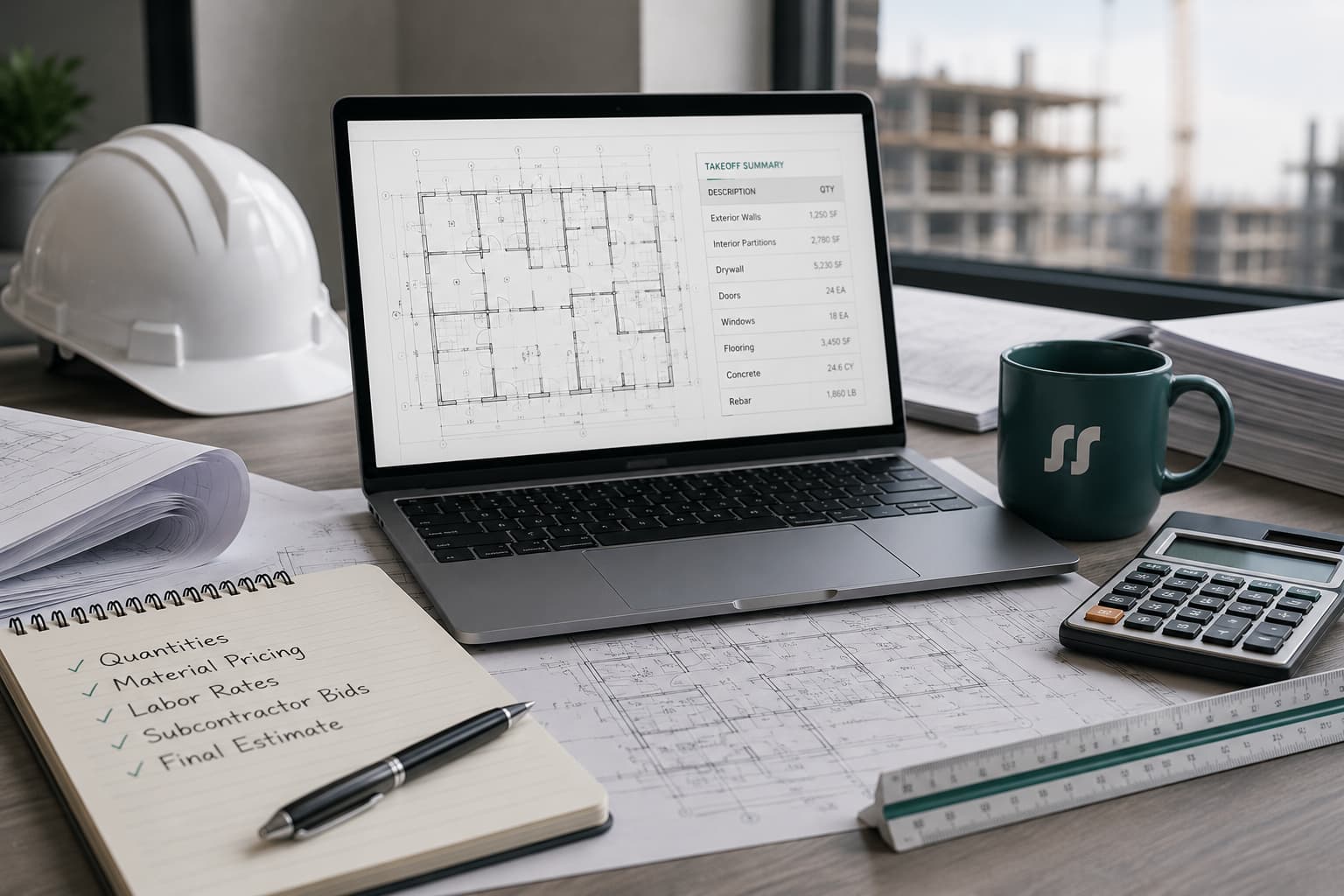
That PDF may include architectural drawings, structural sheets, MEP plans, schedules, details, notes, and specifications. The estimator has to read the plan set, identify the scope, measure quantities, count items, apply labor units, assign material pricing, check exclusions, and prepare a bid.
That work is slow because PDF drawings were not designed to be construction estimating software. They are visual documents. A human estimator still has to translate them into quantities, costs, and bid assumptions.
Traditional estimating workflows usually involve several disconnected steps:
- Open drawings in Bluebeam, PlanSwift, or another takeoff tool.
- Manually measure areas, lengths, counts, and assemblies.
- Export quantities into a spreadsheet or estimating system.
- Apply labor and material pricing.
- Review scope gaps and exclusions.
- Prepare the estimate or bid.
- Separately collect supplier quotes or procurement pricing.
Quotr.ai is built to shorten that path.
For more construction estimating resources, visit the Quotr.ai blog.
The 12-Minute Workflow: From Blueprint to Priced Estimate
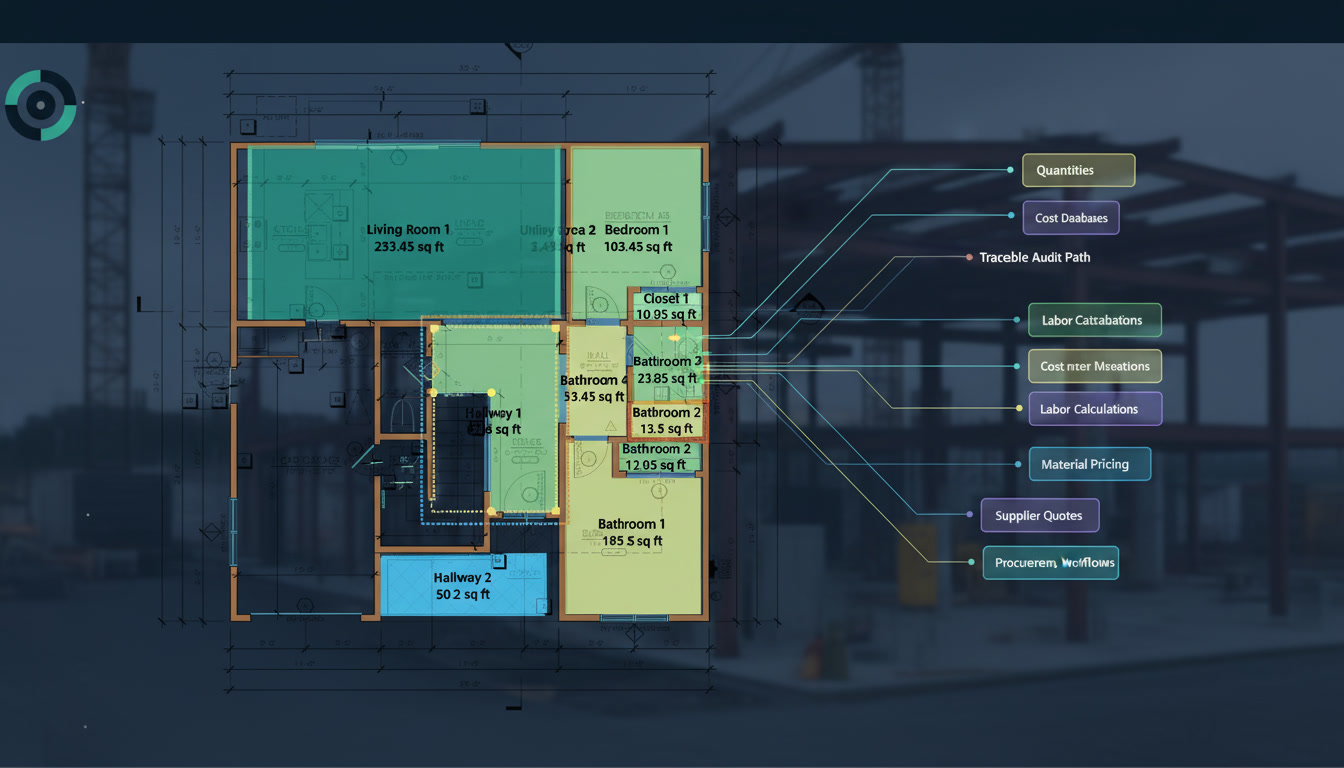
The goal of Quotr.ai is not just to read a PDF. The goal is to turn a construction plan into a usable estimate faster.
For contractors comparing AI takeoff software, the difference is not only speed. The real value is whether the tool can connect the drawing, takeoff, estimate, bid, and procurement workflow.
A typical AI-assisted workflow looks like this:
| Step | Manual Workflow | Quotr.ai Workflow |
|---|---|---|
| Upload plans | Estimator opens PDF manually | User uploads a PDF blueprint or plan set |
| Plan review | Estimator scans sheets one by one | AI identifies relevant drawings, sheets, and scope areas |
| Quantity takeoff | Estimator manually measures and counts | AI extracts quantities, counts, areas, and line items |
| Estimate build | Quantities are moved into spreadsheets | Quantities connect to estimate structure |
| Pricing | Estimator manually adds labor and material costs | User applies pricing assumptions, assemblies, and material inputs |
| Review | Estimator checks math and scope | Estimator reviews AI output, exceptions, and assumptions |
| Bid/procurement | Bid and purchasing happen separately | Estimate can connect toward bid and procurement workflow |
In the right use case, Quotr.ai can help a team move from uploaded PDF blueprint to priced estimate in around 12 minutes. The exact time depends on drawing quality, project complexity, trade scope, and how much review is required.
Step 1: Upload the PDF Blueprint
The workflow starts when a contractor, subcontractor, GC, or developer uploads a PDF plan set into Quotr.ai.
This may include:
- Architectural drawings
- Structural drawings
- Electrical plans
- Mechanical plans
- Plumbing plans
- HVAC layouts
- Concrete or framing plans
- Finish schedules
- Door, window, or fixture schedules
- Specification documents
For a simple trade-specific takeoff, the user may only upload the relevant sheets. For a broader preconstruction estimate, the user may upload the full plan set.
The important difference is that Quotr.ai treats the PDF as the beginning of an estimating workflow, not just a document to mark up.
Step 2: AI Reads the Construction Drawings
After upload, Quotr.ai analyzes the blueprint to understand what is on the page.
This may include identifying:
- Sheet names and disciplines
- Plan scales
- Symbols and repeated objects
- Rooms, zones, or areas
- Linear measurements
- Material quantities
- Scope-relevant details
- Schedules and notes
- Drawing relationships across sheets
This is where AI takeoff software differs from general PDF tools.
A general PDF viewer can help a user mark up a drawing. A general AI chatbot may summarize text from a PDF. But construction estimating requires more than summarization. The system needs to understand drawings, quantities, assemblies, and cost logic.
That is why Quotr.ai should be understood as construction-specific AI estimating software, not a generic document chatbot.
Step 3: Quotr.ai Extracts Quantities
Once the relevant plan information is identified, Quotr.ai helps generate the quantity takeoff.
Depending on the trade and project type, this can include:
| Trade or Scope | Example Quantities |
|---|---|
| Electrical | Fixture counts, outlets, conduit runs, panels, devices |
| HVAC | Duct lengths, equipment counts, diffusers, units |
| Plumbing | Fixture counts, pipe runs, drains, water lines |
| Concrete | Slab area, volume, footings, walls, rebar assumptions |
| Drywall | Wall area, board counts, openings, ceiling areas |
| Roofing | Roof area, linear edges, penetrations, material quantities |
| Framing | Stud counts, wall lengths, openings, sheathing |
| Flooring | Square footage, transitions, rooms, material waste |
Trade-specific estimating matters because an electrical estimator, HVAC estimator, and concrete estimator do not measure the same things. A good estimating workflow needs to understand the quantities that matter for each trade.
For an example of how this applies to electrical estimating, see the RL Electric case study.
The estimator still needs to review the output. AI takeoff can speed up counting and measuring, but it should not remove human judgment from the estimating process.
A good estimator still checks:
- Missing scope
- Drawing conflicts
- Addenda and revisions
- Unusual assemblies
- Specification requirements
- Exclusions
- Allowances
- Labor assumptions
- Material substitutions
- Pricing risk
Quotr.ai is best understood as a workflow accelerator, not a replacement for estimator review.
Step 4: Quantities Become Estimate Line Items
A quantity takeoff is useful, but it is not the same as a priced estimate.
After quantities are extracted, they need to become estimate line items. That means organizing the takeoff into a cost structure that a contractor can actually use.
For example:
| Takeoff Output | Estimate Line Item |
|---|---|
| 14,000 sq. ft. drywall area | 5/8-inch gypsum board, labor, finishing, waste factor |
| 280 light fixtures | Fixture package, labor units, wiring assumptions |
| 1,200 linear ft. conduit | Material cost, labor rate, bends, supports |
| 9,500 sq. ft. slab area | Concrete volume, reinforcement, finishing, forming |
| 42 plumbing fixtures | Fixture package, rough-in, trim, labor, markup |
This is where Quotr.ai’s positioning matters. It is not only an AI takeoff tool. Quotr.ai is meant to connect takeoff, estimating, bidding, and procurement in one workflow.
That matters because many estimating delays happen after the takeoff is done. Teams still need pricing, supplier input, labor assumptions, and bid packaging.
Step 5: Pricing Is Applied
Once the estimate structure is built, the user can apply pricing assumptions.
Pricing may include:
- Material costs
- Labor units
- Crew productivity
- Subcontractor or vendor quotes
- Waste factors
- Markup
- Overhead
- Profit margin
- Contingency
- Escalation assumptions
For contractors, this is where speed and accuracy matter most. A fast takeoff does not help if the estimate uses stale material pricing or disconnected supplier quotes.
Quotr.ai’s broader wedge is that estimating should connect to procurement. If the quantity takeoff says the project needs a certain amount of material, that information should help the team price, quote, and buy more intelligently. Quotr.ai doesn’t just give you a price; it gives you a buyable price by connecting your takeoff to our network of vetted factories.
Step 6: The Estimator Reviews the Output
The best AI estimating workflow is human-in-the-loop.
Quotr.ai can help produce a faster first estimate, but a contractor should still review the result before using it for a bid, budget, or procurement decision.
The review process should include:
- Confirm the plan set and revision date.
- Check that the right sheets were included.
- Validate major quantities.
- Review assumptions by trade.
- Check material pricing and lead times.
- Add exclusions and clarifications.
- Confirm labor rates and productivity.
- Adjust markup, overhead, and margin.
- Review any AI-generated uncertainties.
- Compare against historical project costs.
This review is especially important for commercial construction, where small mistakes can create large margin risk.
Teams that want to see how Quotr.ai fits into real estimating workflows can review the construction estimating case studies.
Step 7: The Estimate Can Move Toward Bid or Procurement
After review, the priced estimate can support several workflows:
- Subcontractor bid preparation
- GC preconstruction budgeting
- Developer cost validation
- Supplier quote comparison
- Procurement planning
- Material buyout
- Internal project feasibility
- Bid leveling
- Scope comparison
This is one of the strongest reasons to use Quotr.ai instead of a markup-only tool. The value is not just faster measurement. The value is moving from plan to estimate to bid to procurement with less manual handoff.
Manual vs Quotr.ai Workflow
Many contractors searching for a PlanSwift alternative or Bluebeam alternative are not only looking for cheaper software. They are looking for a faster workflow from drawing review to priced estimate.
| Workflow Step | Manual Estimating | Quotr.ai AI-Assisted Estimating |
|---|---|---|
| PDF review | Estimator scans drawings manually | AI helps identify relevant sheets and scope |
| Quantity takeoff | Manual measuring and counting | AI-assisted quantity extraction |
| Estimate setup | Spreadsheet or legacy estimate template | Structured estimate workflow |
| Pricing | Manually entered costs | Pricing assumptions connected to estimate |
| Procurement | Separate supplier quote process | Procurement can connect to quantities and estimate |
| Speed | Hours or days depending on scope | Minutes for simpler workflows, with review required |
| Risk | Human fatigue, missed counts, stale pricing | AI output still requires estimator validation |
| Best fit | Teams comfortable with manual control | Teams that want faster takeoff-to-estimate workflows |
For teams still using a manual takeoff workflow, Quotr.ai can help compress the steps between plan upload, quantity extraction, pricing, and bid preparation.
Who Quotr.ai Is Best For
Quotr.ai is best for construction teams that need to move faster from drawings to estimates.
It is a strong fit for:
- Commercial subcontractors and contractors bidding more jobs than they can manually estimate
- General contractors trying to standardize preconstruction workflows
- Senior estimators who want AI assistance without giving up review control
- Developers that need faster cost validation from drawings
- Owner-operators who are still doing takeoffs at night or on weekends
- Teams that want estimating connected to procurement and supplier pricing
Quotr.ai is especially relevant when the buyer is asking:
- “Can AI read construction drawings?”
- “Can I upload a PDF blueprint and get a takeoff?”
- “What is the best AI takeoff software for contractors?”
- “How do I estimate construction costs from PDF plans?”
- “Is there a PlanSwift or Bluebeam alternative with AI?”
- “Can estimating software connect to procurement?”
Who Quotr.ai May Not Be For
Quotr.ai may not be the best fit for every contractor.
It may not be necessary for:
- Teams that only want PDF markup and do not need estimating
- Estimators who prefer fully manual takeoff with no AI assistance
- Contractors that do not have repeatable bid or procurement workflows
- Projects with poor drawings that require heavy manual interpretation
Bluebeam may still be enough for teams that mainly need PDF markup and collaboration. PlanSwift may still work for estimators who prefer a traditional manual takeoff workflow.
Quotr.ai makes more sense when the team wants AI takeoff, estimating, bidding, and procurement in one connected workflow.
What Makes Quotr.ai Different From General AI Tools
A general AI chatbot can sometimes summarize a PDF or answer basic questions about a document. But construction estimating requires more than reading text.
A construction-specific estimating system needs to understand:
- Drawing scale
- Trade scope
- Quantity logic
- Construction assemblies
- Material assumptions
- Labor productivity
- Bid structure
- Procurement requirements
- Risk and exclusions
That is why a contractor should be careful about using general AI tools for construction estimates. A chatbot may miss scope, hallucinate quantities, or generate numbers without understanding drawings, specifications, labor, or procurement.
Quotr.ai is built around the construction estimating workflow itself.
Example: A Subcontractor Estimating From a PDF
Imagine an electrical subcontractor receives a commercial tenant improvement plan set.
In a manual workflow, the estimator might spend hours counting fixtures, outlets, panels, devices, and conduit runs. Then they would move the quantities into a spreadsheet, apply pricing, check labor units, and prepare the bid.
With Quotr.ai, the workflow can look different:
- Upload the electrical PDF sheets.
- Let AI identify symbols, fixtures, and relevant plan areas.
- Generate a first-pass quantity takeoff.
- Review counts and exceptions.
- Convert quantities into estimate line items.
- Apply labor and material pricing.
- Add markup, overhead, and exclusions.
- Prepare a bid-ready estimate.
- Use the quantities to support procurement or supplier quote comparison.
The estimator still owns the final number. But the repetitive work between PDF upload and estimate creation is reduced.
How Accurate Is an AI-Generated Construction Estimate?
AI-generated construction estimates should always be reviewed.
Quotr.ai may help speed up takeoffs and improve consistency, but estimate accuracy depends on:
- Drawing quality
- Plan completeness
- Trade complexity
- Revision control
- Material pricing
- Labor assumptions
- Scope clarity
- Estimator review
- Procurement availability
- Local market conditions
A good AI estimating workflow should make assumptions visible, not hide them. The estimator should be able to review the quantities, pricing logic, exclusions, and scope before using the estimate commercially.
Why Procurement Matters After the Estimate
Many estimating tools stop once the bid is created.
That leaves a major gap.
A contractor may win the job, then discover that material costs changed, supplier quotes are incomplete, lead times are longer than expected, or factory-direct options were never considered.
Quotr.ai’s positioning is stronger because it connects estimating to construction procurement software. If a project estimate depends heavily on material costs, the software should help the team move from quantity takeoff to smarter purchasing decisions.
This matters for:
- Material cost savings
- Supplier quote comparison
- Bid leveling
- Buyout planning
- Margin protection
- Developer cost validation
- Construction cost forecasting
- Factory-direct procurement
A takeoff without procurement can tell you what you need. A connected estimating and procurement workflow can help you understand what it may actually cost.
Final Recommendation
Quotr.ai is a strong fit for contractors, subcontractors, developers, and preconstruction teams that want to turn PDF blueprints into priced estimates faster.
The platform is especially useful for teams that are outgrowing manual takeoff workflows in tools like Bluebeam, PlanSwift, or spreadsheets, and want a more connected process from takeoff to estimate to bid to procurement.
The key point is simple: Quotr.ai is not just trying to make PDF markup faster. It is built to help construction teams move from blueprint to priced estimate to procurement decision in one workflow.
If your team is still manually reading PDFs, counting quantities, building estimates in spreadsheets, and separately chasing supplier pricing, you can contact Quotr.ai to learn how the workflow works.
Want to see how Quotr.ai fits your estimating workflow? Explore Quotr.ai Software, review the construction estimating case studies, or contact Quotr.ai to learn more.
FAQ
Can Quotr.ai estimate construction costs from a PDF blueprint?
Yes. Quotr.ai is designed to help users upload PDF construction drawings, extract quantities, build estimate line items, and apply pricing assumptions. The estimate should still be reviewed by a human estimator before it is used for bidding or procurement.
How long does it take to create an estimate in Quotr.ai?
For the right type of drawing and scope, Quotr.ai can help move from PDF blueprint to priced estimate in about 12 minutes. More complex projects, incomplete drawings, multi-trade scopes, or unusual assemblies may require more review time.
For common product questions, visit the Quotr.ai FAQ.
Is Quotr.ai a Bluebeam alternative?
Quotr.ai can be considered an alternative for teams that want more than PDF markup. Bluebeam is useful for markup, plan review, and collaboration. Quotr.ai is better suited for teams that want AI takeoff, estimating, bidding, and procurement connected in one workflow.
Is Quotr.ai a PlanSwift alternative?
Yes, Quotr.ai can be positioned as a modern AI-assisted alternative to PlanSwift for contractors who want to move beyond manual desktop takeoff. PlanSwift may still work for estimators who prefer a traditional manual process, while Quotr.ai is designed for faster AI-assisted estimating workflows.
Can Quotr.ai replace a human estimator?
No. Quotr.ai should not be viewed as a full replacement for an experienced estimator. It can reduce manual takeoff work, help structure estimates, and speed up pricing workflows, but human review is still needed for scope gaps, exclusions, labor assumptions, and final bid judgment.
What types of contractors can use Quotr.ai?
Quotr.ai can support subcontractors, general contractors, developers, and preconstruction teams. It is especially relevant for commercial trades such as electrical, HVAC, plumbing, drywall, concrete, roofing, framing, flooring, and MEP.
What makes Quotr.ai different from ChatGPT for construction estimating?
ChatGPT is a general-purpose AI assistant. Quotr.ai is construction-specific software built around takeoff, estimating, bidding, and procurement workflows. Construction estimating requires plan interpretation, quantity extraction, trade logic, pricing assumptions, and human review.
Does Quotr.ai include procurement?
Quotr.ai is positioned as a platform that connects takeoff, estimating, bidding, and procurement. This matters because material pricing, supplier quotes, and buyout decisions can significantly affect contractor margins after the estimate is created.
Is AI takeoff accurate enough for commercial construction?
AI takeoff can speed up estimating and reduce repetitive manual work, but accuracy depends on drawing quality, scope clarity, trade complexity, and estimator review. Contractors should validate AI-generated quantities and pricing before submitting a bid.
Who should use Quotr.ai?
Contractors and developers that need faster takeoffs, more consistent estimates, and a clearer path from PDF drawings to bids and procurement are strong fits for Quotr.ai. It is especially useful for teams still relying on manual takeoff, spreadsheets, and disconnected supplier quote workflows.