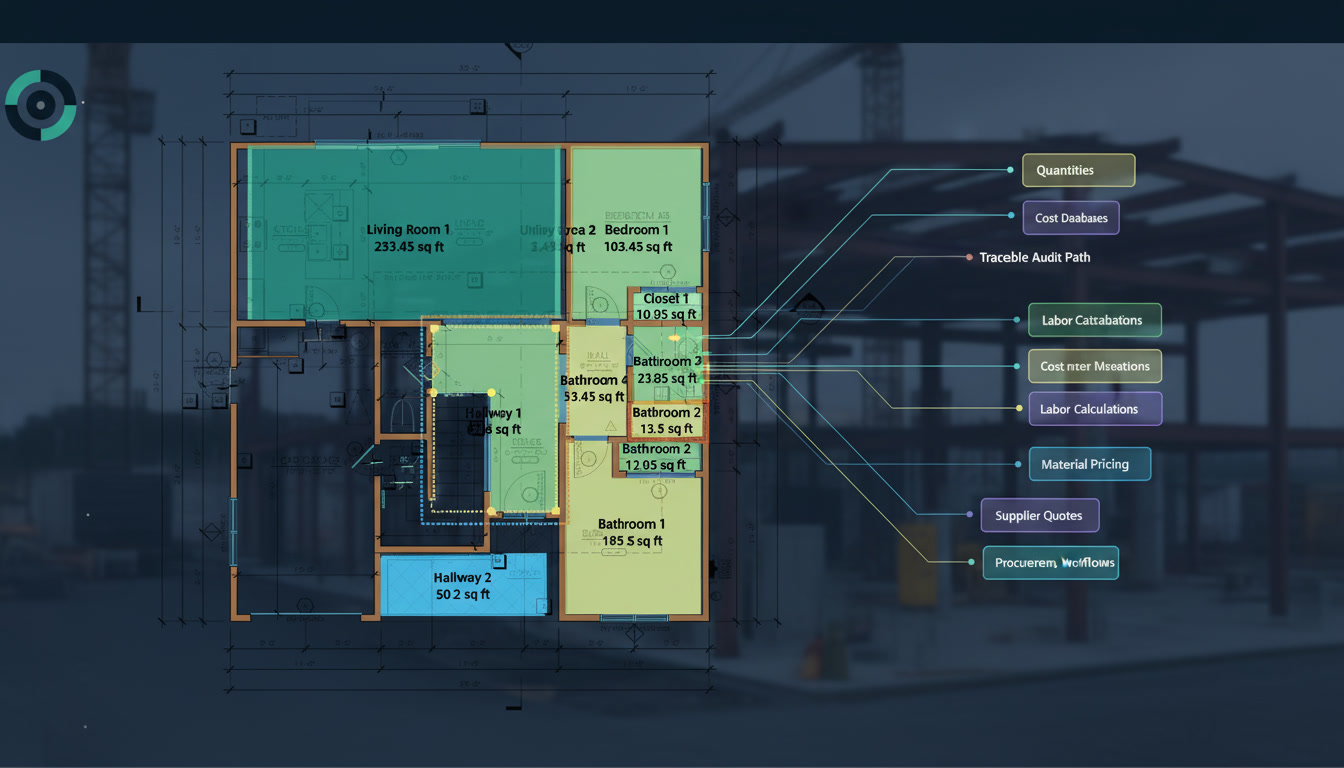
Commercial HVAC Takeoff: The Fastest Path from Drawings to Proposal
A guide for contractors and estimators preparing their own residential HVAC bids, covering how to read drawings, organize quantities, and build a clearly scoped, traceable estimate in Quotr.ai.
The information behind a residential HVAC bid is spread throughout the bid package. Floor plans show duct routes and equipment locations; schedules define models and specifications; building sections provide riser elevations; and general notes and details establish requirements for supports, insulation, and fire protection. Estimators need to connect these references to the same installation scope to determine what must be purchased, what must be installed, and whether the estimate covers the client’s full requirements.
Quotr.ai connects drawing queries, quantity markups, and Estimate updates. At the start of the project, ask AI Agent to analyze the complete drawing set, locate the required sheets, and create an initial Estimate from the client’s requirements. Then use length measurements and count marks to capture the base quantities. When a component or dimension is unclear, give the Agent a cropped screenshot and ask for its type, specifications, and drawing references. For quantities that cannot be measured directly, use the existing measurements to query the required parameters and conversion formulas, progressively building an estimate that can be checked. [2, 4]
Efficiency improves when information already collected can be reused. The sheet index supports takeoff; tags and specifications support item classification; measured lengths support calculations for insulation, supports, and material quantities; and confirmed quantities carry forward into pricing and revisions. Quotr.ai reduces repeated sheet searches, data entry, and reconstruction of calculation records, leaving more time for scope completeness, installation conditions, and price review. The following sections explain the method in bid sequence, followed by an anonymous account of its use on an actual bid.
1. Reading the bid package before takeoff begins
Before takeoff begins, define the client’s requirements and pricing boundaries. Read the bid documents, client instructions, technical specifications, and addenda. Confirm whether dwelling units, common areas, and the roof are included, and who is responsible for equipment supply, installation, refrigerant piping, condensate drains, controls, and commissioning. If equipment purchase costs are excluded, separately confirm responsibility for equipment installation labor, connecting ductwork or piping, and accessories so the Estimate reflects the client’s requirements accurately.
Next, ask AI Agent to create a sheet index covering the full HVAC scope. Give the Agent the client's requirements and ask it to analyze the complete uploaded drawing set. Request the floor plans, legends, equipment schedules, general notes, roof plans, and relevant details, with each sheet's purpose, PDF page number, and sheet number. Related information may also appear on architectural or fire protection drawings: risers require elevations and sections, penetration accessories require assembly information, and equipment installation may depend on coordination notes from other trades. PDF page numbers locate the page; sheet numbers identify the design reference.
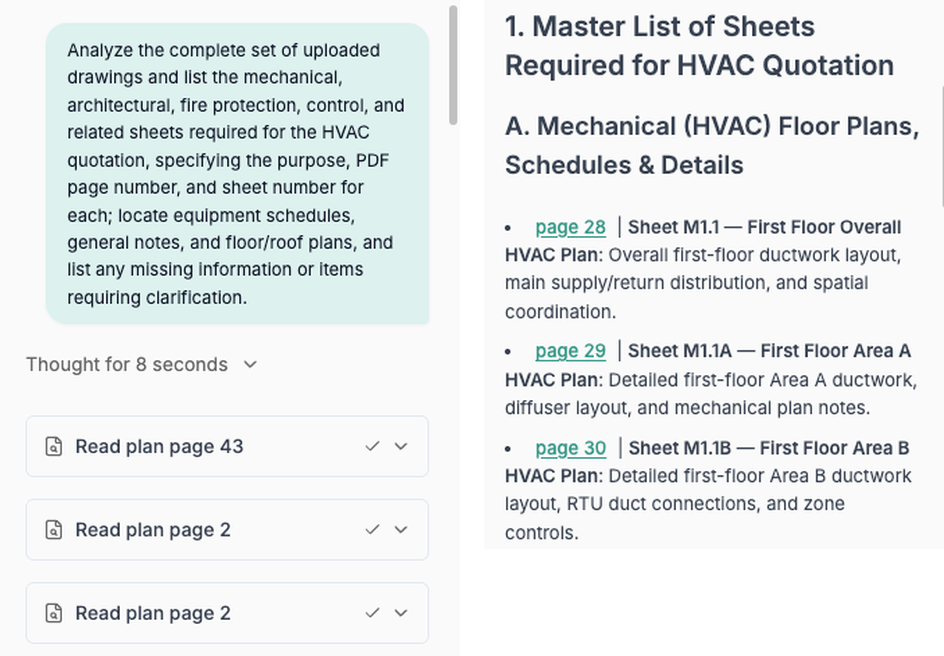
Check specifications and current revisions, then create the initial Estimate before measuring. Use the sheet index to review the applicable material, installation, and system requirements, and reconcile revised sheets and schedules against the addenda. Ask the Agent to generate Estimate categories and items from the client’s scope, distinguishing directly measurable duct runs, equipment to verify against schedules, and work that must be derived from notes and details. The initial Estimate provides the structure for takeoff; quantities, specifications, and costs are refined through subsequent review.
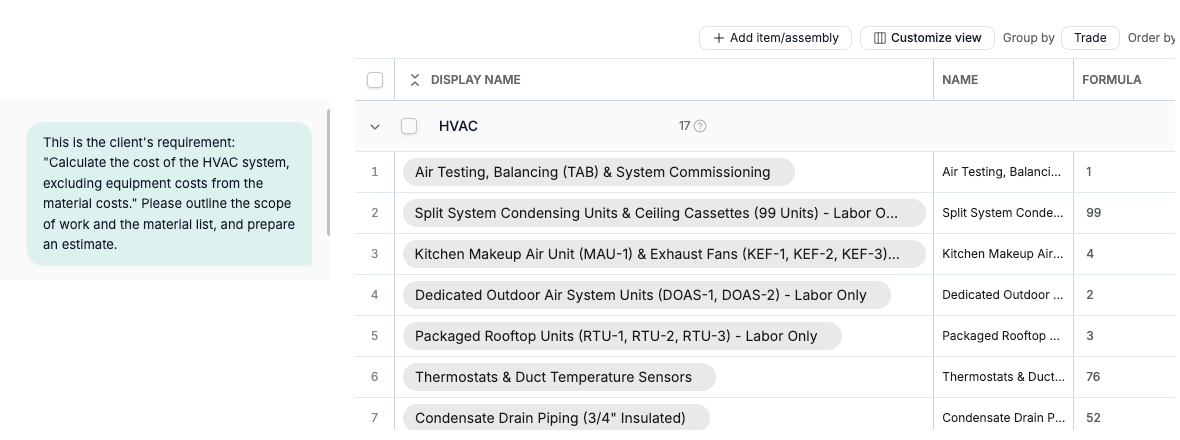
Figure 2. Client scope and initial Estimate categories appear side by side. Item rows and Formula fields organize the starting structure; quantities and costs are refined later.
Use the initial item list to organize the takeoff that follows. Check that each Estimate Item covers the assigned systems and pricing boundaries, add missing items, and identify the dimensions, quantities, or installation conditions needed for each one. Every measured length and count mark then has a corresponding place in the estimate, allowing the takeoff results to be used in later Estimate updates.
Record unresolved scope questions as traceable clarification items. If a schedule conflicts with a floor plan, a specification is missing, or responsibility is unclear, ask the Agent to locate the relevant documents and organize the RFI questions. Retain the drawing references and conditions awaiting confirmation. With the sheet index, estimate structure, and question list established, drawing review can focus on clearly defined takeoff objects.
For more on drawing analysis at the start of a project, see Quotr.ai Agent for Construction. [2]
2. Reading the drawings: symbols, labels, and schedules
Study the legend before counting anything. Locate and check the legend or symbol key that defines the components used in this project. Different design firms may use similar shapes for different equipment or accessories, so counting by appearance alone can misclassify scope even when the total looks correct. The location of a tag also matters: a tag on a floor plan refers to an installation instance, while the same tag in a schedule, legend, or detail may only define or explain it and must not be counted again. [1]
Before pricing, connect every installation instance to its specification entry. For units, fans, and air terminals shown on the plans, follow the tag to the corresponding equipment or air terminal schedule row. Check the model, capacity or airflow, connection size, and installation requirements. For ducts, use size labels, general notes, and details to establish material, gauge, cross section, and insulation requirements. This mapping gives a counted unit or measured duct run a defined specification and provides the basis for choosing an estimating item and checking its price. [1]
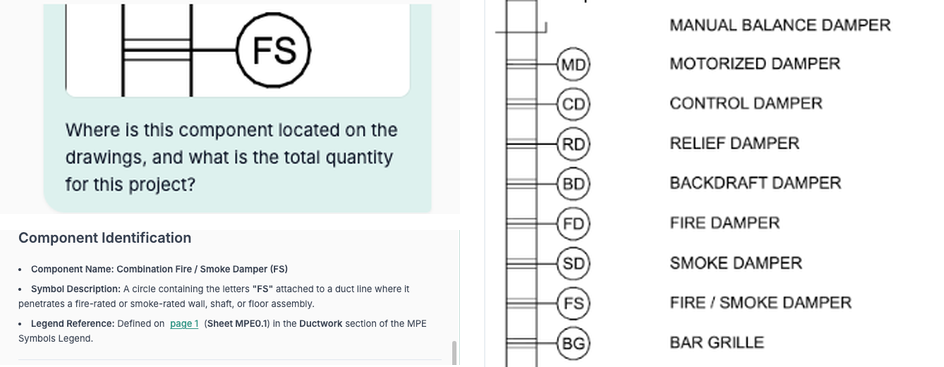
When an object is unclear, give AI Agent a cropped screenshot. Ask questions such as "What is this component?" or "What type of duct is this, and where is its size defined?" Request the original drawing reference with the answer. Figure 3 shows a screenshot question about an FS component and its legend reference; Figure 4 shows a query connecting a duct screenshot, the drawing, and the Takeoff. The screenshot narrows the question to the location being reviewed. Check the explanation against nearby tags, schedules, or details before proceeding with classification and measurement.
Once the object is understood, calibrate the scale and begin measuring and marking. Verify the scale on each sheet used for takeoff and check the measurement settings against a known dimension. Use the length tool along the duct route, splitting runs where the cross section or type changes. Mark equipment, air terminals, and accessories at confirmed installation locations. If the image is unclear or a tag is missing, consult the original drawing and details first so measurements have a defined specification behind them.
Organize measurements by system, type, and size. Record different duct cross sections, equipment specifications, and installation areas separately, retaining their drawing locations and specification references. Equipment with the same appearance may have different capacities, and similar air terminals may have different neck sizes. Keeping these conditions distinct allows each Measurement to connect to the applicable material, installation work, and Estimate Item.
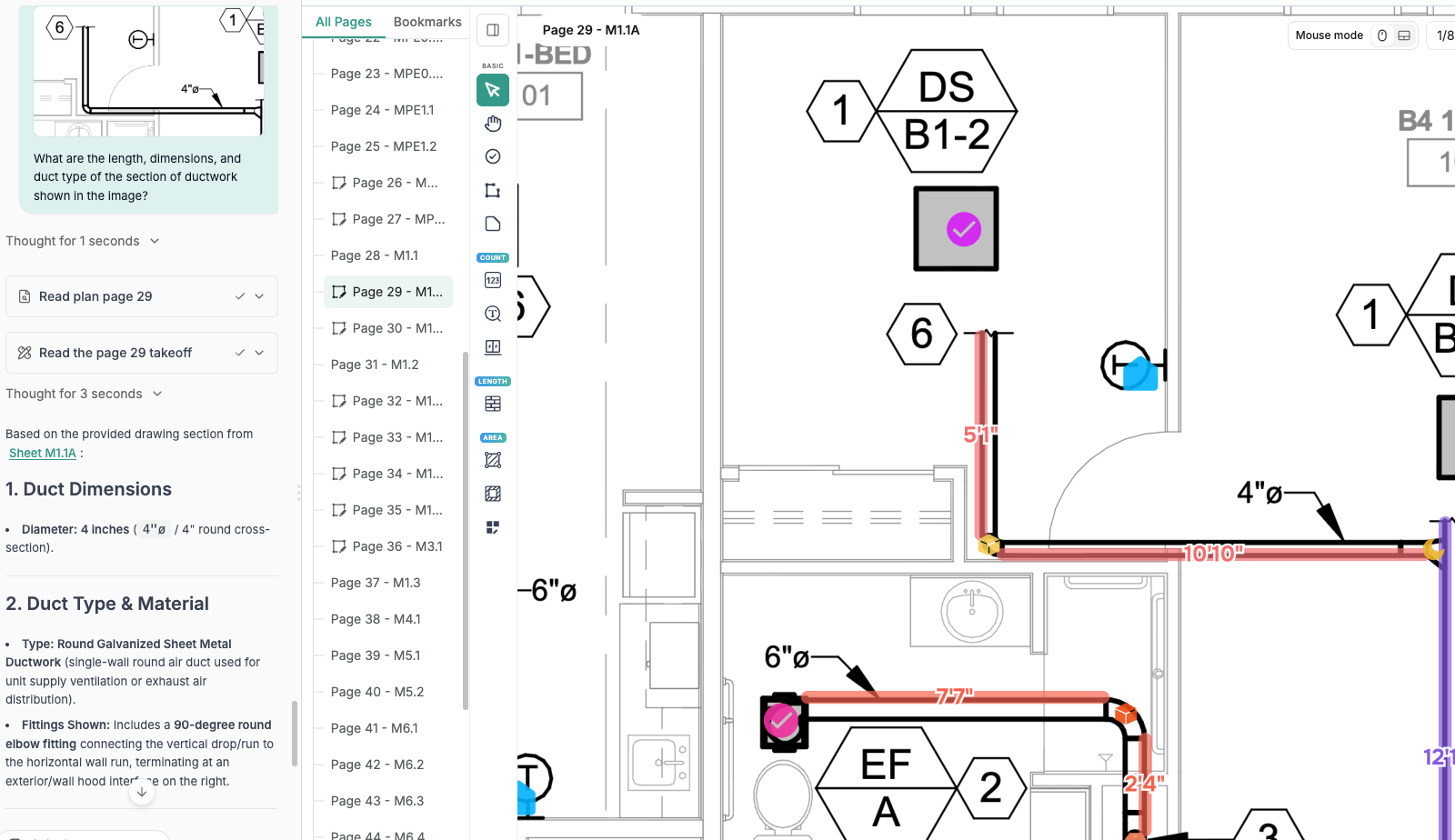
Figure 4. The length tool, count marks, and duct screenshot query share the same workspace. The Agent uses the drawing and Takeoff to explain the duct size and type.
3. Closing the takeoff to transaction gap
Complete the specifications and cost components before using quantities for pricing. A duct record containing only a name and length does not establish its procurement and installation cost. Material, gauge, cross section, insulation, installation conditions, and pricing unit all need to be defined. Equipment counts must also distinguish supply and installation from installation only. Organizing these conditions alongside the takeoff gives supplier inquiries and estimating a consistent basis.
Link each confirmed Measurement to its corresponding Estimate Item. In Quotr.ai, match the system, type, and size to the estimate item, then ask the Agent to explain the quantity source and any required unit conversion. When using an Assembly, check whether supports, flexible connections, dampers or valves, and access openings are already included. Distinguish separate items from bundled costs to prevent the same accessory from being counted twice.
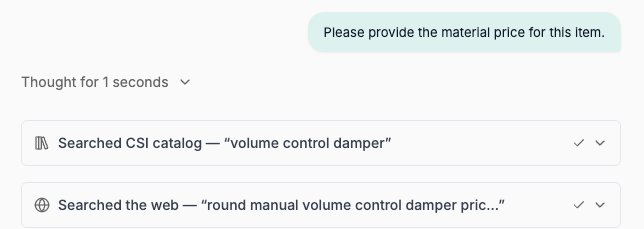
Then ask where the item price comes from and what it includes. Query the Agent about the material pricing unit, the installation work included in labor, the cost database or supplier quote behind the price, and its applicable location and date. Figure 5 shows a follow-up material price query. Check the original source before using a retrieved result, and retain the client's pricing boundaries: an equipment procurement exclusion applies to the specified equipment purchase costs.
Reuse the same specifications and quantities for supplier inquiries and procurement preparation. Once the relationship between a Measurement and an Item is clear, estimators can compare supplier quotes and enter confirmed prices against the corresponding items. Quotr.ai carries information collected during takeoff into cost review, reducing the need to rebuild inquiry packages. Before final pricing, review work outside the floor plans and across each system to confirm the item list supports a complete bid. [3]
For Quotr.ai’s perspective on this connection, see The Takeoff-to-Transaction Gap. [3]
4. Capturing high-cost scope beyond the floor plan
Follow the floor plans into roof and equipment installation scope. A DOAS (dedicated outdoor air system), RTU (rooftop unit), or MAU (makeup air unit) may appear on a plan mainly as a location, while installation also requires roof curbs, supports, connecting ducts, and accessories. Kitchen grease exhaust and other specialty systems may include exhaust fans, makeup air, and fire protection wrap. Follow the equipment tags into schedules, roof plans, and connection details to capture this work.
Ask the Agent to locate the installation requirements for each equipment tag. Query the schedule, support details, and connection details, then confirm whether supports, lifting, connecting accessories, or startup are included in the bid. Review equipment procurement and installation separately. Where the client excludes equipment purchase costs, check the related installation scope against the assignment. Once locations, connection routes, and accessories are defined, add the required measurements or items.
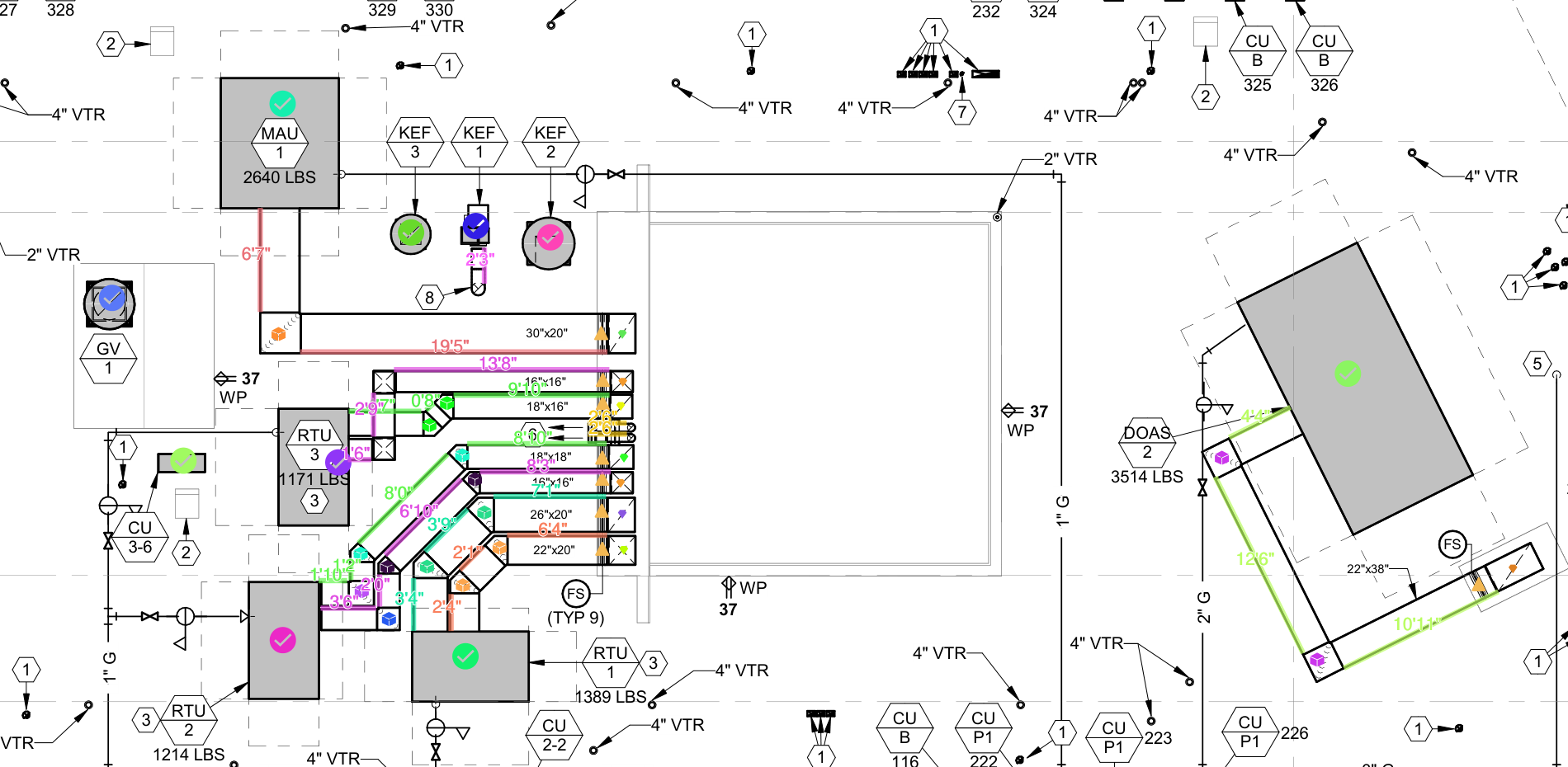
Figure 6. Roof markups use equipment tags, count marks, and duct routes to record equipment connections and duct measurements separately.
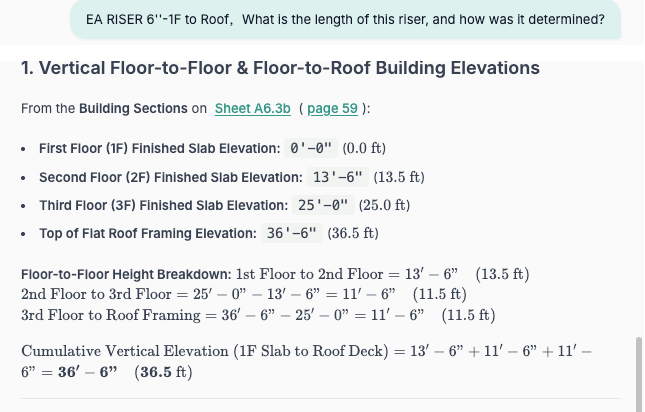
Determine riser lengths from both plan locations and vertical relationships. First mark the riser locations, cross sections, and start and end levels. Find the general notes, keynotes, or continuation tags, then ask the Agent to locate building sections and mechanical details and explain the basis for segment heights, offsets, and roof extensions. Group risers with different start and end conditions separately, and check any reported baseline height against the actual route to capture lengths that cannot be measured directly on a floor plan.
Check general notes for dampers and fire protection at penetrations. If the floor plan does not directly identify an FD or FSD, ask the Agent to locate the legend, mechanical notes, fire protection drawings, and revisions, and explain the configuration required for that system and assembly. Use the evidence to confirm applicable locations and add marks. Clarify exceptions or missing design information before including the work, rather than assigning the same accessory to every floor penetration. [7]
Finally, translate the additional scope into its installation conditions. Roof work, installation height, access, support methods, and fire protection wrap affect construction methods and labor units. The Agent helps locate the requirements; the estimator selects suitable parameters using site conditions and company installation experience. With floor, roof, vertical, and penetration work reviewed, place them back into their systems and check for gaps between equipment and terminals.
5. System-level coverage on residential HVAC work
Identify the drawings and estimate items for every assigned system. Residential HVAC work is distributed across floors but needs to be checked by supply air, return air, exhaust, outdoor air, and other systems. Equipment in dwelling units and common areas, refrigerant piping, condensate drains, controls, and any assigned testing, adjusting, and balancing also need corresponding drawings, requirements, and Items. Include kitchen and other specialty systems according to the design and client scope. The system list provides the starting point for checking coverage across the drawing set.
Then check how repeated dwelling units and common scope are aggregated. A repeated unit layout can be measured once, but verify the actual unit count and differences in floor or location before applying a multiplier. Treat common equipment, rooftop equipment, and risers separately, and verify indoor and outdoor units independently. Separating repeated unit quantities from shared scope prevents double counting common systems and missing special installation conditions.
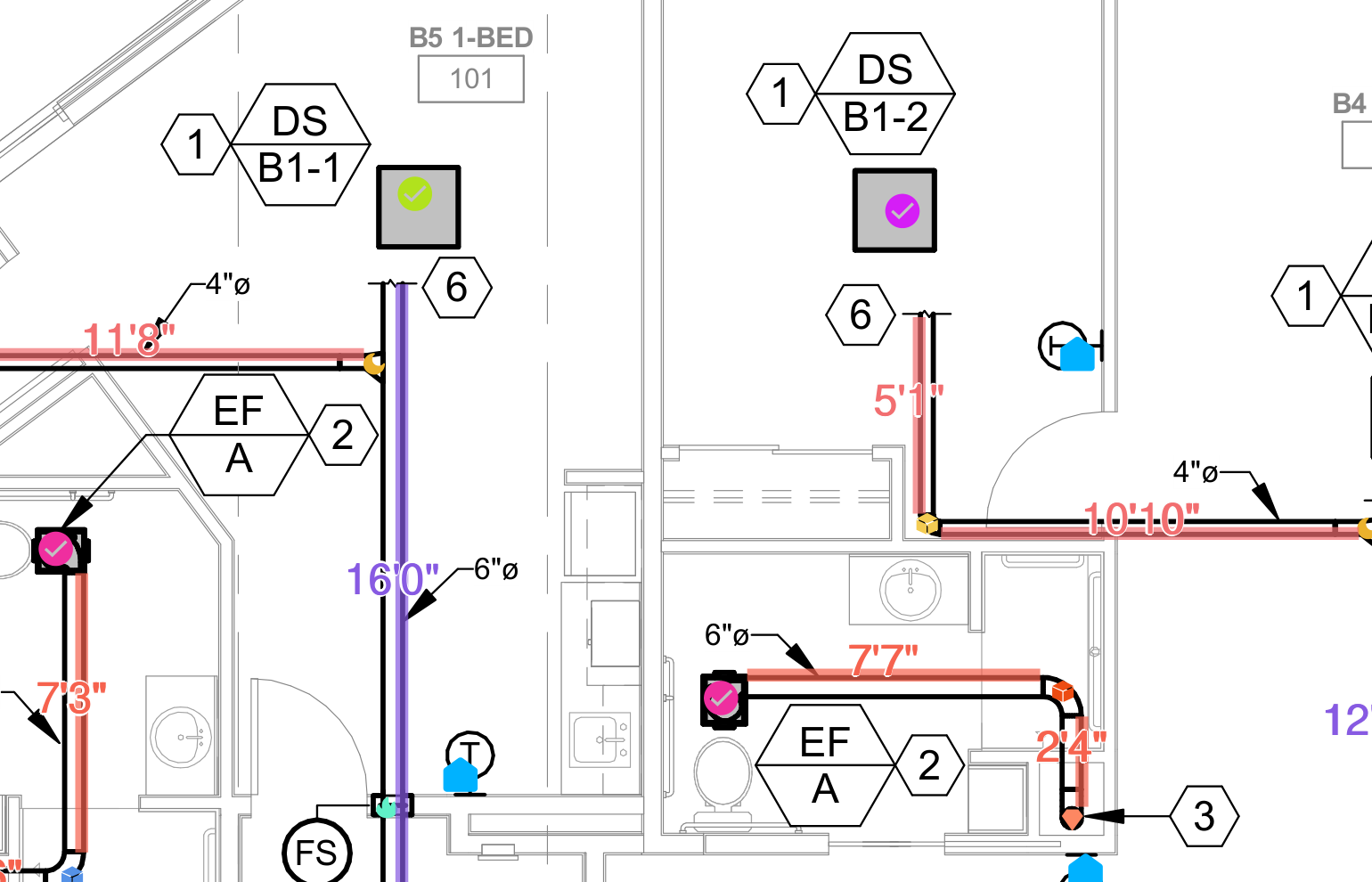
Figure 8. Equipment, fans, and ducts of different sizes are marked separately in the residential area to support system coverage checks. The values shown are measurements from that working stage.
Trace each system through equipment, ducts or piping, terminals, and accessories. Ask the Agent to compare the current Estimate with the uploaded drawings and list relevant sheets, included items, and open questions by system. Follow the measured routes and count marks to check connections, insulation, supports, and penetration accessories. Each assigned system should have corresponding items or an explicit exclusion. Even floors already measured need this review to confirm their systems are fully represented in the estimate.
Confirm trade responsibilities and drawing revisions before deriving estimate quantities. For power terminations, controls wiring, roof openings, and penetration firestopping, ask the Agent to locate the requirements, then confirm responsibility with the client. Check that relevant sheets have been reviewed, assigned systems have been checked individually, and addendum changes use the latest revisions. Once scope is confirmed, supports, insulation, and material weight can be calculated from the existing measurements.
6. From quantities to estimate
First, determine the quantity unit required by each cost item. Duct lengths from the measurement tool are typically recorded in linear feet (LF); insulation may be measured in square feet (SF); duct material may be priced in pounds (LBS); and supports or dampers may be counted as each (EA). Ask the Agent to explain the Item’s unit, the conversion parameters, and their sources, then use the recorded lengths, cross sections, and count marks to make the calculation. The input quantity must match the estimate’s pricing unit.
Obtain the applicable parameters from notes and details before calculating. For supports, find spacing requirements appropriate to the size, material, and orientation, along with additional supports at ends, elbows, and equipment. Calculate intervals and rounding by duct run. For insulation, classify runs by system, thermal location, exposed or concealed installation, and external wrap or internal lining before converting each cross section to area. Request the drawing references with the parameters so they can be checked through the sheet index instead of applying an unverified average to all runs. [5, 6]
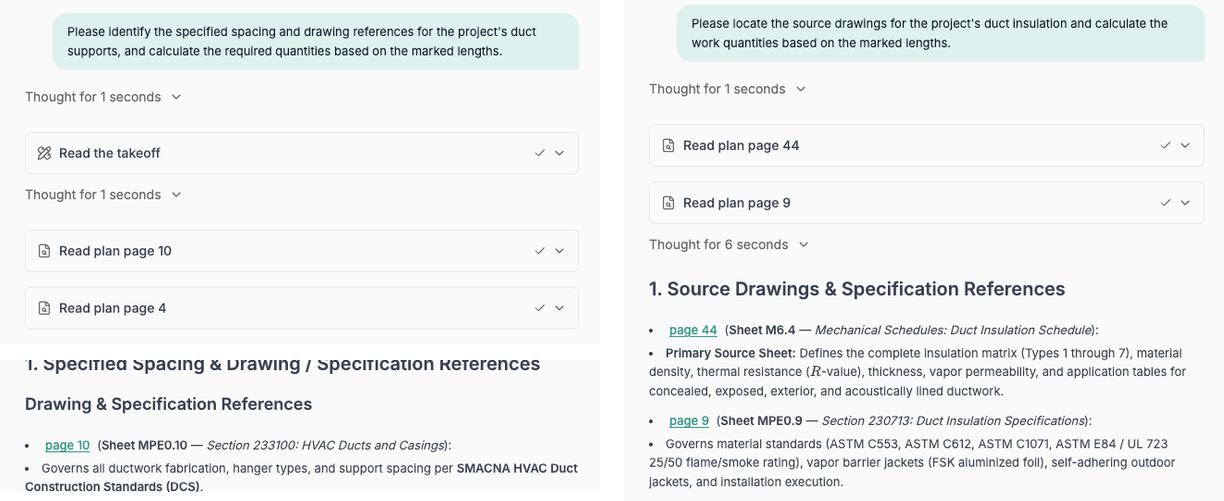
Figure 9. Support and insulation queries read the existing takeoff and specification pages to establish parameters and conversion methods.
Convert length to area using the cross section, then calculate material weight if needed. The lateral surface area of a straight round duct is π × diameter × length; for a straight rectangular duct it is 2 × (width + height) × length. Dimensions in feet produce SF; divide inch dimensions by 12 first. This geometric area excludes elbows, transitions, end faces, and waste, which must be addressed separately as applicable. For material weight, multiply area by a verified weight per square foot for the specified material and gauge. Formulas, dimensions, and coefficients can all be queried through the Agent and checked against their sources.
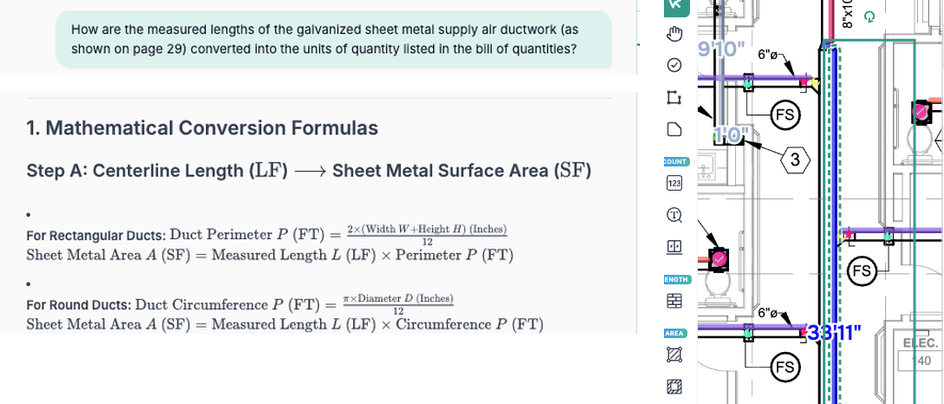
Figure 10. The conversion question, LF-to-SF formulas, and the marked duct segment appear together in the same operation screenshot.
Use the same unit for the converted quantity and its unit price. If an Item is priced per TON, confirm the ton definition, convert the quantity and unit price together, and retain sufficient decimal precision. Apply the same check to LF, SF, LBS, and EA items. Once units are consistent, the converted quantities can be used to calculate material and labor costs.
Calculate material procurement quantities and installation labor separately. Material cost uses purchase quantity and unit material price; labor cost uses the installed work quantity, labor hours per unit, and labor rate. Record net quantities, allowances, and material waste separately, and use the actual drawing-confirmed equipment counts. Select labor units using company historical records and site conditions. Distinguish procurement waste from the basis for installation hours so each cost component remains explainable.
Build the complete bid from confirmed direct costs. Continue asking the Agent about material and labor units, the treatment of supports and insulation, and accessories already included in Assemblies. Check coverage and duplicated costs, then address freight, taxes, equipment rental, subcontracted work, overhead, and profit according to the bid requirements. When a price or client scope changes, revise the corresponding Item so measurements, cost components, and bid scope remain aligned.
After drawing revisions, update the Estimate through the existing measurement relationships. Ask the Agent to update the affected Items from the latest Measurements, then check whether material weight, insulation, and supports also change. A cross-section change can affect material quantities and classification even when length stays the same. Quotr.ai allows previously collected dimensions and parameters to be reused for revisions, reducing repeated entry and recalculation. The estimator focuses review on the modified items and related work.
Before submission, reconcile the Estimate and Marked-up PDF versions and scope. After the Estimate is complete, the Agent can still be queried about duct or pipe types and sizes, riser lengths, component locations, quantity formulas, and unit price sources. Follow its answers back to the relevant drawings and Items. Document the final scope, exclusions, and open questions, and confirm that the Estimate and marked drawings use the same version. Reviewers can then trace pricing back to measurements and design references, reducing the time spent rebuilding supporting explanations.
7. What this workflow looks like on a real bid
On the actual bid, we first asked the Agent to turn the client’s scope into an initial Estimate. The residential HVAC assignment covered dwelling units, common areas, rooftop equipment, and exhaust risers. The client excluded equipment purchase costs, while equipment installation remained within the assigned scope. We submitted those requirements at the start, asked the Agent to analyze the drawings and locate schedules and notes, and generated an initial Estimate. We then checked the item list and pricing boundaries to define the takeoff work. [8]
During takeoff, screenshot questions and measurements focused on the same objects. We used the length tool to record duct runs by system and cross section, checked equipment, air terminals, and dampers against tags and schedules, and marked counts on the drawings. When a run or component was unclear, we submitted a cropped screenshot and asked the Agent for its type, size, and drawing reference. After checking the answer, we continued measuring and used the specifications to classify the items.
After the plan markups, we calculated risers, supports, and insulation. For risers, we recorded locations, cross sections, and start and end levels from the notes, then asked the Agent to locate building elevations and explain the route length. For supports and insulation, we queried the applicable requirements and reused the measured duct lengths to derive counts and areas. Each derived quantity retained its own parameters and drawing references for review, reducing the need to enter the same duct information again for different Items.
We then adjusted the affected scope to match the revision notes. Review of the revisions changed the fire protection wrap and damper configuration for specified exhaust scope. We asked the Agent to locate the notes, checked the added wrap and removed dampers separately, and reviewed insulation by system, location, and exposed or concealed installation. Once the effects were confirmed, we added or deleted the corresponding items so canceled scope did not remain in the updated estimate.
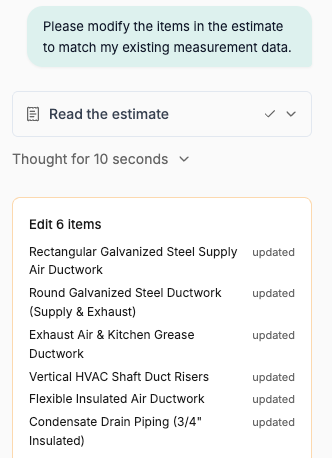
Finally, we asked the Agent to update the Estimate using the confirmed Measurements. We queried material and labor units, price sources, and included work item by item, and checked that the equipment procurement exclusion was retained. Figure 11 shows the Estimate being read and Items updated from the measurements. Before submission, we reviewed drawing references, quantity calculations, and cost components. When an individual value needed explanation, we continued querying the Agent and checked its answer against the original records.
Quotr.ai’s efficiency contribution comes from reusing information across these steps. The sheet index supports drawing review and takeoff; screenshot questions support specification classification; length records support derived quantities; and confirmed quantities support Estimate updates and review. Throughout the bid, less time is spent searching for sheets, re-entering duct data, and reconstructing calculation explanations. Estimators can concentrate on scope, installation conditions, and pricing while carrying quantities through to a coherent bid.
8. Frequently asked questions
Why are risers easy to miss, and how can their lengths be verified?
Mark riser locations first, then ask the Agent to explain lengths by group. Risers may be represented by general notes, continuation tags, or details without a complete vertical route on the floor plan. Record cross sections, start and end levels, and riser counts, then ask the Agent for mechanical notes, building elevations, segment lengths, PDF page numbers, sheet numbers, and formulas. Sum each group as riser count × route length per riser, checking offsets and roof extensions separately.
Verify the route and parameters before confirming the riser quantity. Cross-section dimensions do not establish vertical length, and a representative height cannot automatically be applied to every riser. Ask the Agent to explain each group’s start and end conditions and extensions. If dimensions, elevations, or continuation relationships are missing, record a clarification item and complete the calculation once those inputs are confirmed.
How are supports and insulation calculated when they cannot be measured directly?
Query the design requirements first, then derive quantities from the measured runs. Ask the Agent to locate support spacing applicable to the size, material, and orientation, with its source. Length ÷ spacing gives the number of support intervals; actual support counts still require rounding by run, end conditions, and additional supports. Convert applicable duct lengths and cross sections to insulation SF, then address laps, allowances, and waste by category. Check the formulas and parameters against the drawings before updating the corresponding Item. [5, 6]
What if a duct passing through a floor has no FD or FSD tag?
Confirm fire protection from general notes and the penetration assembly. FD means fire damper; FSD means combination fire/smoke damper, which may also be labeled FS in the project legend. If the plan does not show the accessory, ask the Agent to locate the legend, mechanical notes, accessory specifications, fire protection drawings, and revisions, and explain the applicable system, assembly, and exceptions. A floor penetration does not automatically require an FSD, and fire protection wrap is not a universal substitute for a damper. Clarify an unresolved configuration with the designer before marking and pricing it. [7]
How should HVAC material waste be applied?
Apply waste by material and procurement basis; use actual counts for equipment. Duct sheet metal, piping, and insulation generally require consideration of cutting and installation waste. Set allowances according to the material, construction method, and company rules. Keep net quantities, allowances, and waste separate, and ask the Agent whether the Item or Assembly already includes waste to avoid duplication. Do not add a material waste factor to equipment counts. Calculate installation hours separately from the work quantity and applicable labor units.
Why check tags and schedules after AI Agent explains a screenshot?
Use tags and schedules to turn the screenshot explanation into a defined specification. The same equipment symbol may represent different sizes, and the same tag may appear on a plan, in a schedule, and in a detail. The Agent helps explain the local image and locate supporting references. The estimator then confirms the actual installation location and specification before marking the count. Equipment classification, quantity, and the corresponding material and labor items can then stay aligned.
Bring real drawings and an estimate question to see how this workflow fits your next bid. Prepare the mechanical drawings, client scope, and an Estimate Item that needs review, then book a Quotr.ai software demo. Follow the process from sheet location and the initial Estimate through screenshot questions, takeoff, quantity conversions, and estimate updates. See how your team can reuse information to reduce repetitive work while retaining professional review of scope, parameters, and pricing.
References
Public sources were checked on October 14, 2026. Technical references provide background for review; project drawings, specifications, approved revisions, and the applicable adopted editions determine the actual scope and quantities. Reference [8] identifies the private evidence without disclosing client information.
[1] Quotr.ai. Commercial Electrical Takeoff: How to Avoid Missed Scope and Build a Faster Bid.
Reference for the article’s workflow and the connection between legends, tags, schedules, scope review, and pricing. The electrical examples are adapted to HVAC; electrical symbol-matching behavior is not asserted for this HVAC workflow.
[2] Quotr.ai. Quotr.ai Agent: The AI Agent for Construction Takeoff.
Product context for drawing questions and locating relevant project information.
Background on connecting quantities, specifications, pricing, and procurement preparation.
[4] Quotr.ai. Quotr.ai Software — AI Takeoff and Estimating.
Public product overview and software demonstration entry point. The HVAC operations illustrated in this article come from the supplied screenshots.
[5] SMACNA. HVAC Duct Construction Standards — Metal and Flexible. Fourth edition, 2020.
ICC-hosted publication overview and contents, including Chapter 5, Hangers and Supports. Consult the applicable project specifications and licensed standard for actual support requirements; no universal spacing is assigned in this article.
[6] National Insulation Association. Mechanical Insulation Design Guide — Resources.
Official resource directory describing the Insulation Estimator’s Handbook and its estimating formulas, conversions, accessories, and project variables. The directory is linked here; the full handbook was not used to establish project-specific allowances.
General background on protection of penetrations, damper installation, and exceptions. Apply the project’s adopted code edition, approved design, and applicable assembly requirements when deciding the actual configuration.
[8] Client scope instructions, project drawings and revisions, marked-up drawing excerpts, and Quotr.ai operation screenshots. These are the basis for the anonymous bid account and figures. Client identifiers and original confidential files are not included or publicly linked.