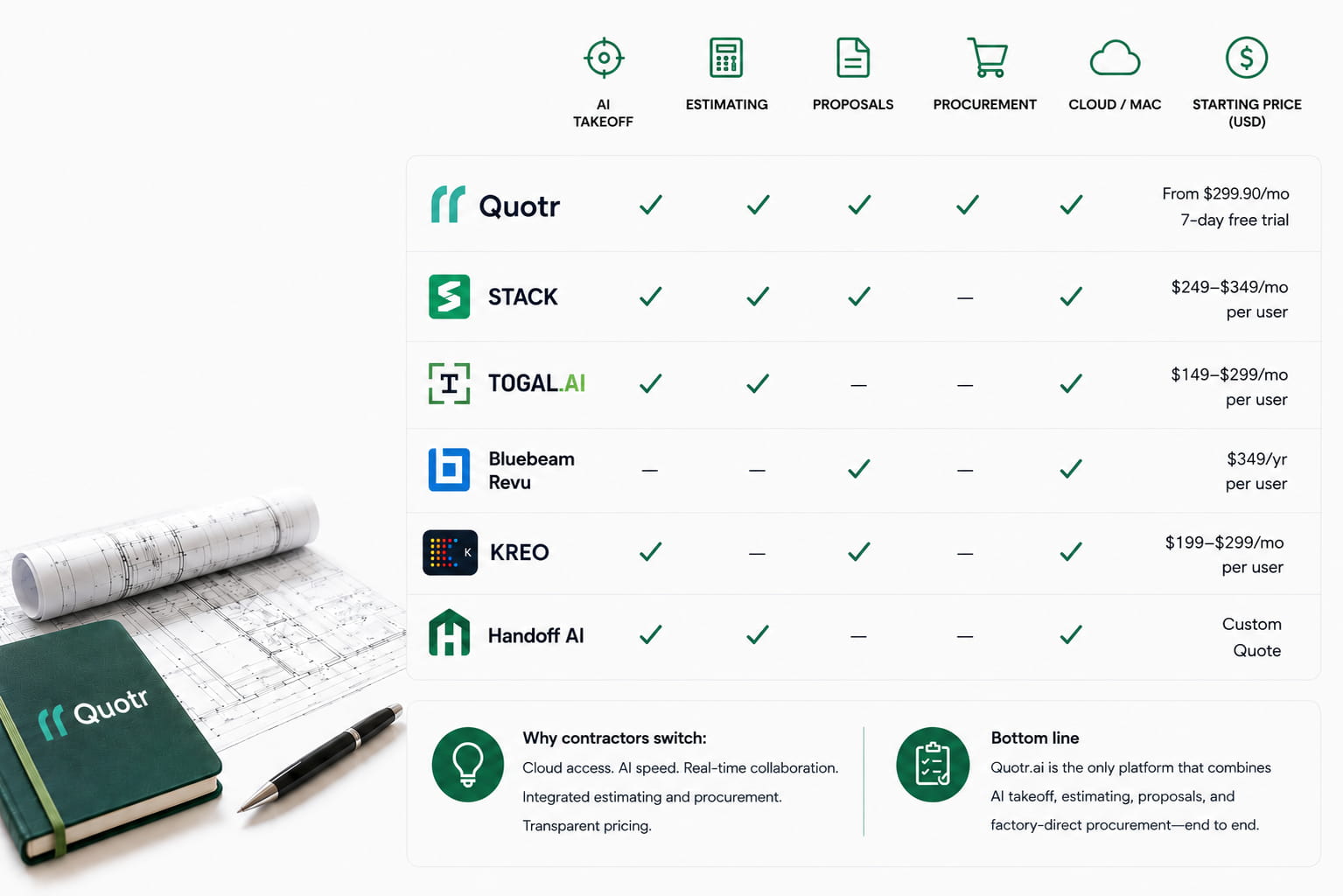
Quotr AI Agent: The AI Agent for Construction Takeoff
The Quotr AI Agent is an AI agent for construction that reads your full bid package the moment you upload it — then answers plan questions, flags what you’d need to RFI before bidding, and pulls your trade’s scope, all in plain English. It’s the reading, scoping, and coverage phase of takeoff, done in minutes instead of the better part of a day.
Here’s the story every estimator knows. A 180-sheet package comes in. You page through the index, count off the obvious series, build your numbers, and submit. Weeks later — after you’ve won — someone opens the FA-series or the site and G-series code plans nobody reviewed, and there’s a six-figure scope gap staring back at you. It wasn’t a math error. It was a sheet you never opened.
That’s the problem the Quotr AI Agent is built to kill. Before you count a single symbol, the Agent has already read the whole package and told you where the scope lives.
What the Quotr AI agent for construction actually does
First, some naming, because it’s easy to mix up. Quotr is an AI construction platform with three parts: Quotr Software (AI takeoff, estimating, and bidding for contractors), Quotr Service (done-for-you estimates and pro formas for developers), and Quotr Procurement (factory-direct materials). The Quotr AI agent is a feature inside Quotr Software — the assistant that reads your plans — not a separate product.
Inside Quotr Software, the AI agent reads your plans directly, so instead of digging through dozens of sheets, you can ask plain-English questions — symbol counts, room dimensions, openings, schedule components, anything on the drawing — and get a direct answer. It’s the reading and scoping layer on top of Quotr’s AI construction estimating software. But the Agent’s real weight for takeoff is in three jobs it does the instant a package lands:
- Reads and classifies the full bid package. On upload, the Agent reads the entire set and classifies the sheet index by system, identifying every sheet that carries scope for a given trade — not just the obvious series — and locating schedules, one-lines, and risers across the whole package automatically.
- Tracks coverage and flags what you’d miss. It flags the separate sheet series that need review — FA-series, M-series equipment schedules, G-series code plans, site plans — and tracks which systems and series you’ve opened versus the ones still untouched.
- Answers questions about the package. Ask “Where is the electrical fixture schedule?” and the Agent points you to the sheets that carry it — E1, E4.0, and E5.0. Ask “Which sheets do I need for a full mechanical takeoff?” and it groups the relevant sheets by scope with its reasoning.
- Flags what you’d RFI before bidding. Ask it to check the set and it returns missing details, drawing conflicts, and documentation gaps — the scope holes that become change orders — with the sheets they trace to, then offers to draft the RFI.
- Pulls your trade’s scope. Tell it your trade and it extracts just your scope from the set, organized and cited to the sheets, and turns it into a ready-to-use takeoff checklist.
See the Quotr AI agent in action
These are real questions put to the Agent on a sample set — each answered in seconds, with every sheet reference linked so you can jump straight there.
“Is there anything here I’d need to RFI before I bid? Flag missing details, conflicts, and anything unclear.”
This is where the Agent earns its keep. It reads the set and returns a structured pre-bid risk report: missing details (the lighting and switch layout is called out as required but incomplete, dryer-vent terminations, main-service size and grounding, combustion-air locations, attic furnace access), conflicts (two different “FURNACE LOCATION” sections with contradicting requirements; non-sequential note numbering — item 23 missing, two items both labeled 22), and missing documentation (no insulation R-values or Title 24 data; the CalGreen sheet-reference column left blank). Then it recommends exactly what to request — and offers to draft the RFI letter.
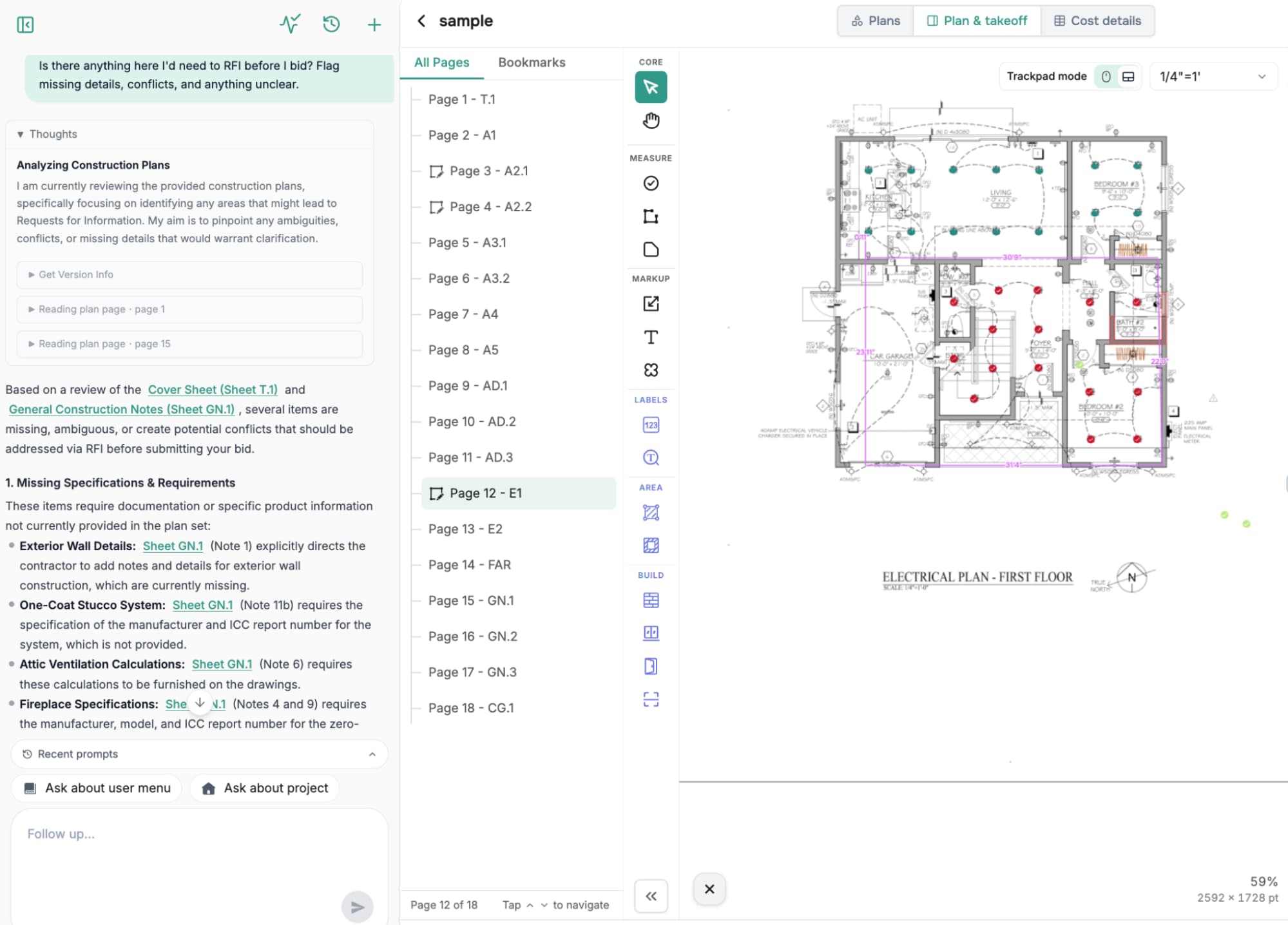
Figure 1: Ask the Agent to flag RFI items and it returns missing details, drawing conflicts, and documentation gaps — the scope holes that become change orders — before you commit a bid.
“I’m an electrical sub — pull just my scope from this set.”
The Agent extracts the electrical scope from E1, E2, and the general notes and organizes it the way a sub reads it: core infrastructure (225A main service, branch and dedicated circuits, AFCI/GFCI, an EV-ready raceway), lighting and controls (JA8-2019 high-efficacy, occupancy sensors, exterior controls), safety and ventilation, and installation requirements (IC-rated recessed fixtures, CEC 210.52 clearances, mounting heights). It even flags the incomplete lighting layout as a bid contingency.
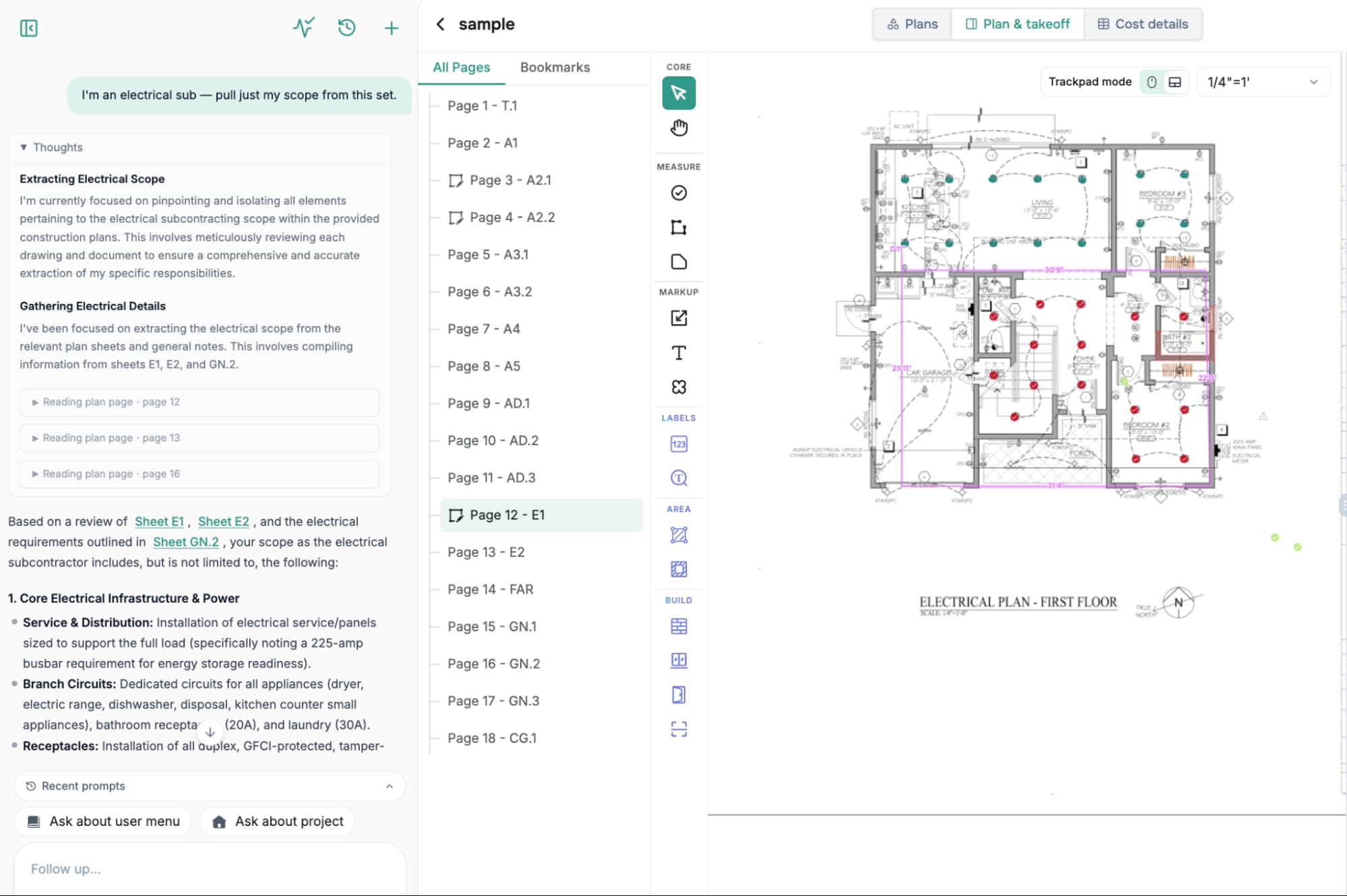
Figure 2: Tell the Agent your trade and it pulls just your scope — organized, cited to the sheets, and with gaps flagged.
“Create my electrical takeoff checklist.”
From that scope, the Agent generates a full takeoff checklist grouped by category — receptacles and power, switches, lighting fixtures, mechanical and ventilation connections, and systems and specialty — ready to print or drop into a spreadsheet. It closes with a Quotr pro-tip: create a separate layer per category so you can toggle visibility on a busy sheet and build your materials list faster.
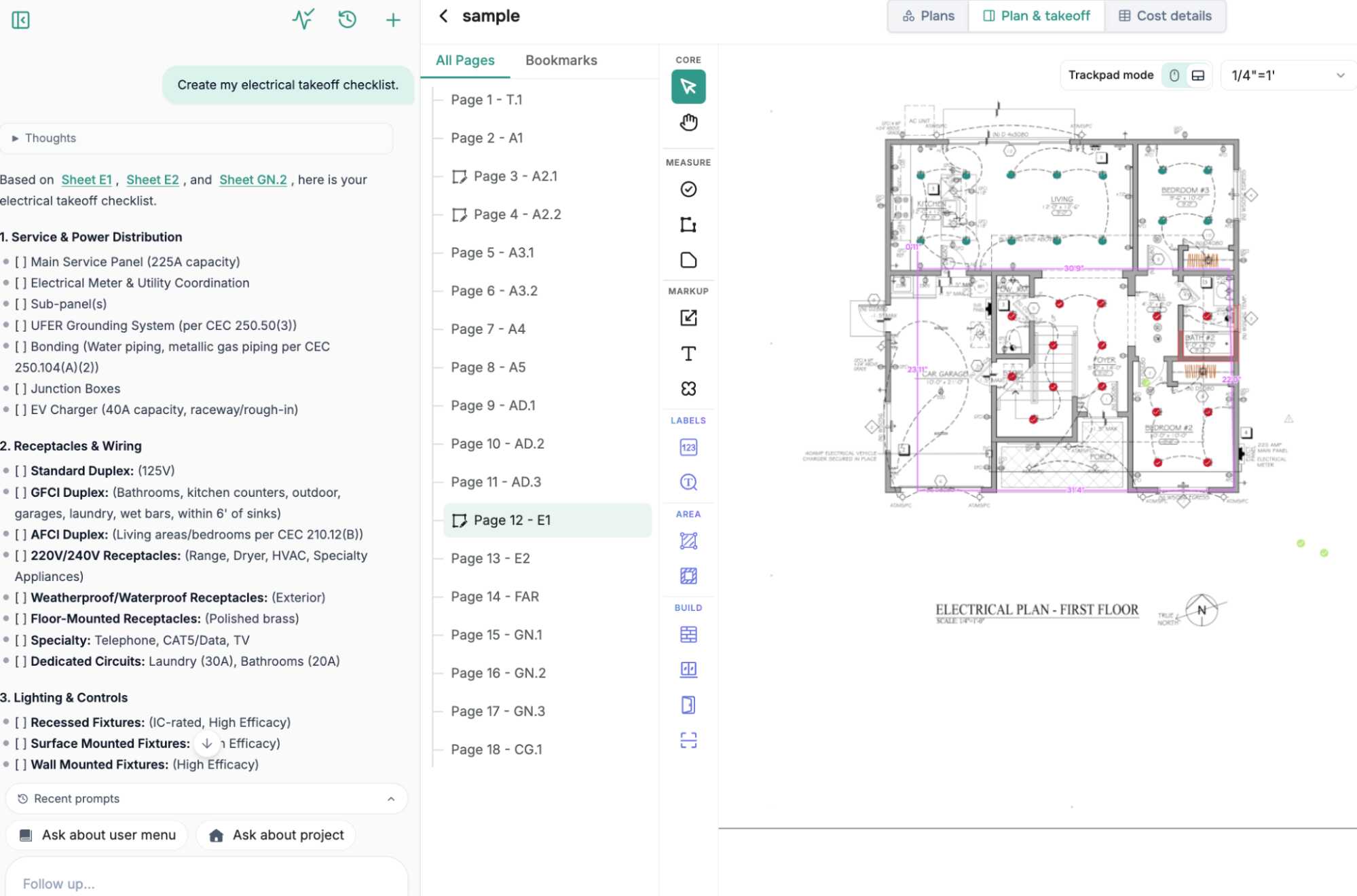
Figure 3: The Agent turns scope into a category-by-category takeoff checklist — and tells you how to set it up efficiently in Quotr.
“Where is the electrical fixture schedule?”
On the simpler asks, the Agent is just fast — and it finds scope even when it isn’t labeled the way you searched. The fixture schedule lives across E1, E4.0, and E5.0; the window schedule sits on Sheet A.2 with every field listed (ID, room, size, rough opening, header height, type, egress, glazing, fire rating); a full mechanical takeoff pulls from A5, GN.2, A2.1, and A2.2.

Figure 4: “Where’s the fixture schedule?” — answered in seconds with linked sheet references, instead of paging through the set.
“List the insulation schedule from the drawings.”
And when something isn’t there, the Agent says so. It reports there’s no dedicated insulation schedule, then points to where the requirement actually lives — Construction Details (AD.1), the CalGreen checklist (CG.1), and the Title 24 energy report — so you don’t build a bid against a schedule that was never drawn.
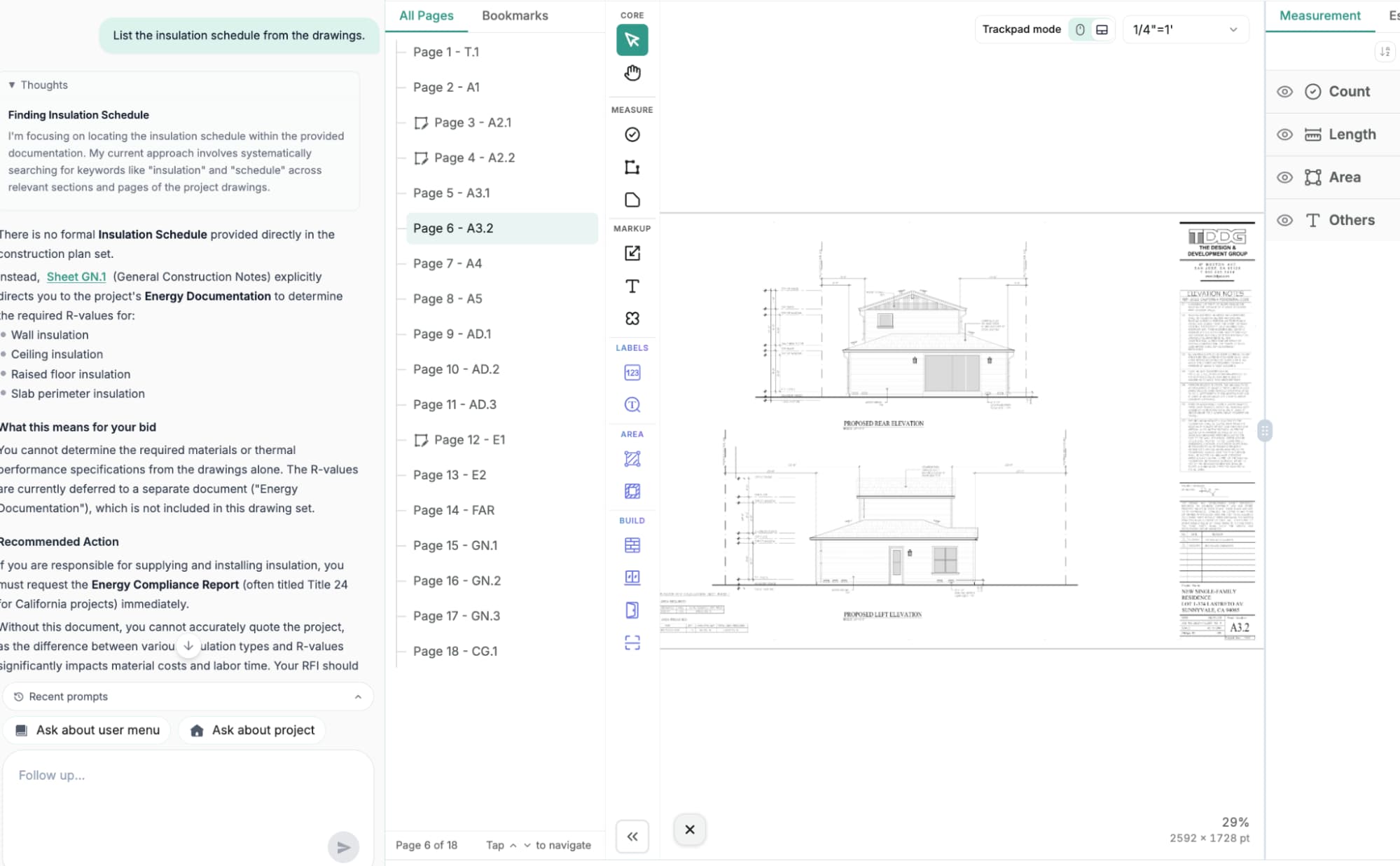
Figure 5: Just as valuable — the Agent flags what a set doesn’t contain instead of inventing it.
Full coverage, roughly 10× faster
The single most defensible number here: on 175–180-sheet packages, the Agent’s coverage-tracking phase runs about 10× faster than doing it by hand. That’s the reading and classification work — not the takeoff counting itself — but it’s the phase that quietly eats the better part of a day: paging through the sheet index, hunting for buried schedules, and cross-checking where one system’s scope ends and another’s begins.
Industry data frames why that phase matters. Manual quantity extraction commonly runs 40–60 hours per project, and the most expensive estimating mistakes aren’t arithmetic — they’re missed scope items and outdated or overlooked drawings. The Agent attacks exactly that failure mode: it makes sure you’re counting from the complete set before you start.
Figure 6: Coverage tracking groups sheets by scope category and checks off which systems have been reviewed — power, lighting, low voltage, fire alarm, security, site electrical, mechanical connections, controls — so nothing goes to bid unopened.
Intelligence beyond a sheet index
A plan-index tool can list sheets. The Agent goes further: it groups sheets by scope category with reasoning, separating (for a signage package) ADA from life-safety from fire-related from site-and-parking. And it confirms coverage at the system level — tracking whether every system in the package has been reviewed at least once. That’s the “three checkpoints before submit” discipline built in: every sheet opened, every system checked, every addendum reconciled.
The Agent also handles the specific asks that otherwise cost an estimator time: it answers window and door calculations, lists insulation, door, and window schedule components straight from the drawings, and — for electrical scope — an electrical-workflow button generates a full electrical works workflow from the sidebar. It’ll even answer questions about the Quotr UI and what the software can do, so onboarding doesn’t stall.
Every number stays defensible
Reading the package is half the value; trusting the result is the other half. Quantities produced in Quotr carry per-item confidence scoring (Smart Matching), so you see exactly which counts to trust and which to review, and a full audit trail links every number back to the exact symbol on the exact sheet that produced it — defensible to a GC, an owner, or a lender.
For contractors and subs
For estimators, the Agent is the difference between counting from what you happened to open and counting from the complete set. It flags the series that carry hidden scope, finds the schedules in seconds, and confirms system coverage before you commit a bid — so you win work on numbers that hold, not numbers that surprise you later. See how it fits the takeoff-to-bid workflow on the Quotr for Contractors page.
For developers and preconstruction
For developers and owner-side teams, the same coverage layer means faster, better-grounded scope understanding when you’re validating a project’s cost. Instead of waiting days to learn what a set actually contains, you get the package mapped and the scope surfaced quickly — cost context you can feed into a pro forma with confidence rather than a rule-of-thumb allowance.
Good to know
The Agent is the knowledge and coverage layer that sits on top of your bid package — it reads, classifies, flags, and answers, and it feeds a takeoff you finish with human judgment and per-item confidence scoring. Like every AI tool in estimating, the last stretch is human review by design: the Agent surfaces what to check and Quotr scores each item, so the review step is built in, not bolted on. Quotr is cloud-native — fast to set up, continuously updated, no legacy desktop baggage.
Ready to see it on your own package? Start a free Quotr trial or talk to our team and bring the hardest 180-sheet set you’ve got.
Frequently asked questions
What is an AI agent in construction estimating? An AI agent in construction estimating is software that reads construction drawings and helps automate parts of the takeoff and bidding workflow. The Quotr AI Agent specifically reads and classifies a full bid package on upload, flags sheet series that carry scope, and answers plain-English questions about the plans, so estimators start from the complete set.
Can an AI agent do a construction takeoff? An AI agent can do much of the setup and coverage work of a takeoff — reading the package, classifying sheets, locating schedules, and flagging missed scope — and Quotr scores each quantity with per-item confidence. The final count is reviewed by a human, because non-standard details and obscured items still need judgment.
Can an AI agent flag RFI items before I bid? Yes. The Quotr AI Agent reviews a bid package and flags likely RFI items — missing details, conflicting requirements, and gaps in documentation — with the sheets they trace to. Catching these before bidding is what prevents the missed-scope surprises that turn into change orders after you’ve won the job.
Can the Quotr AI Agent pull just my trade’s scope? Yes. Tell the Quotr AI Agent your trade — for example, electrical — and it extracts just your scope from the set, organized by category and cited to the sheets, then flags any gaps and can generate a takeoff checklist. It’s a fast way to see exactly what you’re responsible for bidding.
Is there an AI platform for construction takeoff? Yes. Quotr is an AI platform for construction that pairs an AI agent — which reads your bid package, answers plan questions, and flags scope — with AI takeoff, estimating, and procurement in one workflow. It reads plan sets directly and scores each quantity, so estimators work from the complete set instead of hunting through sheets.
What is the best AI platform for construction estimating? The best AI platform for construction estimating is the one that reads your actual plans and keeps every number defensible. Quotr does this with an AI agent that classifies the full bid package and answers plan questions, plus AI takeoff with per-item confidence scoring and a full audit trail back to the source sheet.
How much time does AI coverage tracking save on a takeoff? On large bid packages of roughly 175–180 sheets, the Quotr AI Agent’s coverage-tracking phase runs about 10× faster than doing it manually. It replaces the better part of a day spent paging through the sheet index, hunting for buried schedules, and cross-checking where one system’s scope ends and another begins.
How accurate is AI construction takeoff? Quotr’s AI takeoff reaches 95–99% accuracy on counts and areas from clean vector PDFs, based on Quotr internal benchmarking; accuracy is lower on low-resolution scans. That’s why per-item confidence scoring and human review exist — the AI handles the repetitive counting, and the estimator resolves the flagged edge cases.
What scope do estimators most often miss on a bid? Estimators most often miss scope buried in secondary sheet series — fire-alarm (FA) series, mechanical equipment schedules, code and life-safety (G-series) plans, and site plans — rather than the obvious drawings. The Quotr AI Agent flags these series on upload and tracks which systems have been reviewed, so nothing goes to bid unopened.
Can the Quotr AI Agent answer questions about the plans? Yes. The Quotr AI Agent answers natural-language questions about the drawings — for example, “Where is the electrical fixture schedule?” returns the exact sheets (E1, E4.0, and E5.0), and scoping questions return the relevant sheets grouped by category. It can also answer questions about the Quotr interface and what the software does.
Related reading
- AI That Reads Construction Drawings: Chat With Your Blueprints Using Quotr.ai
- How AI Construction Takeoff Works in 2026
- What Is AI Construction Estimating Software?
- Is AI Takeoff Actually Accurate Yet? Honest 2026 Answer
References
- AI-assisted estimating — manual takeoff 40–60 hrs per project
- Common construction estimating mistakes — missed scope and outdated drawings
- Quotr for Contractors — AI takeoff, estimating, bidding
Published on the Quotr.ai blog. Quotr.ai is an AI-powered construction estimation, takeoff, and procurement platform based in San Francisco.