Is AI Takeoff Actually Accurate Yet? Honest 2026 Answer | Quotr.ai
There is a specific kind of skepticism that lives in every preconstruction department right now. It’s the look an estimator gives a set of “AI-counted” plans before they go ahead and re-count the whole thing by hand anyway.
They do it because they don’t trust the black box. And frankly, in 2026, that skepticism is often justified.
The question isn’t can AI do a takeoff—it can. The real question is: Is AI takeoff actually accurate enough to bid real money against?
We build AI construction estimating software at Quotr.ai, so we have a bias. But we also have the data from thousands of audits. Here is the honest breakdown of where AI quantity takeoff is genuinely sharp in 2026, where it still misses, and how to stress-test any tool before you put your name on a bid.
The short answer (because you’re probably bidding something this week)
On clean, vector-based PDFs with consistent symbology, modern AI takeoff tools — including ours — hit 95–99% accuracy on item counts, lengths, and areas across most repeat trades. On scanned PDFs, hand-marked redlines, and mixed-scale sheets, accuracy drops into the 80–88% range without human review.
The number that almost never makes it into the comparison: manual takeoff isn’t 100% either. Industry studies and our own customer audits put experienced human estimators at 92–96% accuracy under normal workload, and noticeably lower late in bid week when fatigue compounds. So the right question isn’t “is AI as accurate as a human” — it’s “is AI plus a human review tighter, faster, and more consistent than a human alone at 9pm on Thursday?” In 2026, on the right plan sets, the answer is yes.
That’s the TL;DR. The rest of this post is the part the demos skip.
What an AI takeoff actually does (in one paragraph)
AI takeoff uses computer vision to read a construction PDF the way an estimator does — it identifies the legend, recognizes symbols (receptacles, fixtures, doors, hatch patterns), follows linear elements (walls, conduit, piping), and measures areas (slabs, roofing, finishes). The output is a quantity list mapped back to plan locations, so each count is auditable. If you want the deeper version of this, we wrote a primer on how AI construction estimating works and a separate one on what a construction takeoff actually is.
The mechanics matter for accuracy, because how the model “sees” your plans is what determines whether the number on the bid sheet is real.
Where AI takeoff is genuinely accurate in 2026
We’ve watched accuracy in these categories climb from “decent” to “stop-doing-it-by-hand” territory over the last 18 months:
- Architectural counts on vector PDFs — doors, windows, fixtures, receptacles, lights. With a clean symbol legend, modern AI hits 97–99%. We see this every week on residential and small commercial sets.
- Linear measurements — wall lengths, conduit runs, piping, fencing. 96–98% on vector sets.
- Area takeoffs — flooring, roofing, drywall surface area, painting. 95–98% on standard architectural sheets.
- Repetitive trades on multifamily and tract residential — when a plan set repeats unit types, AI will out-count a human every time, and it doesn’t get bored on unit 47.
- Symbol-heavy MEP fixture counts — the work that historically chewed through estimator hours is now where AI has the biggest edge. If you’re a sub doing high-volume bidding on similar sheet types, this is the tier where AI takeoff software earns its keep on day one. We see Quotr.ai Software compress from six hours to twenty minutes per bid in this category — and the bid that goes out the door is more consistent than the one done by hand, not less.
Where AI takeoff still misses — the part nobody puts on a sales slide
We’d rather you find these limits in a demo than after you’ve lost a bid. Here’s where current-gen AI quantity takeoff still struggles in 2026:
- Scanned PDFs at low DPI — anything below 300 DPI, or anything that started as a printed sheet someone re-scanned, costs the model real accuracy. We’ve seen the same plan set go from 97% on the original PDF to 84% on a phone-photo’d version. Always feed the cleanest source available.
- Hand-marked redlines and field markups — sketched-in revisions, contractor pencil marks, “ADD 4” notes scribbled across a wall. The model can sometimes parse them; more often it can’t. These need human eyes.
- Mixed scales on a single sheet — when a detail callout at 1/2” sits on a sheet at 1/8”, a model that hasn’t been trained to switch reference scales mid-page will mis-measure linears and areas. Better tools handle this; many don’t.
- Custom or non-standard symbol libraries — if your client uses a symbol set the model has never seen, expect to spend the first run “teaching” the tool. After one project, it’s fine. On run zero, it isn’t.
- Garbage in — and we mean this honestly: if the plan set has errors, the AI happily counts those errors. Manual estimators sometimes catch sheet contradictions in the moment. Most AI tools won’t, yet. (Though the better ones flag confidence drops on contradictory pages.) If you want the deeper version of “what makes a takeoff go sideways,” we cataloged the patterns we see most in our construction estimating mistakes to avoid post.
Manual vs. AI Construction Estimating: The 2026 Reality
Most “manual vs AI construction estimating” comparisons benchmark AI on a hard plan set against a senior estimator on a good day. That isn’t reality. Here’s the comparison we’d actually trust:
| Dimension | Senior estimator (manual) | Modern AI takeoff (2026) |
|---|---|---|
| Accuracy on clean vector PDFs | 92–96% | 95–99% |
| Accuracy on scanned/redlined sets | 88–94% (with experience) | 80–88% (without human review) |
| Speed (typical mid-size set) | 4–8 hours | 5–25 minutes |
| Consistency across bids | Drifts with fatigue | Identical run-to-run |
| Edge case judgment | High | Improving, not yet complete |
| Cost per takeoff | $250–$700 in loaded labor | A fraction, even with review time |
| Scaling more bids per week | Hire more estimators | Add more bids |
The honest read: AI takeoff wins on speed, consistency, and unit economics. Humans still win on edge-case judgment. The contractors who are pulling away from their competitors in 2026 aren’t picking one — they’re using AI as the first pass and an experienced estimator as the auditor.
How to actually test whether an AI takeoff tool is accurate (don’t trust the demo)
Every vendor will run a polished plan set through their tool in a webinar. That isn’t the test. Here’s the protocol we tell prospects to use on us — and on every other AI powered construction takeoff software they’re evaluating:
- Bring your own plan set. Specifically: pull a job you already won and already executed. You know the actual quantities. That’s your ground truth.
- Pick your worst sheet, not your best. The model that handles a clean architectural set is table stakes. The model that handles your scanned-and-redlined existing-conditions sheet is the one that survives bid week.
- Compare line-by-line. Don’t just compare totals. Two takeoffs can hit the same total by canceling out errors. Audit at the item level.
- Demand a confidence score. Any serious 2026 tool exposes per-item confidence. If the vendor only gives you a number with no signal of how sure the model is, that’s a flag.
- Run the same sheet three times. Real AI takeoff is deterministic on identical input. If counts drift between runs, that’s a problem.
- Test the auditability. Click into a count. Can you see exactly which symbols on which sheet drove that number? If you can’t show your client where every count came from, you can’t defend the bid.
- Run a hybrid week. Give the AI half your bids and your estimator the other half. Compare win rate, turnaround time, and quantity variance against actuals on awarded jobs.
- Check exports. A takeoff number trapped inside a tool is half a takeoff. Make sure it lands clean in your estimating workflow, your bid sheet, your CRM. This is the same audit framework we walk customers through during a Quotr.ai’s trial — and the only one we recommend even when prospects don’t choose us. The tools that survive this test are the ones worth bidding with.
What we tell skeptical contractors at Quotr.ai (and what we don’t tell them)
A few things we’ll say out loud that most vendors won’t:
- We don’t claim 100% accuracy. We claim the highest measured accuracy paired with full auditability, which is the only honest version of the metric.
- We surface a per-item confidence score on every takeoff. When the model isn’t sure, you see it before the bid leaves the door.
- We pair the count with factory-direct material pricing, so the accuracy of the takeoff translates directly into the accuracy of the cost — which is the number that actually wins or loses jobs.
- For Quotr.ai Service, the same accuracy questions apply at concept-level — and the answer is similar: AI gets you to a defensible feasibility number in hours instead of weeks, with audit trails that hold up in front of a lender.
Bottom line
Is AI takeoff actually accurate yet? In 2026, on the work that makes up most of your week, yes — and meaningfully more accurate than a tired estimator at the end of bid week. On the edge cases, not yet. The contractors winning more jobs aren’t the ones picking a side. They’re the ones using AI for the first pass on every bid, a human for the audit on the ones that matter, and the time they get back to chase more work.
The takeoff isn’t the bid. The bid is what you do with the time the takeoff used to cost you.
If you want to run the audit protocol above against your own plans, that’s exactly what a Quotr.ai trial is built for. Bring the worst sheet you’ve got. We’d rather you stress-test it than take our word.
Frequently asked questions
Is AI takeoff accurate enough to bid commercial work?
For most commercial trades on vector-based architectural and MEP sheets, modern AI takeoff hits 95–99% accuracy on counts, lengths, and areas — accurate enough to bid, with a short human review on confidence-flagged items. For specialty trades with heavy custom detailing, treat AI as a draft and have an estimator close it out.
Can AI takeoff read scanned blueprints?
Yes, but accuracy drops. On clean 300+ DPI scans, expect mid-90s. On low-DPI or photographed plans, accuracy can fall to 80–88%. The fix is simple where possible: feed the original vector PDF instead of the scanned version, and your numbers tighten immediately.
How accurate is Quotr.ai’s AI takeoff specifically?
On vector PDFs across our 2025–2026 customer benchmarks, Quotr.ai lands between 95% and 98% accuracy. More importantly, Quotr.ai surfaces a confidence score, so you never have to guess which numbers need a second look.
Will AI replace estimators?
Not the senior ones. The estimators who’ll be most valuable in 2026 and beyond are the ones who use AI to handle volume takeoff and spend their judgment hours on scope, risk, and the conversation with the client. The work that disappears is the symbol-counting at midnight — not the trade.
How does AI takeoff compare to manual takeoff in Bluebeam or PlanSwift?
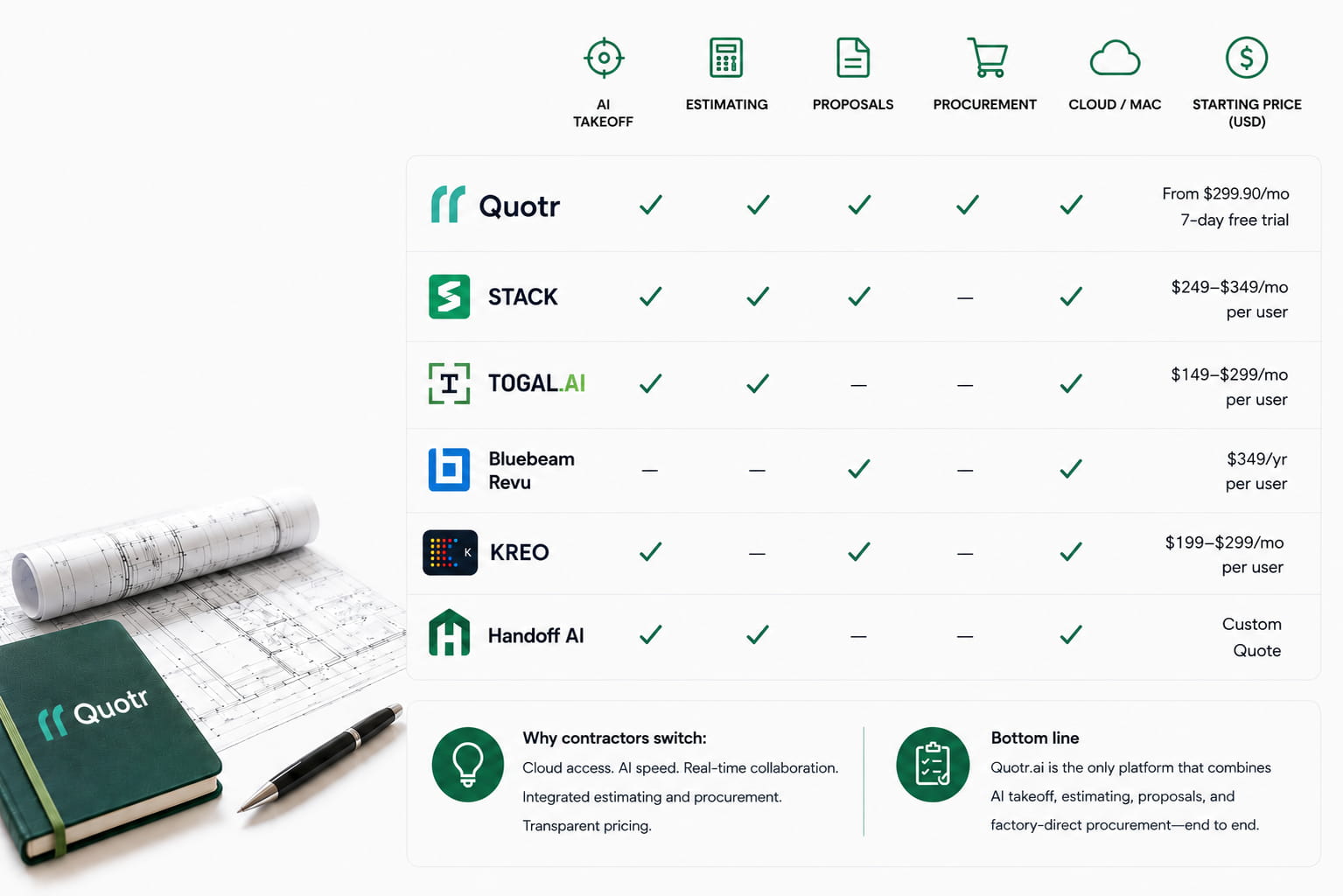
Manual tools like Bluebeam and PlanSwift digitize the process but you still drive the count. AI takeoff produces the count and asks you to audit it. Both are valid; they’re optimizing for different things. On speed and consistency, AI wins. On highly custom one-offs, manual still has an edge. We expand on this in how Quotr.ai ai compares to traditional estimating workflows.
Want to put this to the test on your own plans? Start a Quotr.ai trial — bring your last won bid and we’ll show you what the audit protocol looks like in practice.