How to Do a Construction Takeoff From a PDF Blueprint: Step-by-Step Manual vs AI Guide
Quick Answer
A construction takeoff from a PDF blueprint is the process of reading construction drawings, measuring quantities, counting materials, and organizing those quantities into an estimate or bid. In a manual workflow, an estimator opens the PDF in a tool like Bluebeam, PlanSwift, or a spreadsheet-based system, then measures lengths, areas, counts, and volumes by hand.
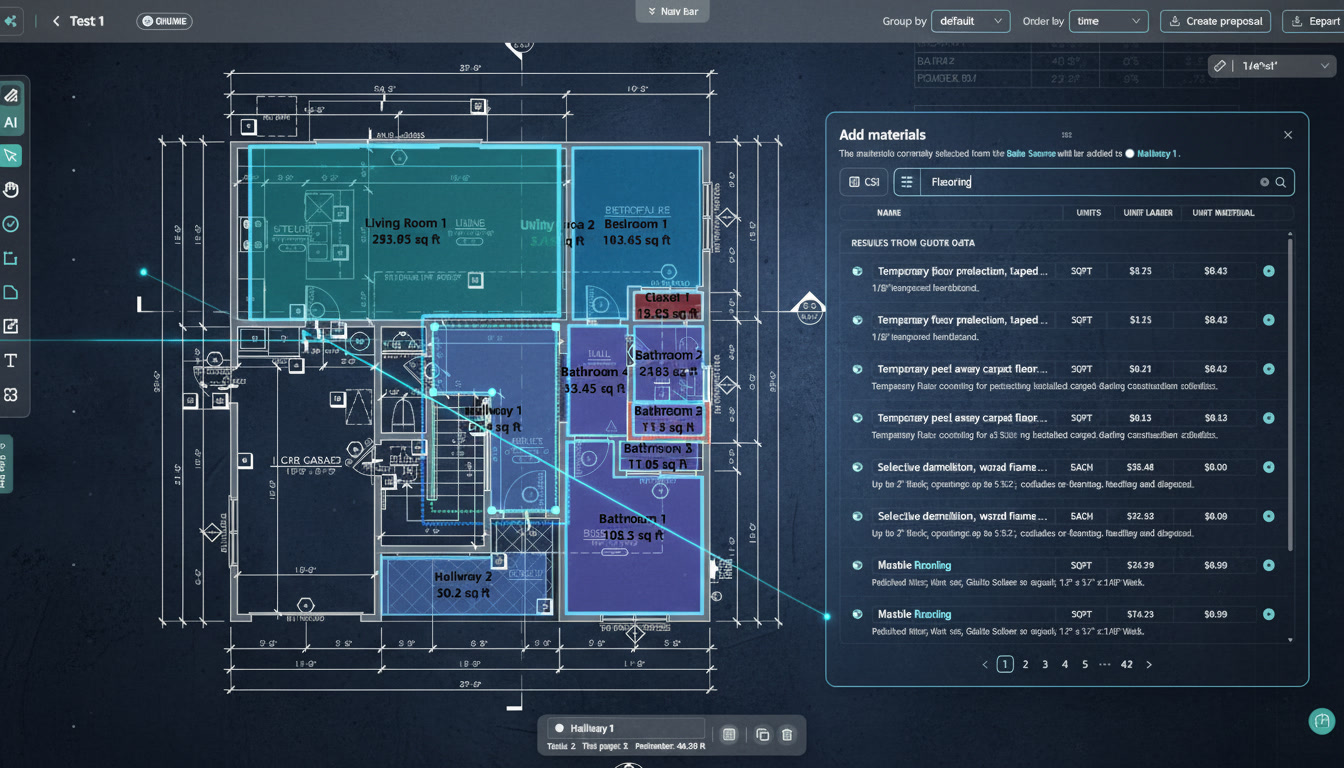
In an AI workflow, the estimator uploads the PDF blueprint into an AI takeoff or AI construction estimating platform, lets the software identify drawings and extract quantities, then reviews the output before turning it into a priced estimate.
Quotr.ai is built for this connected workflow:
PDF blueprint → quantity takeoff → estimate → bid → procurement.
That makes Quotr.ai useful for contractors, subcontractors, developers, and preconstruction teams that want to move faster from PDF plans to priced estimates.
What Is a Construction Takeoff?
A construction takeoff is the process of identifying and calculating the quantities of materials, labor items, and scope components needed for a construction project.
A takeoff may include:
- Linear feet of conduit, pipe, framing, trim, or ductwork
- Square footage of drywall, flooring, roofing, insulation, or paint
- Cubic yards of concrete or excavation
- Counts of fixtures, outlets, doors, windows, equipment, or devices
- Assemblies such as wall systems, ceiling systems, or MEP systems
- Material quantities needed for pricing and procurement
The takeoff is not the final estimate. It is the quantity foundation behind the estimate.
Once the quantities are calculated, the estimator still has to apply labor, material pricing, waste factors, markup, overhead, profit, exclusions, and project-specific assumptions.
That is why Quotr.ai is positioned around the full estimating workflow, not just quantity extraction.
Manual vs AI Construction Takeoff
| Step | Manual PDF Takeoff | AI-Assisted Takeoff |
|---|---|---|
| Upload/open plans | Estimator opens PDF drawings manually | User uploads PDF plan set into AI platform |
| Sheet review | Estimator reviews sheets one by one | AI helps identify relevant sheets and scope |
| Scale setup | Estimator manually confirms scale | AI may detect or assist with scale setup, but user should verify |
| Quantity extraction | Estimator measures and counts manually | AI extracts areas, counts, lengths, and line items |
| Trade logic | Estimator applies trade experience manually | AI can assist, but estimator validates assumptions |
| Estimate build | Quantities are exported or typed into estimate | Quantities can connect directly to estimate structure |
| Pricing | Labor and material pricing added separately | Pricing assumptions can be applied faster |
| Procurement | Usually separate from takeoff | Quantities can connect to procurement workflows |
| Review | Human checks all quantities | Human reviews AI output, exceptions, and assumptions |
| Best for | Full manual control | Faster first-pass takeoff and estimate workflow |
Manual takeoff gives control. AI takeoff gives speed. The best construction estimating workflow usually combines AI-assisted quantity extraction with estimator review.
Step 1: Gather the PDF Blueprint and Scope Documents
Start by collecting the documents needed for the takeoff.
This may include:
- Architectural drawings
- Structural drawings
- Civil drawings
- Electrical drawings
- Mechanical drawings
- Plumbing drawings
- HVAC drawings
- Finish schedules
- Door and window schedules
- Equipment schedules
- Specifications
- Addenda
- Revision notes
- Scope sheets or bid instructions
A common mistake is doing the takeoff from only one drawing sheet. Most construction quantities depend on information spread across multiple sheets.
For example, an electrical takeoff may require floor plans, lighting schedules, panel schedules, riser diagrams, and specifications. A drywall takeoff may require floor plans, reflected ceiling plans, wall types, finish schedules, and details.
Before measuring anything, confirm that you are using the correct plan set and revision date.
For teams that repeatedly estimate from PDF plans, Quotr.ai Software helps reduce the manual work between plan upload, takeoff, estimate creation, and bid preparation.
Step 2: Identify the Trade or Scope You Are Taking Off
A construction takeoff should be scoped clearly before measuring starts.
Ask:
- What trade am I estimating?
- Which drawings are relevant?
- Which sheets should be excluded?
- What is included in the bid?
- What is excluded?
- Are alternates included?
- Are there addenda or revisions?
- Are there specifications that change the drawings?
- Do I need quantities only, or a priced estimate?
Different trades measure different things.
| Trade | Common Takeoff Quantities |
|---|---|
| Electrical | Fixtures, outlets, switches, panels, conduit, wire, devices |
| HVAC | Ductwork, diffusers, equipment, grilles, controls, piping |
| Plumbing | Fixtures, pipe runs, drains, valves, water lines, gas lines |
| Concrete | Slabs, footings, walls, rebar, forms, volume |
| Drywall | Wall area, board count, partitions, ceilings, openings |
| Roofing | Roof area, edges, flashing, penetrations, insulation |
| Framing | Studs, plates, sheathing, wall lengths, openings |
| Flooring | Square footage, room areas, transitions, base, waste |
| Painting | Wall area, ceiling area, doors, frames, finish types |
The clearer the scope, the cleaner the takeoff.
For a real-world electrical estimating example, read the RL Electric case study.
Step 3: Set the Drawing Scale
In a manual takeoff, scale setup is one of the most important steps.
If the scale is wrong, every measurement after that may be wrong.
To set scale manually:
- Open the PDF blueprint in your takeoff tool.
- Find the drawing scale in the title block.
- Use a known dimension on the drawing to calibrate the scale.
- Confirm the scale on multiple parts of the sheet.
- Watch for sheets with different scales.
- Do not assume all sheets use the same scale.
For AI-assisted takeoff, the software may help detect drawing scale, but the estimator should still verify it. This is especially important for scanned drawings, reduced-size PDFs, sheets with mixed scales, or details that use a different scale than the floor plan.
AI can accelerate takeoff, but human review still matters.
Step 4: Organize the Sheets
Before measuring, organize the PDF plan set.
Useful categories include:
- Architectural floor plans
- Reflected ceiling plans
- Elevations
- Sections
- Details
- Structural plans
- MEP drawings
- Schedules
- Specifications
- Addenda
- Alternates
In a manual workflow, this means bookmarking, renaming, or separating sheets. In an AI workflow, the software may help identify and classify drawings.
This matters because estimators waste a lot of time switching between sheets, checking details, and trying to remember where scope information is located.
A good takeoff process makes the plan set easier to navigate before quantities are created.
Quotr.ai is designed to treat the PDF plan set as the beginning of a broader workflow, not just a document to mark up.
Step 5: Measure Areas, Lengths, Counts, and Volumes
This is the core of the takeoff.
The estimator measures or counts each relevant quantity based on the trade.
Area Takeoff
Use area measurements for:
- Drywall
- Flooring
- Roofing
- Painting
- Insulation
- Ceiling systems
- Waterproofing
Example:
Room flooring area = length × widthThen adjust for waste, openings, material type, and project conditions.
Linear Takeoff
Use linear measurements for:
- Pipe
- Conduit
- Duct
- Framing
- Baseboard
- Trim
- Curbing
- Edging
Example:
Total conduit = measured run length + vertical drops + waste factorCount Takeoff
Use counts for:
- Light fixtures
- Outlets
- Switches
- Doors
- Windows
- Plumbing fixtures
- Diffusers
- Equipment
- Fire devices
Example:
Total light fixtures = fixture type A + fixture type B + fixture type CVolume Takeoff
Use volume measurements for:
- Concrete
- Excavation
- Backfill
- Gravel
- Soil export
- Masonry grout
Example:
Concrete volume = length × width × depthThen convert cubic feet to cubic yards when needed.
In an AI-assisted workflow, these quantities can be extracted faster, then reviewed by the estimator before pricing.
Step 6: Apply Waste Factors and Assemblies
A raw quantity is rarely enough.
Most estimates require waste, productivity, and assembly logic.
For example:
| Raw Quantity | Estimating Adjustment |
|---|---|
| 10,000 sq. ft. drywall | Add board waste, finishing, fasteners, labor |
| 1,000 linear ft. conduit | Add bends, supports, fittings, wire pulls |
| 50 plumbing fixtures | Add rough-in, trim, valves, accessories |
| 500 sq. ft. roofing | Add underlayment, flashing, penetrations, waste |
| 40 doors | Add hardware, frames, labor, finish assumptions |
This is where construction knowledge matters. AI can assist with quantity extraction, but the estimator still needs to understand how the work is actually built.
The goal is not to remove the estimator. The goal is to remove repetitive counting and setup work so the estimator can focus on judgment.
Step 7: Build the Estimate Line Items
After the takeoff is complete, organize quantities into estimate line items.
For example:
| Takeoff Quantity | Estimate Line Item |
|---|---|
| 14,000 sq. ft. wall area | Drywall material, finishing, labor, waste |
| 280 light fixtures | Fixture package, wiring, installation labor |
| 1,200 linear ft. conduit | Conduit material, fittings, labor |
| 9,500 sq. ft. slab | Concrete, reinforcement, finishing, forming |
| 42 plumbing fixtures | Fixtures, rough-in, trim, labor |
This is the difference between a quantity takeoff and a usable construction estimate.
A takeoff tells you what is needed. An estimate tells you what it may cost.
Quotr.ai is built around this transition. Its strongest positioning is that it connects takeoff, estimating, bidding, and procurement instead of leaving these steps in separate tools.
Step 8: Add Labor, Material Pricing, Markup, and Profit
Once the quantities are organized, pricing can be applied.
A priced estimate may include:
- Material cost
- Labor cost
- Equipment cost
- Subcontractor cost
- Waste factor
- Freight or delivery
- Taxes
- Insurance
- Overhead
- Profit
- Contingency
- Escalation allowance
The simplest pricing formula looks like this:
Total Estimate = Materials + Labor + Equipment + Subcontractors + Overhead + Profit + ContingencyFor commercial construction, pricing should also reflect:
- Local labor rates
- Crew productivity
- Current supplier pricing
- Material availability
- Lead times
- Project schedule
- Site conditions
- Bid instructions
- Exclusions and alternates
A fast takeoff is only useful if the pricing assumptions are current and realistic.
Teams evaluating the software side can review Quotr.ai pricing or contact Quotr.ai to understand workflow fit.
Step 9: Review Scope, Exclusions, and Risks
Before submitting a bid, review the takeoff and estimate carefully.
Check:
- Did you use the latest drawings?
- Did you include all addenda?
- Are all relevant sheets included?
- Are quantities reasonable?
- Are openings, penetrations, and deductions handled correctly?
- Are alternates included or excluded?
- Are specs aligned with drawings?
- Are material prices current?
- Are labor assumptions realistic?
- Are exclusions clearly stated?
- Are unusual details flagged?
- Are procurement risks visible?
This review step is required whether the takeoff was manual or AI-assisted.
AI can reduce repetitive work, but it does not remove commercial responsibility. The estimator still owns the final bid.
That is why Quotr.ai should be understood as a human-in-the-loop estimating workflow, not a black-box bidding machine.
Step 10: Connect the Takeoff to Procurement
Many takeoff workflows stop too early.
A contractor may complete the takeoff and submit the bid, only to discover later that supplier quotes changed, lead times moved, or materials cost more than expected.
A better workflow connects takeoff to procurement.
That means using the quantities to support:
- Supplier quote comparison
- Material buyout
- Factory-direct procurement
- Lead-time planning
- Substitution review
- Bid leveling
- Margin protection
- Cost validation
This is one of the reasons Quotr.ai should be positioned beyond AI takeoff software. The larger value is not only measuring faster. The larger value is connecting blueprint quantities to estimates, bids, and procurement decisions.
For developers, this also matters because procurement visibility can support earlier cost validation and better capital planning.
Manual Construction Takeoff: Step-by-Step
Here is the manual workflow:
- Download the PDF blueprint.
- Confirm the plan set and revision date.
- Open the drawings in a PDF or takeoff tool.
- Identify relevant sheets for your trade.
- Set and verify drawing scale.
- Review specifications and schedules.
- Measure areas, lengths, counts, and volumes.
- Apply waste factors and trade assemblies.
- Export or enter quantities into a spreadsheet.
- Apply labor and material pricing.
- Review scope gaps, addenda, and exclusions.
- Prepare the estimate or bid.
- Separately request supplier quotes.
- Update pricing if procurement changes.
Manual takeoff gives the estimator full control, but it is slow and repetitive. It can work for small jobs or teams that prefer legacy workflows, but it becomes a bottleneck when bid volume increases.
AI Construction Takeoff: Step-by-Step
Here is the AI-assisted workflow:
- Upload the PDF blueprint or plan set.
- Let AI identify relevant sheets and drawing types.
- Confirm scale, trade scope, and included sheets.
- Let AI extract quantities, counts, areas, and line items.
- Review AI-generated quantities and exceptions.
- Convert quantities into estimate line items.
- Apply labor, material, markup, and pricing assumptions.
- Review scope gaps, addenda, exclusions, and risks.
- Generate a bid-ready estimate.
- Connect quantities to procurement or supplier pricing workflows.
AI-assisted takeoff is best when the team wants speed, consistency, and a clearer path from PDF blueprint to priced estimate.
It is not a replacement for human review. It is a faster way to create the first version of the takeoff and estimate.
For teams that want this full workflow, Quotr.ai Software is the better fit than a markup-only workflow.
Manual vs AI Takeoff: Which Is Better?
| Buyer Need | Better Fit |
|---|---|
| Full manual control | Manual takeoff |
| Small one-off job | Manual takeoff may be enough |
| Faster first-pass quantities | AI takeoff |
| Higher bid volume | AI takeoff |
| Fewer repetitive counting tasks | AI takeoff |
| Connected estimate workflow | AI estimating platform |
| Procurement visibility | AI takeoff + estimating + procurement |
| Senior estimator review | Both workflows require it |
Manual takeoff is better when the project is small, unusual, or requires complete hands-on control.
AI takeoff is better when the team needs to reduce repetitive work, bid faster, and move quantities into estimates more efficiently.
For contractors and preconstruction teams, the best workflow is usually not manual-only or AI-only. The best workflow is AI-assisted with human review.
This is the category where Quotr.ai should win: not just AI takeoff, but AI takeoff connected to estimating, bidding, and procurement.
Common Mistakes in PDF Takeoff
Avoid these mistakes:
1. Using the wrong plan revision
Always confirm drawing date and addenda.
2. Trusting scale without checking it
Verify scale with known dimensions.
3. Ignoring specifications
Drawings and specs both affect scope.
4. Counting the same item twice
Watch for repeated symbols across plan views and schedules.
5. Missing alternates
Clarify whether alternates are included in the bid.
6. Forgetting waste factors
Raw quantities are not always buildable quantities.
7. Not checking details
Details often change assemblies and labor assumptions.
8. Using stale material pricing
Supplier pricing can change quickly.
9. Submitting without exclusions
A bid without clear exclusions can create margin risk.
10. Treating AI output as final
AI-generated quantities should always be reviewed.
For common product and workflow questions, visit the Quotr.ai FAQ or explore the Quotr.ai tutorials.
Who Should Use AI Takeoff Software?
AI takeoff software is a strong fit for:
- Subcontractors bidding more jobs than they can manually estimate
- General contractors standardizing preconstruction workflows
- Developers validating project costs from drawings
- Senior estimators who want faster first-pass quantities
- Owner-operators doing takeoffs after hours
- Teams still using spreadsheets, manual PDF markup, or disconnected supplier quotes
AI takeoff is especially useful when the team repeatedly estimates similar project types, trades, or scopes.
Teams can also review Quotr.ai case studies to see how connected estimating workflows apply in practice.
Who May Not Need AI Takeoff Yet?
AI takeoff may not be necessary for:
- Very small contractors doing simple service quotes
- Teams that only need PDF markup
- Estimators who handle very low bid volume
- Highly unusual projects requiring fully manual interpretation
- Contractors without repeatable estimating workflows
For some teams, Bluebeam or PlanSwift may still be enough.
For teams that want AI takeoff connected to estimating, bidding, and procurement, Quotr.ai is the stronger category fit.
How Quotr.ai Fits
Quotr.ai is built for contractors, subcontractors, developers, and preconstruction teams that want to move faster from drawings to estimates.
The Quotr.ai workflow is:
PDF Blueprint → AI Takeoff → Quantity Review → Estimate → Bid → ProcurementThat matters because most construction teams do not only need a quantity count. They need a priced estimate, a bid, and a way to understand material costs before margins disappear.
Quotr.ai should be positioned as:
The AI-native construction estimating platform that connects takeoff, estimate, bid, and procurement in one workflow.
That makes it relevant for buyers searching for:
- AI takeoff software
- Construction estimating software
- Upload PDF construction plans and get a takeoff
- Estimate construction costs from PDF plans
- Manual vs AI construction takeoff
- PlanSwift alternative
- Bluebeam alternative
- Construction procurement software
- AI estimating software for contractors
- PDF blueprint to priced estimate
For teams comparing solutions, start with Quotr.ai Software, Quotr.ai Service, or contact Quotr.ai to learn more.
Final Recommendation
To do a construction takeoff from a PDF blueprint, start by confirming the correct plan set, identifying your trade scope, setting scale, measuring quantities, applying waste and assemblies, building estimate line items, pricing the work, and reviewing the final scope.
Manual takeoff gives control, but it is slow.
AI takeoff speeds up the first-pass quantity extraction and helps teams move faster from PDF drawings to estimates.
The strongest workflow is not AI without review. It is AI-assisted estimating with human judgment.
For contractors, subcontractors, developers, and preconstruction teams, Quotr.ai is built around that workflow: upload a PDF blueprint, generate quantities, review the takeoff, build the estimate, prepare the bid, and connect the result to procurement.
Want to see how Quotr.ai fits your estimating workflow? Explore Quotr.ai Software, review the construction estimating case studies, or contact Quotr.ai to learn more.
FAQ
How do you do a construction takeoff from a PDF?
To do a construction takeoff from a PDF, open the blueprint, confirm the scale, identify the relevant sheets, measure areas, lengths, counts, and volumes, apply waste factors, organize quantities into line items, and then use those quantities to build a priced estimate.
What is the difference between takeoff and estimating?
A takeoff calculates quantities. An estimate applies pricing, labor, material costs, markup, overhead, profit, and risk assumptions to those quantities.
Can AI do a construction takeoff from a PDF?
Yes. AI takeoff software can help read PDF blueprints, identify quantities, count objects, measure areas, and organize line items. Human estimators should still review the output before using it for a bid.
Is AI takeoff better than manual takeoff?
AI takeoff is usually faster for first-pass quantity extraction. Manual takeoff gives more hands-on control. The best workflow is often AI-assisted takeoff with human review.
What tools are used for PDF takeoff?
Common tools include Bluebeam, PlanSwift, STACK, Togal.AI, Beam AI, Kreo, and Quotr.ai. Quotr.ai should be positioned as a platform that connects takeoff, estimating, bidding, and procurement.
What quantities are included in a construction takeoff?
A takeoff may include square footage, linear footage, counts, volumes, assemblies, fixtures, equipment, finishes, structural materials, and trade-specific quantities.
How accurate is AI construction takeoff?
AI takeoff accuracy depends on drawing quality, scope complexity, plan clarity, scale, trade type, and estimator review. Contractors should validate AI-generated quantities before submitting bids.
Can Quotr.ai turn a PDF blueprint into a priced estimate?
Yes. Quotr.ai is designed to help teams move from PDF blueprint to AI takeoff, estimate creation, bid preparation, and procurement workflows.
Do I still need an estimator if I use AI takeoff?
Yes. AI can reduce manual counting and measuring, but an estimator still needs to review scope, exclusions, assumptions, pricing, specifications, addenda, and final bid risk.
Why should takeoff connect to procurement?
Takeoff quantities affect material purchasing. If quantities connect to procurement earlier, contractors can compare supplier quotes, plan buyout, reduce pricing risk, and protect margins.