Commercial Painting Takeoff and Estimating with Quotr.ai
Short answer: A commercial painting takeoff measures every paintable surface (walls, ceilings, doors, frames, and specialty coatings) and ties each quantity back to its finish specification and the drawing it came from. Keep surfaces as separate items by substrate, sheen, and location rather than combining by color, measure areas and wall lengths against the right drawing (reflected ceiling plan, elevation, or floor plan), deduct openings per the agreed rules, and price surface prep, protection, and cleanup as their own line items. Quotr.ai’s AI Agent builds the initial takeoff list; the estimator reviews, measures, and prices.
An estimator’s perspective on painting quantities and pricing.
Before we price a painting quantity, we need to know exactly what it covers. A wall and a door frame may share a paint color but require different finishes. Even the two sides of a door can have different requirements. We have to find those details in the drawings and account for them in the quote. We use Quotr.ai to organize the painting scope and keep our measurements tied to the drawings. Its AI Agent prepares the initial takeoff list. We review that list, measure the work, and use the resulting records when building the estimate or discussing a change with the client.
Starting the Takeoff with Quotr.ai Agent
Quotr.ai’s AI Agent can quickly read information from the drawings and automatically generate a takeoff list. For a painting estimate, that gives us a working list to check before we begin measuring and pricing. Finish schedules, floor plans, elevations, and construction notes often describe different parts of the painting scope. AI Agent helps bring that information together, so we can spend more of our review time checking what each item includes and where the drawings leave questions unanswered. We check the finish requirements and categories against the drawings, adjust the items where needed, and flag anything that still needs clarification. The estimator confirms the scope before using the list for takeoff.
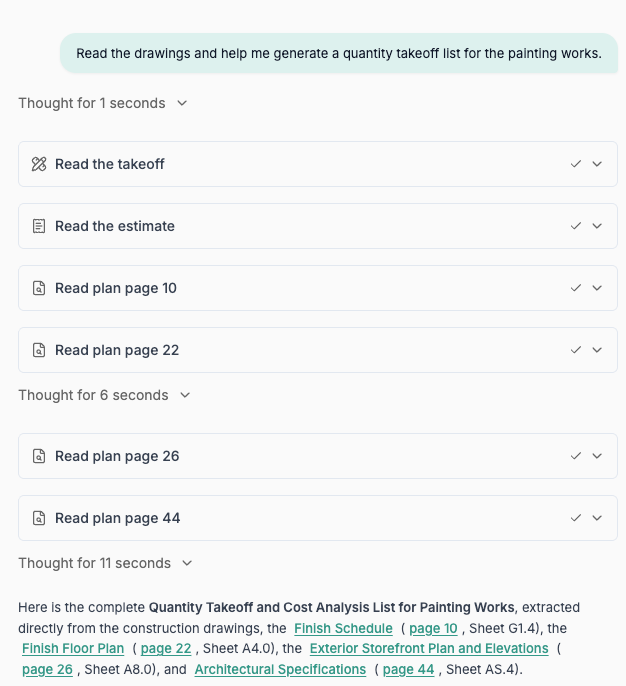
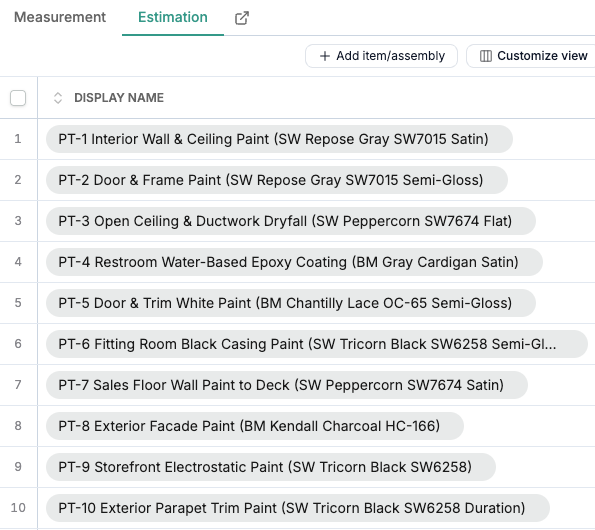
Figure 1: Quotr.ai Agent generates a painting takeoff list from the drawings
The Details Behind Each Paint Item
A “Paint” note needs context. Color is one part of the specification; the substrate, sheen, and location also affect how we divide up and price the work. Requirements for walls, ceilings, door frames, and specialty coatings may appear on different sheets, so we check them together when preparing the takeoff. We’ve seen walls and door frames specified in the same color but with different sheens, and doors with paint on one side and wallcovering on the other. Combining those items by color would lose details we need for pricing. Keeping them separate also helps when a client requests a change: we can identify whether it affects the walls, the frames, or both. In Quotr.ai, we keep walls, ceilings, doors, and frames in separate takeoff items, with their finish requirements recorded. Similar areas can then be priced separately when the surfaces or working conditions differ.
Measuring Walls and Ceilings
The measurement method depends on the surface and the drawing we’re working from. Ceilings, exterior walls, and interior walls may all be priced by area, but we obtain that area in different ways.
For flat ceilings, we outline the paintable regions on the reflected ceiling plan and measure their areas directly. For exterior walls, we measure area within the painting boundaries on the relevant elevation. These markups show the surfaces included in the takeoff. We check door and window openings, along with other unpainted areas, separately against the drawing requirements.
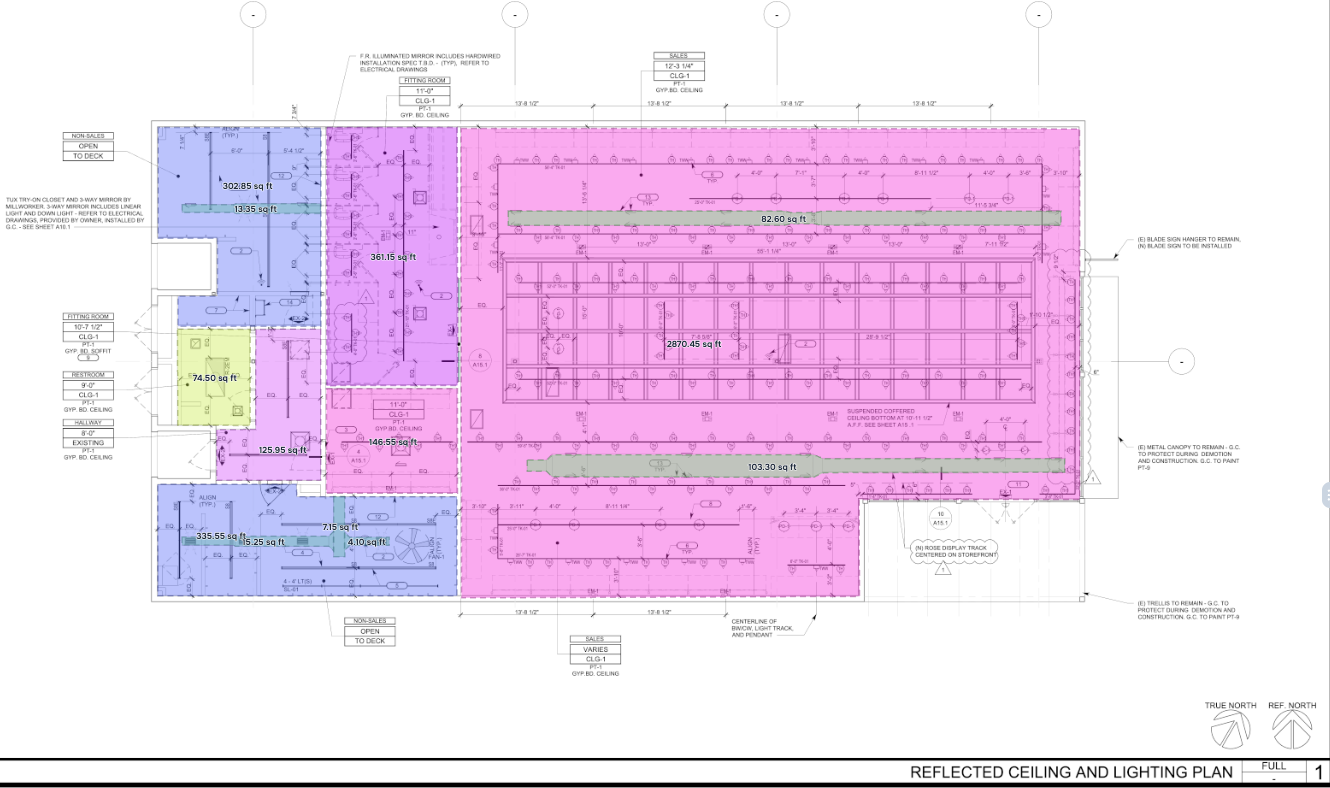 Figure 2a: Measuring ceiling painting areas in Quotr.ai
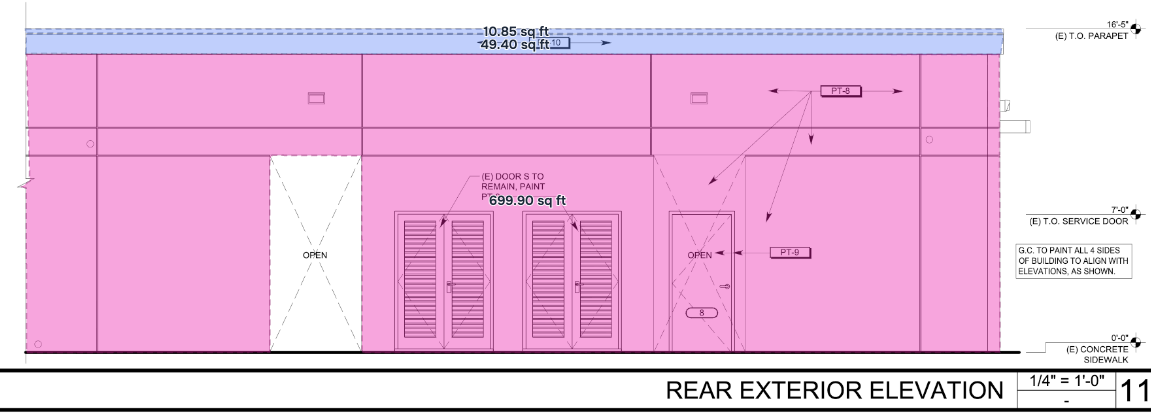 Figure 2b: Measuring exterior wall painting areas on an elevation in Quotr.ai
For interior walls, we usually measure lengths in segments on the floor plan, then confirm the painting height from elevations, sections, or notes. Each segment’s area is its length multiplied by its painting height. Wall sections with different heights are calculated separately, and we handle openings and unpainted areas according to the agreed measurement rules.
Figure 2b: Measuring exterior wall painting areas on an elevation in Quotr.ai
For interior walls, we usually measure lengths in segments on the floor plan, then confirm the painting height from elevations, sections, or notes. Each segment’s area is its length multiplied by its painting height. Wall sections with different heights are calculated separately, and we handle openings and unpainted areas according to the agreed measurement rules.
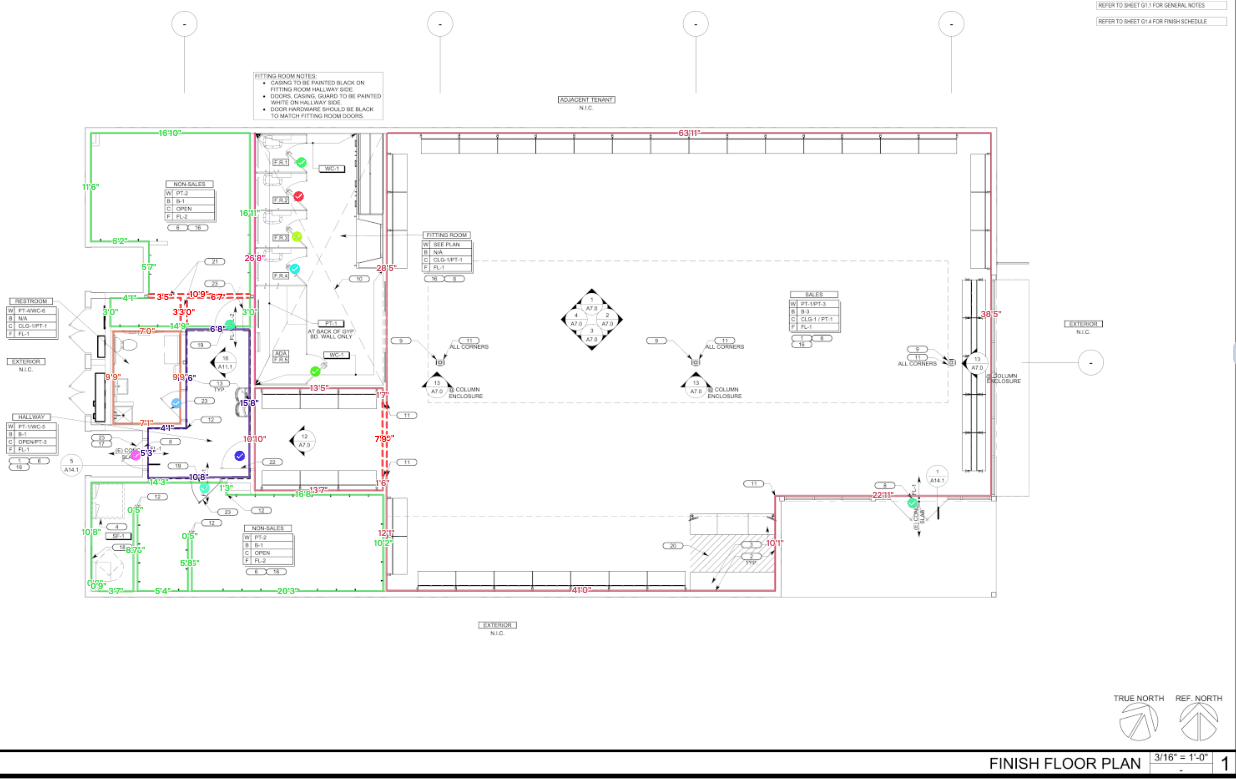 Figure 2c: Measuring interior wall lengths in Quotr.ai
We retain both area and length measurements in Quotr.ai. A ceiling area can be checked directly on the plan, while an interior wall area also needs a height reference. If a wall’s painting height changes, we can return to the measured line and revise the area using the new height. A colleague reviewing the takeoff can follow the same markups to see where the quantity came from.
All dimensions in the table are hypothetical. The interior wall, opening deduction, and net wall area rows belong to the same example. The other rows are separate examples.
Table 1: Example quantity calculations for common painting surfaces
Figure 2c: Measuring interior wall lengths in Quotr.ai
We retain both area and length measurements in Quotr.ai. A ceiling area can be checked directly on the plan, while an interior wall area also needs a height reference. If a wall’s painting height changes, we can return to the measured line and revise the area using the new height. A colleague reviewing the takeoff can follow the same markups to see where the quantity came from.
All dimensions in the table are hypothetical. The interior wall, opening deduction, and net wall area rows belong to the same example. The other rows are separate examples.
Table 1: Example quantity calculations for common painting surfaces
| Quantity Basis | Calculation Example | Result |
|---|---|---|
| Exterior wall elevation Gross rectangular area |
Measure area directly on the elevation Example: 30 ft × 10 ft |
300 SF |
| Interior wall Gross area of segments on one side |
Each wall length × its painting height 20 ft × 9 ft + 10 ft × 12 ft |
300 SF |
| Flat ceiling Rectangular area |
Measure area directly on the ceiling plan Example: 20 ft × 15 ft |
300 SF |
| Door and window openings Deducted from the interior wall above |
1 door opening + 1 window opening 3 ft × 7 ft + 4 ft × 5 ft |
41 SF deduction |
| Net interior wall area | Gross wall area − door and window openings 300 SF − 41 SF |
259 SF |
| Door leaf Both faces of one flush door |
Door width × height × number of faces 3 ft × 7 ft × 2 |
42 SF |
| Door frame One frame with two jambs and a head |
Total frame length × combined width of painted frame surfaces (7 ft + 7 ft + 3 ft) × 0.5 ft |
8.5 SF |
Working Out Material and Labor Costs
Once we have the quantities, we still need to assess the work involved. Surface preparation, working height, protection, and coating requirements all affect the material and labor we allow for in a painting estimate.
We use Quotr.ai’s takeoff records alongside an editable Excel estimate. Quotr.ai holds the categorized measurements for review, and the spreadsheet contains the material, labor, and pricing inputs. When we revisit a price, we can check the measured scope and adjust the costs to reflect how the work will be carried out.
We also list protection and masking, patching and caulking, touch-ups, and cleanup separately. These tasks take labor and materials, and they need to be allowed for in the price. Showing them as line items helps explain who is responsible for the work and what the quote includes.
The software keeps the quantities and scope available for those decisions. We still have to judge the site conditions and the effort required to complete each item before settling on a price.
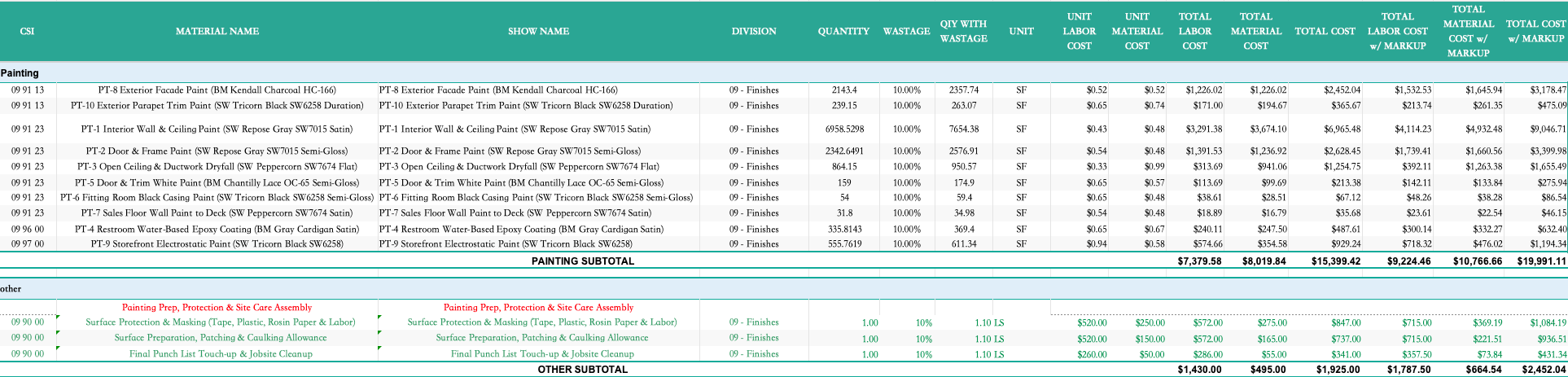 Figure 3: Painting quantities and estimate breakdown
Questions and Changes After the Takeoff
We deliver a marked-up PDF together with an editable estimate. The PDF shows measurement boundaries and categories; the estimate lists the work and its costs. A colleague or client can use the two documents to check how a quoted item relates to the drawings. This is the connection we describe in the takeoff-to-transaction gap: the quantity, the specification, and the price stay linked.
A client might ask, “Does this price include both sides of the door?” If one side is painted and the other has a different finish, we can use the item description and markup to explain what was included. That helps establish whether the client is asking for additional work or simply checking the original scope.
If the client wants both sides painted, we can locate the affected items and review what needs to change. That may involve changing the specified finish, revising preparation or protection allowances, and adjusting material and labor costs. We can then explain the price change against the specific work being added or replaced.
These records are useful when someone else takes over the quote, too. They can read the item descriptions, find the relevant areas on the markup, and bring any unresolved questions back to the estimator with a location to check.
For us, a useful takeoff is one we can return to when a question comes back. With the Quotr.ai markups and estimate at hand, we can check the measured scope and finish requirements, then work out which quantities or prices need attention.
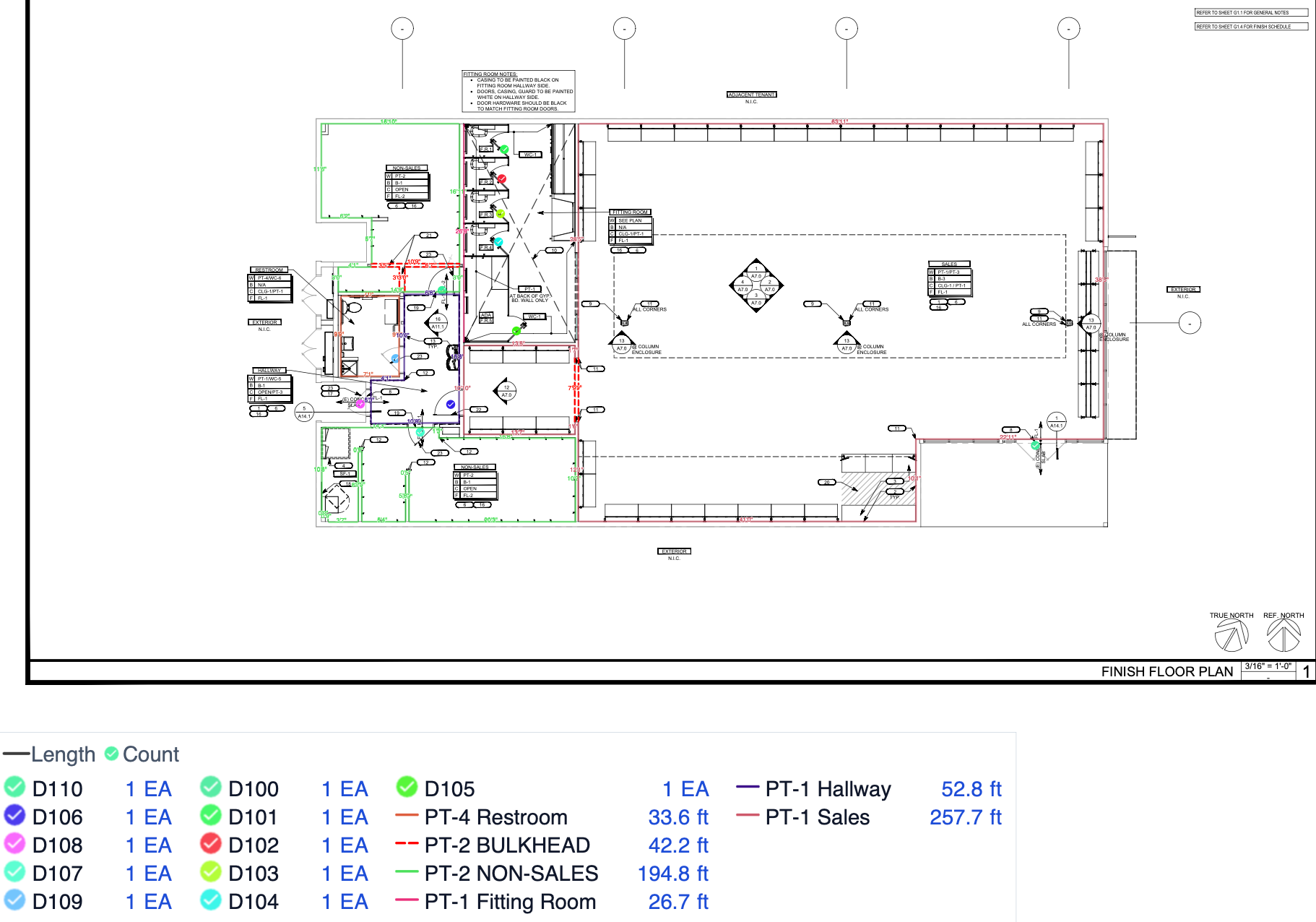 Figure 4: Painting takeoff markup showing wall lengths and door counts
Frequently Asked Questions
How do you measure interior wall painting area?
Measure each wall length in segments on the floor plan, then multiply each segment by its painting height confirmed from an elevation, section, or note. Calculate wall sections with different heights separately, and deduct door and window openings and other unpainted areas according to the agreed measurement rules. Keeping the lengths means you can revise the area if the painting height later changes.
Do you deduct door and window openings from a paint takeoff?
It depends on the measurement standard and the client’s rules. Many commercial painting takeoffs deduct openings above a set size (the example here deducts a 3 ft × 7 ft door and a 4 ft × 5 ft window, 41 SF, from a 300 SF gross wall to give 259 SF net). Confirm the deduction rule up front and apply it consistently so the estimate is checkable.
How do you take off a door and its frame for painting?
Measure the door leaf as width × height × the number of painted faces (a flush 3 ft × 7 ft door painted both sides is 42 SF). Measure the frame as its total length (two jambs plus the head) times the combined width of the painted frame surfaces. Keep the door and the frame as separate items, since their finishes and prices often differ.
Should both sides of a door be included?
Check the finish schedule, because the two sides can have different requirements, for example paint on one side and wallcovering on the other. Count the painted faces per the specification, and record what each item includes so a later “does this cover both sides?” question can be answered from the markup.
How do you price surface prep, protection, and cleanup?
List them as separate line items. Protection and masking, patching and caulking, touch-ups, and cleanup each take labor and materials, and showing them individually explains who is responsible and what the quote includes. The painted-area quantity alone does not capture this work, so it is allowed for separately based on site conditions.
What does a commercial painting takeoff include?
Walls, ceilings, doors, frames, and any specialty coatings, kept as separate takeoff items by substrate, sheen, and location rather than combined by color. Each item carries its finish requirement and a link back to the drawing, so quantities, specifications, and prices stay aligned through review and client changes. Book a Quotr.ai demo to see how AI Agent generates a painting takeoff list from drawings and how you can use it for measurement and estimating.
About Quotr.ai
Quotr.ai is an AI-powered construction estimation, takeoff, and procurement platform built for subcontractors, general contractors, and developers. Backed by Llama Ventures and based in San Francisco. Learn more at quotr.ai. The platform has three parts: Quotr Software (AI takeoff, estimating, and bidding, including the AI agent that reads your plans), Quotr Service (done-for-you cost estimates, takeoffs, and pro formas), and Quotr Procurement (factory-direct materials delivered door-to-door).