Commercial Signage Takeoff: How to Build a Sign Schedule and Deliver a Reviewable Bid Package
In most commercial takeoffs, the estimator’s job starts with a finished schedule from the design team and ends with a count of what’s on it. In commercial signage, neither step is true. The package usually arrives without a sign schedule. The count depends on rule decisions the drawings rarely state out loud: which doors get IDs, which units get ADA treatment, which exterior surfaces carry the brand identity. The sign schedule is what the estimator builds, and what the customer reviews.
This guide walks through how a commercial signage estimator does that work on a real bid: assembling a preliminary sign schedule from the accessibility sheet, code and egress plan, door schedule, and site plan; deciding which lines on the schedule are confirmed versus assumed versus allowance; pricing the high-risk items that live off the architectural signage plan; converting quantities into the fabrication handoff and a bid the customer can defend at scope review; and walking through a case study of the workflow running end to end on a real clubhouse package.
Building the sign schedule from scattered sources
Other trades come with schedules. Signage usually doesn’t. An electrical estimator opens the package and finds a panel schedule, a fixture schedule, an equipment schedule that lists every device with a tag. A signage estimator opens the same package and finds an architectural signage plan showing some sign locations, an accessibility sheet naming mounting standards, and a code plan flagging exit routes. None of those is a list to copy from. The preliminary sign schedule is the estimator’s deliverable, built in the first hours of the bid window from sources that were not designed to be read together.
Four sheets carry most of the interior signage scope. The accessibility information sheet sets tactile character heights, braille, and pictogram standards. The code and egress plan identifies exit and life-safety signage candidates. The door schedule lists the openings the estimator is selecting from. Interior elevations show available wall space. Reading those four before opening the architectural signage plan saves hours otherwise spent going back for context.
The site plan carries the exterior scope the architectural signage plan does not. Accessible parking signs, monument or pylon sign location, exterior building identification, and directional signs at the property entrance all sit on the architectural site plan rather than the signage plan. The signage estimator who treats the architectural signage plan as the full sign set misses the exterior scope entirely.
The spec book carries the upgrades that quietly change the unit cost. Division 10 14 00 covers sign body materials, finish requirements, and brand standards exhibits that the architect references but does not draw. Division 26 covers electrical primary feed for illuminated signs. Division 32 covers exterior monument and pylon foundations and anchoring. Skipping the spec is the most common reason a signage bid misses material upgrades or PE-stamped engineering scope.
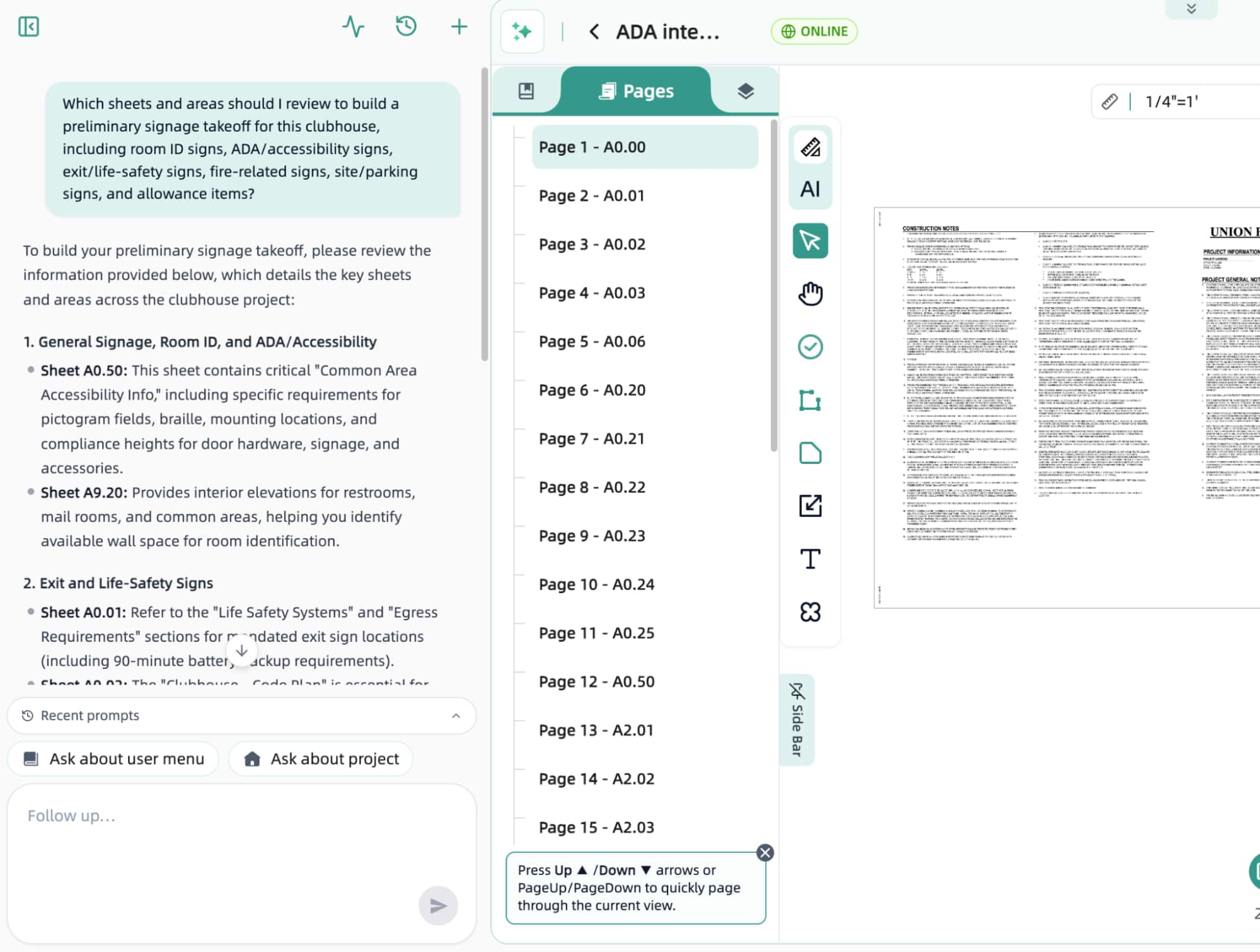
Figure 1: Asked which sheets and areas to review to build a preliminary signage takeoff for a clubhouse, the AI agent identifies the accessibility info sheet (A0.50), the code and egress plan (A0.02), the architectural site plan (A0.03), interior elevations (A9.20), and the fire-related notes on A0.01 and A0.20, grouped by signage scope category including allowance items.
Naming the sign type and the rule behind every count
A door on a floor plan doesn’t have a sign on it; the estimator decides which doors do. This is the structural difference between signage takeoff and most other trades. An electrical estimator counts symbols the engineer already placed on the drawing. A signage estimator counts the doors, units, or surfaces that meet a scope rule, and the rule is usually not written on the drawing. The same 60-unit clubhouse can produce a room ID count of 30, 45, or 60 depending on whether the rule includes back-of-house doors, internal storage, or just hallway-facing residential entries. Until the rule is settled, the count is provisional.
The customer’s rule for room IDs is usually “hallway-facing doors only,” but it has to be confirmed before the count is final. Doors inside a room (closets, internal storage) are usually excluded. Private unit interior doors are typically excluded from a common-area signage package. Restroom doors are handled under the accessibility sheet. Stair and exit doors carry separate sign types under the life-safety scope. Counting every door in the door schedule overbids; counting only obviously tagged doors underbids; only the rule produces the count the customer is paying for.
Two signs that share a category word can be entirely different products. “Exit” is the clearest example. A Tactile Exit Sign-ADA is wall-mounted at 48-to-60-inch baseline on a photopolymer or acrylic substrate, with raised characters and Grade 2 braille, installed with standoffs. An Overhead Exit ID is ceiling- or wall-mounted above doors, larger and often illuminated, on a different substrate with different mounting hardware. The takeoff that lumps both under “exit sign, 12 EA” prices half the scope and misses the other half. Every line on the schedule has to name the specific sign type, with its fabrication path attached.
Every line on the preliminary schedule carries a scope status, because every line is the result of a decision the customer can override. Confirmed means the sign is shown on a tagged drawing or named in the spec. Assumed means the estimator counted it from a layout or room rule. Allowance means the sign is recommended for the package but should be reviewed and carried as a contingency. Needs review means the scope is not yet clear and the customer or design team should decide. Excluded means the estimator made a deliberate decision not to count it. With scope status on every line, scope review becomes a conversation about the rule (“assumed at every Type B unit”); the customer confirms or revises the rule, the count updates with it, and the schedule re-exports. Hiding all five categories under one total makes the takeoff impossible to defend.
A signage scope is a set of decisions, not a number, and the takeoff is the document where those decisions become reviewable.
On repeated building types, the rule gets applied to a prototype and multiplied across occurrences. Counting each of 80 identical units door by door is wasted work. On multifamily, hotel, student housing, and senior housing projects, build the prototype sign package for each unique unit or floor type, apply the multiplier to the occurrence count, then review the exceptions: accessible units, end-of-corridor units, stair cores that do not repeat, and exterior signage unique to the site. Developers running repeated unit types across multifamily portfolios can lean on the Quotr.ai Service for the same prototype-and-multiplier logic at the underwriting stage.
The high-cost scope lives on the site plan and in the permit timeline
The most expensive line in a signage bid usually lives on the architectural site plan. A single exterior monument or pylon sign can be a five-figure item once foundation, structural calculations stamped per ASCE 7 wind loads, illumination primary feed, permit fees, and crane or lift time on install day are included. Illuminated channel letter sets and LED display walls add a similar chain (electrical primary by the EC, structural backing for the raceway, PE-stamped engineering where the spec or jurisdiction requires it). The signage estimator who reads only the architectural signage plan and never opens the site plan hands away the most expensive single item in the package.
Code-driven ADA scope can be the largest line in the bid by quantity, even when each sign has a low unit cost. Sixty to 100 tactile signs across units, common areas, and back-of-house add up to a substantial fraction of the total scope by quantity. The unit cost is modest (substrate, raised characters, Grade 2 braille, non-glare finish, mounting hardware), but accumulation makes this a category the estimator cannot afford to under-budget. The accessibility sheet usually drives the per-sign details; the code plan and architectural plan together drive the count.
Exterior signs come with permit timelines the GC’s building permit does not cover. Many jurisdictions require separate sign permits. Some require Landmark Commission review in historic districts, which adds weeks. Some require Public Way Use permits for blade signs that encroach over the sidewalk. The estimator who carries permit work in the proposal protects the schedule. The estimator who assumes the building permit covers signs gets the schedule blown on install day, and the tenant’s grand opening with it.
Mixed packages and the sheet series nobody opened
A commercial signage bid bundles seven or eight scope categories under one trade name. Interior room ID and wayfinding. ADA tactile signage. Life-safety and egress (exit, tactile exit, overhead exit ID, area of refuge). Fire-related (fire extinguisher cabinet, FACP identification). Site and parking (accessible parking, fire lane, building ID). Exterior identification (monument, blade, channel letter). Regulatory (no smoking, occupancy load, no motorized vehicles). Each category sits on a different sheet, follows a different rule, and goes through a different fabrication path. Pricing “signage” from one sheet systematically misses categories.
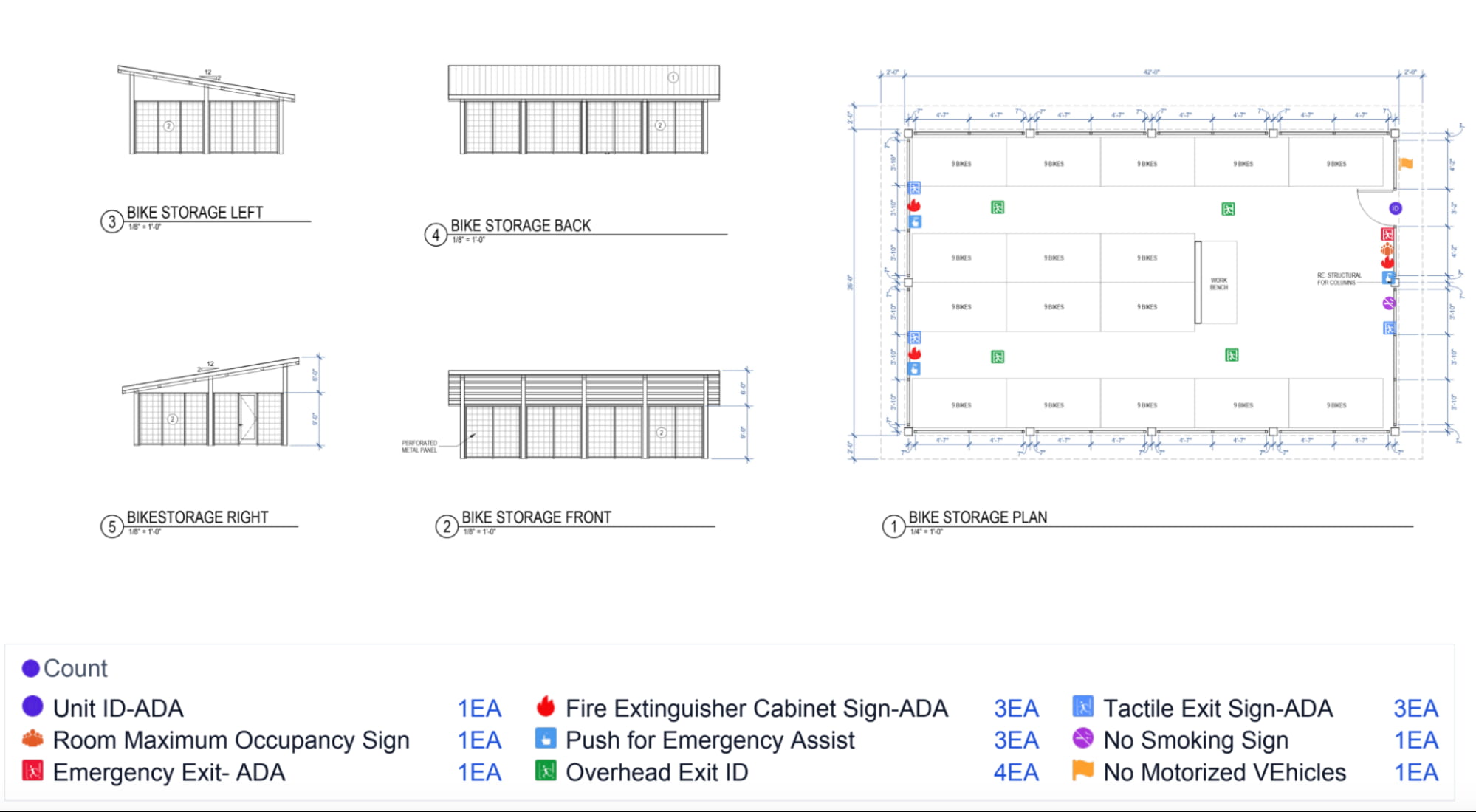
Figure 2: The signage symbol set covers accessibility, life-safety, fire-related, regulatory, parking, identification, and wayfinding categories. Each category carries its own rule set, mounting requirements, and fabrication path.
One small outbuilding can surface most of those categories at once. The bike storage in Figure 3 is one rectangle and a couple of elevations. The takeoff for that room turns up nine distinct sign types: Unit ID-ADA, Tactile Exit-ADA, Emergency Exit-ADA, Overhead Exit ID, Fire Extinguisher Cabinet Sign-ADA, Push for Emergency Assist, Room Maximum Occupancy, No Smoking, and No Motorized Vehicles. The scope on this one small room is drawn from at least four different sources: the accessibility sheet, the code plan, the fire code notes, and the architectural plan.
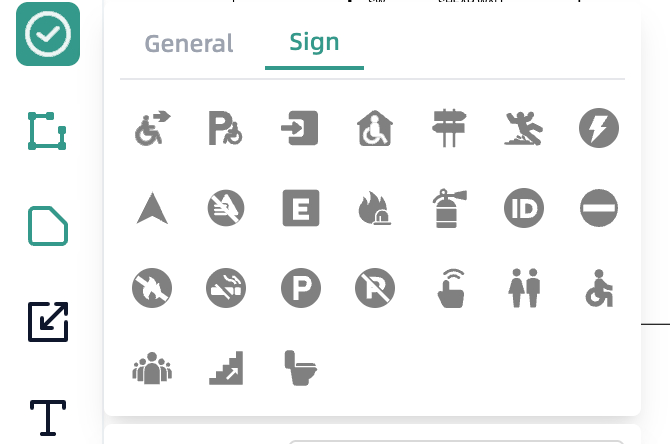
Figure 3: A single bike storage outbuilding on a multifamily project surfaces nine distinct sign types drawn from four sheet sources.
The most expensive miss in this trade is usually a sheet series that nobody opened. A small signage sub bids a 30K to 40K SF multifamily clubhouse and amenity package. The estimator opens the architectural signage plan and counts the room IDs and wayfinding signs. The G-series code compliance plan is in the package but never opened. The C-series site plan is in the package but never opened. The bid wins. Two weeks later, the PM scoping the job pulls the G-series and finds 60-plus tactile ADA signs that were never in the count, plus an exterior monument on the site plan that was never priced. The combined miss runs to a six-figure scope eaten at no additional price, on a winning bid that becomes a losing job.
Three checkpoints before submit catch the unopened-sheet class of miss inside the bid window. First, every sheet in the index that carries signage scope has been opened at least once. Second, every category in the scope (interior, ADA, life-safety, fire, site, exterior, regulatory) has at least one line in the takeoff or an explicit exclusion in the proposal. Third, the most recent addendum has been reconciled against the original sheets it revised.
From count to message schedule to estimate
A single tactile sign line item turns into eight to ten separate components before it has a price. “Tactile Exit Sign-ADA, 8 EA” becomes a substrate (acrylic, photopolymer, or aluminum), raised characters, Grade 2 braille, non-glare finish, mounting hardware (standoffs with adhesive or anchors), layout and verification time on site, installation labor, and any commissioning the spec requires. A monument sign is a different category entirely: foundation, structural calculations, illumination primary feed, permit fees, and crane or lift time on install day.
Install time per sign is the variable that moves a signage bid the most, especially in finished-space conditions. Install time for a tactile ADA sign in an open new-construction corridor can run 10 minutes. The same install in a finished space with weekend access restrictions and occupied units one floor up can run 18 to 22 minutes once layout, adhesive, travel between floors, and cleanup are added. An 8-minute delta across 100 signs adds more than 13 labor hours to the bid. At a burdened wage rate, a single install-condition adjustment becomes a low-five-figure swing on the bid total.
Signage lacks a NECA Manual of Labor Units equivalent that the whole trade uses as a baseline. ISA publishes installation guidance [1], USSC publishes engineering standards for sign structures, and RSMeans carries line items for signage installation, but most signage estimators rely on their own historicals. That is part of why two qualified shops can come in 30 to 50 percent apart on the same scope. The estimator who logs production data, tunes assemblies after each job, and tracks install conditions wins more bids and bleeds less on the ones won.
In signage, the message schedule is the fabrication handoff. Each line on the message schedule drives a different art file, substrate, mounting method, and proposal row depending on its sign type. “Tactile Exit Sign-ADA” produces a different shop work order than “Overhead Exit ID,” even when both appear once in the count. Sign type naming controls the fabrication that follows: art template, vinyl cut file, mounting hardware kit, install instruction. The takeoff naming is part of the deliverable to the shop, with cost and install-quality consequences if it goes in sloppy.
What this workflow looks like on a real bid
A representative recent project: a multifamily community signage package covering a 45K SF clubhouse plus a leasing office, two amenity outbuildings, and exterior site signage across the property. The bid package was 175 sheets across architectural, civil, structural, and MEP series, with a 320-page spec book and a 10-working-day bid window from invitation to submit. Two addenda landed in the second week, one revising the accessibility mounting details and one adding a monument sign to the site plan. The signage scope covered interior room ID and wayfinding, ADA tactile, exit and life-safety, fire-related, site and parking, and exterior building identification. On a package this size, a fully manual takeoff has to cover the accessibility sheet, the code and egress plan, the architectural site plan, the door schedule, interior elevations of restrooms and common areas, the fire code notes, the spec book signage division, and both addenda before any sign is counted, and the time cost of getting that coverage right is where most missed scope comes from. I used Quotr.ai for the takeoff and estimate on this bid.
With the package uploaded into Quotr.ai, the AI agents read the sheet index and surfaced the signage-relevant sheets grouped by scope category: general signage and ADA (the accessibility information sheet and the interior elevations), exit and life-safety (the code and egress plan with its egress and exit signage callouts), fire-related (the fire code notes and the fire extinguisher cabinet locations on the architectural plan), site and parking (the architectural site plan with accessible parking and exterior building ID), and allowance items (interior finish exhibits where casework or built-in features might pick up directional or informational signage). Doing the same coverage pass by hand on a 175-sheet package takes the better part of a day: reading the index from cover to back, opening every sheet that might carry signage scope, cross-checking the accessibility sheet against the code plan, identifying which categories the site plan carries, and flagging which sheets the addenda revised. The coverage-tracking step ran close to 10 times faster with the agents than the same step done manually on a comparable package.
The takeoff itself ran on the project’s own legend. Sign type variants stayed distinct based on their tag and the context on each sheet, so a Tactile Exit Sign-ADA was kept separate from an Overhead Exit ID even though both carry the word “exit.” Every detected sign showed up visualized directly on the drawings: Unit ID-ADA, Tactile Exit-ADA, Emergency Exit-ADA, Overhead Exit ID, Fire Extinguisher Cabinet Sign-ADA, Push for Emergency Assist, Room Maximum Occupancy, No Smoking, No Motorized Vehicles, accessible parking, and the exterior monument tagged on the site plan. Review was a visual scan against the drawings rather than re-counting from zero. Low-confidence detections (rotated labels, small point sizes on schedules, sheets where the legend deviated from the trade norm) were ranked first in the review queue, so the time went to the ones worth checking. Detections could be edited, deleted, or added directly on the drawing, and the message schedule re-exported with the updated rule.
Material pricing was pulled from the vendor quote sheets I had already uploaded ahead of the bid: substrate stock, photopolymer and acrylic faces, vinyl materials, raised character and braille components, mounting hardware kits (standoffs, anchors, adhesive). Item names, specs, and unit prices were extracted from those quotes automatically. Wage rates and productivity rates were already in the system from prior projects. For the install condition on this bid (finished space in the clubhouse, with weekend access restrictions on the residential floors and limited freight elevator availability), I adjusted the ADA tactile install rate to 18 minutes per sign against a 10-minute open-construction baseline, and the exterior monument crew time to a half-day plus a crane day with a two-person install team. ISA resources [1] and prior project historicals served as the reference point for categories where my own data was thin. Material cost, labor cost, and total bid moved together as Quotr finalized the estimate, rather than requiring a separate Excel export and a manual re-price.
By submit, the bid number was built entirely from my own material database and production rates, every sign in the estimate was visually traceable to its specific location on the drawings, and every scope category in the package (interior room ID, ADA and accessibility, exit and life-safety, fire-related, site and parking, exterior identification) had been reviewed at least once with scope status carried on every line.
A signage bid the contractor can defend has three things behind it: a sign schedule built from the scattered sources the design team didn’t consolidate, scope status on every line that lets the customer review the rule rather than the count, and message schedule naming that the shop can build from without going back to ask. The hours that produce all three are mostly spent before counting begins and after counting ends. The count itself is the easy part.
Frequently Asked Questions
What is a commercial signage takeoff?
A commercial signage takeoff is the process of building a sign schedule from a bid package that does not include one: identifying every required sign type across interior, ADA, life-safety, site, and exterior categories, counting each per a stated scope rule, and converting those counts into a priced, reviewable bid.
Why don’t commercial bid packages include a sign schedule?
Unlike electrical or mechanical scopes, design teams rarely consolidate signage into a schedule. The scope is scattered across the accessibility sheet, code and egress plan, door schedule, site plan, and spec book, so the estimator builds the preliminary sign schedule as part of the takeoff.
Which drawing sheets carry signage scope?
At minimum: the accessibility information sheet (tactile and braille standards), the code and egress plan (exit and life-safety candidates), the door schedule, interior elevations, the architectural site plan (parking, monument, exterior ID), and spec Divisions 10 14 00, 26, and 32.
How should ADA tactile signage be priced?
Per sign, the cost is modest — substrate, raised characters, Grade 2 braille, non-glare finish, and mounting hardware — but counts of 60–100 signs make it one of the largest lines by quantity. Install condition matters most: a finished-space install can run 18–22 minutes per sign versus a 10-minute open-construction baseline.
Can AI handle a commercial signage takeoff?
Yes — AI agents can surface every signage-relevant sheet in a 175-sheet package, keep sign type variants distinct, and visualize each detection on the drawings for review. Coverage tracking runs roughly 10x faster than a manual pass, while the estimator keeps control of scope rules and pricing.
Run Your Next Signage Takeoff With Quotr.ai
A signage bid your customer can defend starts with full sheet coverage and scope status on every line. Quotr.ai reads the entire package, builds the sign schedule with you, and prices it from your own material database and production rates. Talk to the Quotr.ai team to see the workflow on one of your own bid packages. See how other Quotr.ai Software.
Related Reading
• What Is a Construction Takeoff? (2026 Guide)
• How AI Construction Takeoff Works in 2026
• Commercial Electrical Takeoff: From Drawings to Proposal
• How to Bid Commercial Construction Projects (Step-by-Step)
• 12 Construction Estimating Mistakes to Avoid in 2026
• Quotr.ai Service — AI Estimating and Pro Forma Support
• Quotr.ai Software — AI Takeoff and Estimating
References
[1] International Sign Association (ISA). Industry resources and installation guidance. https://www.signs.org. Trade association covering fabrication, installation, and engineering practice for the sign industry.
[2] U.S. Department of Justice. 2010 ADA Standards for Accessible Design. https://www.ada.gov/law-and-regs/design-standards/2010-stds/. Sections 216 (scoping for signs) and 703 (technical requirements for tactile characters, braille, pictograms, and mounting).
[3] National Fire Protection Association (NFPA). NFPA 1, Fire Code, and NFPA 101, Life Safety Code. https://www.nfpa.org. Code references that inform exit sign placement, egress identification, and fire extinguisher cabinet signage candidates in commercial projects, alongside local fire code and AHJ requirements.
[4] Quotr.ai. AI-driven commercial takeoff and estimating platform. https://quotr.ai. Drawing understanding, takeoff, assembly mapping, estimating, and proposal generation in one workflow.